

On this page
Security
Micronaut Security is a fully featured and customizable security solution for your applications.
|
Note
|
Micronaut Security 3.x requires Micronaut 3.x. |
For this project, you can find a list of releases (with release notes) here:
Micronaut Security includes the following new features and improvements.
What’s New in Micronaut Security 3
-
Improvements to many APIs
-
Consolidated authentication state into a single interface
-
The SecurityRule API is now reactive
-
A
getRolesmethod was added to Authentication -
New static methods on Authentication and AuthenticationResponse have been added to help create authentication related objects
This section will document breaking changes that may happen during milestone or release candidate releases, as well as major releases eg (1.x.x → 2.x.x).
Micronaut Security 5.5 breaking changes
-
Starting with 5.5.2, issuer claim matching is stricter. Previously, the
issclaim was accepted when the expected issuer (micronaut.security.token.jwt.claims-validators.issuer, ormicronaut.security.oauth2.clients..openid.issuerfor IdTokenClaimsValidator and DefaultProviderResolver) merely ended with the claim value once the scheme and trailing slash were removed, so for a configured issueradmin-portalvalues such asportal,l,/,https://or an empty string passed validation, and forhttps://idcs-abc.identity.oraclecloud.comthe parent domainhttps://identity.oraclecloud.com/did. Now theissclaim must be equal to the expected issuer. Suffixes and parent domains are never accepted. Formicronaut.security.token.jwt.claims-validators.issuer(IssuerJwtClaimsValidator), a value starting withhttp://orhttps://is compared after removing the scheme and a single trailing slash; the scheme is now matched case-insensitively (HTTPS://equalshttps://), while the host, port and path remain case-sensitive as before. The trailing slash is only ignored when the value has no query or fragment, where it is part of that component. Any other value is an opaqueStringOrURIand is compared verbatim, soadmin-portal/no longer matchesadmin-portal. Surrounding whitespace in the claim is not ignored. Ifmicronaut.security.token.jwt.claims-validators.issueris present but has no value (for exampleissuer:in YAML), IssuerJwtClaimsValidator now rejects every token and logs a warning at startup; previously it accepted anyissclaim. For the OpenID client validators (IdTokenClaimsValidator and DefaultProviderResolver), theissclaim must be identical to the expected issuer (micronaut.security.oauth2.clients..openid.issuer-identifierif set, otherwiseopenid.issuer), as OpenID Connect Core 1.0 section 3.1.3.7 requires: only the case of the scheme and a single trailing slash (when the issuer has no query or fragment) are tolerated, so anhttp://claim no longer matches anhttps://issuer and the host is compared case-sensitively. This is the same comparison IssuerClaimValidator and the issuer binding of the JWKS use. If your provider issues tokens whoseissdiffers from the configured issuer, configure the exactissvalue:claims-validators.issuerfor IssuerJwtClaimsValidator, andopenid.issuer-identifierfor the OpenID client validators (for examplehttps://identity.oraclecloud.com/for Oracle IDCS, whose tenant specificopenid.issueris only the discovery URL). -
ClaimsUtils.endsWithIgnoringProtocolAndTrailingSlash(String, String)has been deprecated and now delegates toClaimsUtils.equalsIgnoringProtocolAndTrailingSlash(String, String), which implements the rule above. -
Starting with 5.5.2, when
micronaut.security.authenticationis set toidtoken, IdTokenClaimsValidator ignores OAuth 2.0 clients configured withmicronaut.security.oauth2.clients.*.enabled: false. ID tokens issued to a disabled client no longer authenticate requests as bearer tokens or JWT cookies. The OpenID provider metadata and the JWKS signature configuration of a disabled client are no longer registered. This removes only the trust that client itself contributed: if the claims validator is disabled withmicronaut.security.token.jwt.claims-validators.openid-idtoken: false, a token issued to the disabled client is still accepted when an enabled client trusts the same issuer and signing keys, because nothing checks theaudclaim. Keep IdTokenClaimsValidator, or an equivalent custom GenericJwtClaimsValidator, active to isolate clients that share an OpenID provider. Inidtokenauthentication mode, unsigned JWTs are now always rejected, including when every OAuth 2.0 client is disabled or none is configured and no JWKS signature configuration exists. DefaultProviderResolver and the well-known proxy also ignore disabled clients. The constructorDefaultProviderResolver(List<OpenIdClientConfiguration>)has been deprecated. UseDefaultProviderResolver(List<OpenIdClientConfiguration>, Collection<OauthClientConfiguration>)instead. -
AttributesConvertibleValues no longer splits a single-valued LDAP attribute at commas when it is read as a collection or an array. Every attribute value is one element. As a result, DefaultLdapGroupProcessor maps an LDAP group named
Sales,Marketingto the single roleSales,Marketinginstead of the two rolesSalesandMarketing. Applications relying on the previous splitting must map such groups themselves with a custom LdapGroupProcessor. -
The
toString()of all security events no longer includes the event source. AccessTokenGeneratedEvent, RefreshTokenGeneratedEvent and TokenValidatedEvent no longer print the token, and the events extending SecurityEvent (LoginSuccessfulEvent, LoginFailedEvent, LogoutEvent and TokenValidatedEvent) no longer print the authentication or response they carry, whose attributes may hold tokens in OAuth 2.0 and OpenID Connect flows. Micronaut Framework logs every published event atDEBUGlevel with its string representation, which wrote these values to the log. UsegetSource()orgetRefreshToken()to obtain the value in your listeners. -
SignedRefreshTokenGenerator no longer includes the token being validated in its
WARNlog messages. The introspection endpoint and the refresh token grant hand client-supplied tokens, such as other users' access tokens, to the refresh token validator, so the value was being written to the application log. The parse or verification exception is now logged atDEBUGwithout the token. -
Log statements no longer include credentials, tokens or claim values: the
Authorizationheader (HttpHeaderTokenReader), undecodable basic auth credentials (BasicAuthUtils), JSON Web Tokens verified or rejected by the signature validators and JWKS signatures, the claim set generated by JWTClaimsSetGenerator (only claim names are logged), the access tokens handled by the client credentials client, and the nonce and claims of an ID token that fails nonce validation. Applications relying on these log messages for troubleshooting no longer see the values. -
TokenAuthenticationFetcher consults the TokenValidator beans one at a time, in order, and stops at the first validator which authenticates the token. Previously every validator was invoked concurrently for each token, which handed tokens already accepted by the JWT validator to lower precedence validators such as the OpenID provider
UserInfoendpoint validator. Lower precedence validators are now only invoked once every preceding validator rejected the token. When the request carries several tokens, for example in a header and a cookie, they are likewise validated one at a time in the order the token readers resolve them. -
IpPatternsRule no longer compiles every entry of
micronaut.security.ip-patternsas a regular expression. An entry made only of hexadecimal digits, dots, colons and(for example127.0.0.1or192.168.1.) is now an IP wildcard whose dots and colons match literally. Previously192.168.1.was the regular expression192.168.1., which also admitted192.168.10.5or192.168.100.5. Entries containing any other character (for example192\.168\.1\.\d+), and entries starting with a dot (for example the "allow all" regular expression.), keep being compiled as regular expressions. Ain the middle of a wildcard matches within a single address segment (192.168..1does not match192.168.2.3.1), while a trailingmatches the rest of the address. To allow every address use0.0.0.0,or.. -
CsrfTokenValidator no longer falls through to another CsrfTokenRepository when the token found in a repository does not match the token supplied in the request. Repositories are consulted following their
Orderedorder and the first repository holding a CSRF token for the request is authoritative. SessionCsrfTokenRepository now runs before CookieCsrfTokenRepository: with Session-Based Authentication, a request carrying an HTTP session which holds a CSRF token is only accepted when the supplied token matches the session token; a CSRF cookie does not replace it. -
DefaultOpenIdAuthenticationMapper qualifies the username with the provider name when more than one enabled OAuth 2.0 client, other than client-credentials-only clients, is configured under
micronaut.security.oauth2.clients:Authentication.getName()is<provider name>:<sub>instead of<sub>, so that the same subject at two providers never maps to one user. With a single client the username remains thesubclaim. The unqualified subject is kept in thesubattribute. The username of authentications created from an ID token withmicronaut.security.authenticationset toidtokenis not qualified. Applications with several clients which key data on the username must migrate those keys, or setmicronaut.security.oauth2.openid.qualify-username-with-providertofalseto restore the previous (unsafe) behavior. See User Details Mapping. -
JWTClaimsSetGenerator now writes the
subclaim after the authentication attributes, so thesubclaim of a generated JWT is alwaysAuthentication.getName(). Previously an authentication attribute namedsubreplaced the principal name in the token, which turned a provider-qualified username back into the bare subject on every later request. -
The constructor
DefaultOpenIdAuthenticationMapper(OpenIdAdditionalClaimsConfiguration, AuthenticationModeConfiguration)has been deprecated. UseDefaultOpenIdAuthenticationMapper(OpenIdAdditionalClaimsConfiguration, AuthenticationModeConfiguration, OpenIdConfiguration, Collection<OauthClientConfiguration>)instead. -
Starting with 5.5.2,
micronaut.security.token.jwt.signatures.jwks.*.key-typeis applied again when verifying token signatures with a remote JSON Web Key Set. Since 3.11.0 the setting had no effect: a token signed with a key of any type in the JWKS was accepted. A JWKS configured with akey-typenow only verifies tokens signed with a key of that type. The setting no longer defaults toRSA; unless it is configured, keys of any type are matched, which preserves the previous behavior for applications that do not set it.JwksSignatureConfigurationProperties.DEFAULT_KEYTYPEis deprecated, andJwksSignatureConfiguration.getKeyType()returnsnullfor a JWKS without a configuredkey-type. Thekey-typevalue is case-insensitive and must be one ofRSA,EC,OKPoroct; any other value now fails application startup with aConfigurationException. A key published in the JWKS with an explicitalgis only used to verify tokens whose header declares that algorithm; keys withoutalgmatch any algorithm. -
AbstractEndSessionRequest no longer expands the OpenID provider end session URL as a URI template. The logout parameters are percent-encoded and appended to the query component of the provider URL, preserving any query component it already has. If the provider URL is empty or not a valid URI,
getUrl(HttpRequest, Authentication)returnsnulland/oauth/logoutdoes not redirect, instead of throwing or redirecting to a malformed URL. The provider URL must be an absolutehttporhttpsURL with a host and without user information: a relative URL, another scheme, an empty or non-ASCII host, orhttps://user:password@provider.example/logoutnow results in this 404 response instead of being passed through. So does a provider URL that is not a strict RFC 3986 URI, for example one with an unencoded space or{in its path. Characters such as{or non-ASCII in the query component of the provider URL are percent-encoded, and a;in it is treated as a parameter separator. -
A failed retrieval of a remote JSON Web Key Set (connection error, non-2xx response, unparseable body or a JWK Set without keys) is no longer retried for every token. The JWK Set is not requested again until the back-off configured with
micronaut.security.token.jwt.signatures.jwks-client.failure-backoff(default 10 seconds) elapses; tokens which cannot be verified by another signature configuration are rejected meanwhile. Set the property to0sto restore the previous behavior. Concurrent requests share one retrieval per signature configuration and url, bounded bymicronaut.security.token.jwt.signatures.jwks-client.retrieval-timeout(default 30 seconds); a retrieval which exceeds it is treated as a failure. -
JwkSetFetcher
clearCache(url)now also evicts the JWK Set cached by the caching implementations (the Reactor based one evicts the entries for that url; the Micronaut Cache based one evicts the wholejwkscache, since its entries are keyed by provider name and url) in addition to the AOT optimization and the failure back-off. -
The constructor
DefaultJwkSetFetcher(JwksClient)has been deprecated. UseDefaultJwkSetFetcher(JwksClient, JwksClientConfiguration)instead. -
CookiePriorToLoginPersistence only stores the path and query of the request rejected prior to login, and only honours a local path (one starting with a single
/) when redirecting after login. Scheme-relative (//host/…) or absolute URIs are ignored and the login handlers fall back tomicronaut.security.redirect.login-success. -
The plain OAuth 2.0 client (DefaultOauthClient) now sends the application’s own callback URL, built with OauthRouteUrlBuilder, as the
redirect_uriparameter of the authorization code grant token request. Previously the value stored in thestateparameter of the authorization response was used, which allowed anyone redirecting the browser to the callback endpoint to choose theredirect_urisent to the provider and redeem an authorization code issued for a different redirection URI (RFC 6749 sections 4.1.3 and 10.6). The OpenID Connect client already behaved this way. -
The constructor
DefaultOauthAuthorizationResponseHandler(TokenEndpointClient, StateValidator, PkcePersistence)has been deprecated. UseDefaultOauthAuthorizationResponseHandler(TokenEndpointClient, OauthRouteUrlBuilder, StateValidator, PkcePersistence)instead. -
The constructor
OauthCodeTokenRequestContext(AuthorizationResponse, SecureEndpoint, OauthClientConfiguration, String)has been deprecated. UseOauthCodeTokenRequestContext(AuthorizationResponse, OauthRouteUrlBuilder, SecureEndpoint, OauthClientConfiguration, String)instead. A context created with the deprecated constructor no longer sends aredirect_uriparameter to the token endpoint. -
Starting with 5.5.2, the JSON Web Key Set published at the
jwks_uriof an OpenID provider is registered as a signature configuration for request tokens only whenmicronaut.security.authenticationis set toidtoken, as it was before Micronaut Security 4.8.0. Incookie,sessionandbearermodes, or when the authentication mode is not set, tokens signed by the provider’s keys, such as ID tokens issued to other clients, no longer authenticate requests. Applications that must accept the provider’s tokens as request credentials in those modes need to configure the JWKS explicitly withmicronaut.security.token.jwt.signatures.jwks.*. -
The ID token returned by the token endpoint during the authorization code flow is verified exclusively against the issuing provider’s JWKS. It is no longer accepted when signed by any other signature configuration of the application.
-
Single-valued keys directly under
micronaut.security.ldap, such as the global switchmicronaut.security.ldap.enabled, no longer create an LdapConfiguration named after the key. Previouslymicronaut.security.ldap.enabled: truecreated a configuration and an LdapAuthenticationProvider namedenabledwith no server, whose failures turned login attempts for unknown usernames into HTTP 500 responses and allowed username enumeration. Only keys with nested properties, for examplemicronaut.security.ldap.default.*, define LDAP configurations. -
The HTTP clients Micronaut Security creates to talk to an identity provider (token endpoint, OpenID provider metadata discovery, UserInfo endpoint and JWK Set retrieval) no longer follow redirects, regardless of
micronaut.http.client.follow-redirects. A redirect returned by the provider is never followed, so the request fails instead of reaching the redirect target. AnHttpClientbean named after an OAuth 2.0 provider is no longer used to call its token endpoint: a client that never follows redirects is created from the service configurationmicronaut.http.services.<provider>.*, or from the default client configuration, instead. See HTTP Clients for the Provider. -
The constructor
OpenIdProviderMetadataFetcherFactory()has been replaced byOpenIdProviderMetadataFetcherFactory(BeanContext, HttpClientConfiguration)and the factory methodcreateOpenIdProviderMetadataFetcher(OpenIdClientConfiguration, HttpClient)bycreateOpenIdProviderMetadataFetcher(OpenIdClientConfiguration). The class is internal API. -
Starting with 5.5.2, the JSON Web Key Set registered for the
jwks_uriof an OpenID client is bound to the issuer of that client (theissuerasserted by the provider metadata or, if it asserts none,micronaut.security.oauth2.clients..openid.issuer). Tokens whoseissclaim is not equal to the issuer (tolerating only the case of the scheme and a trailing slash), or that have no or an emptyissclaim, are no longer verified with the keys of that provider, even if their signature validates against one of them. This prevents a key trusted for one provider from signing tokens as another provider. Applications that must verify tokens of a different issuer with a provider’s keys need to configure the JWKS explicitly withmicronaut.security.token.jwt.signatures.jwks..url, optionally bound to the expected issuer withmicronaut.security.token.jwt.signatures.jwks.*.issuer. -
LdapAuthenticationProvider no longer returns
AuthenticationFailureReason.USER_NOT_FOUNDwhen the username does not match any directory entry. It returnsCREDENTIALS_DO_NOT_MATCH, the same reason as for a wrong password, and attempts a bind against a decoy DN (a random non-existent entry under the search base, or the entry configured withmicronaut.security.ldap.*.search.decoy-dn) so that unknown usernames cannot be enumerated through the failure message and the response-time difference is narrowed. Only the client-side cost is equalised by default; see the LDAP section for configuring a decoy account where directory-side timing matters. -
The Authentication created by the
UserInfoendpoint token validator is bound to the provider which answered. The attributeoauth2Provideris always set to the provider name, and whenmicronaut.security.oauth2.openid.qualify-username-with-provideristrue, or it is not set and more than one enabled OAuth 2.0 client is configured undermicronaut.security.oauth2.clients, the username is<provider name>:<sub>instead of<sub>, so that the same subject at two providers never maps to one user. Applications with several clients which key data onAuthentication.getName()forUserInfo-validated requests must migrate those keys. Client names undermicronaut.security.oauth2.clientscontaining:are not supported by the configuration binding, and theUserInfovalidator additionally rejects them with aConfigurationExceptionwhen usernames are qualified, since they would make the qualified name ambiguous. See the UserInfo Endpoint section. -
With
micronaut.security.authenticationset toidtoken, OktaEndSessionEndpoint (used for Okta and Oracle Cloud) only sends asid_token_hintthe token which authenticated the request, as recorded in the SecurityContext. Previously, it sent the first token found in the request, which could be an unrelatedAuthorization: Bearerheader added by a gateway rather than the ID token cookie. If no token authenticated the request and the authentication has noopenIdTokenattribute, noid_token_hintis sent. -
Starting with 5.5.2, IssuerClaimValidator requires the
issclaim of an ID token to match the issuer expected for the OpenID client in addition to the Issuer Identifier of the provider metadata. The expected issuer ismicronaut.security.oauth2.clients..openid.issuer, ormicronaut.security.oauth2.clients..openid.issuer-identifierwhen set. The comparison is exact, tolerating only the case of the scheme and a trailing slash. Moreover, anissuerannounced in the provider’s discovery document that does not match the expected issuer is discarded (an error is logged) and the expected issuer is used instead, as required by OpenID Connect Discovery 1.0 section 4.3. ID tokens whoseissclaim only matched the issuer announced by the provider are now rejected. If the provider issues tokens with anissthat differs from the URL used to fetch the discovery document (for example, discovery over a cluster-internal URL, or Oracle IDCS with a tenant specificissuerand the provider wide issuerhttps://identity.oraclecloud.com/), setmicronaut.security.oauth2.clients.*.openid.issuer-identifierto the expectedissvalue.
Micronaut Security 5.4 breaking changes
-
SessionLoginHandler issues a new session on successful login instead of reusing the session present in the request. Attributes of the previous session are migrated to the new session and the previous session is deleted from the session store.
-
SessionLogoutHandler deletes the session from the session store and expires the session cookie on logout instead of only removing the authentication from the session.
-
The constructor
SessionLogoutHandler(RedirectConfiguration, RedirectService)has been deprecated. UseSessionLogoutHandler(RedirectConfiguration, RedirectService, SessionStore, List<HttpSessionIdEncoder>)instead.
Micronaut Security 5.0 breaking changes
-
The JSR 250 annotation mappers have been moved to a new module
micronaut-security-processor.If you are using the
@RolesAllowed,@PermitAllor@DenyAllannotations, you will need to replace themicronaut-security-annotationsdependency withmicronaut-security-processorin your project.
Deprecations
-
The Singleton constructor
io.micronaut.security.token.jwt.validator.JwtTokenValidator(Collection<SignatureConfiguration>, Collection<EncryptionConfiguration>,
Collection<GenericJwtClaimsValidator>, JwtAuthenticationFactory)
deprecated previously has been removed.JwtTokenValidator(Collection<SignatureConfiguration>, Collection<EncryptionConfiguration>, Collection<GenericJwtClaimsValidator>, JwtAuthenticationFactory, ExecutorService)is used instead. -
The following methods in
io.micronaut.security.oauth2.client.DefaultOpenIdProviderMetadatadeprecated previously have been removed. Note that the Open ID provider name is now required in all cases:-
Constructor
DefaultOpenIdProviderMetadata(). UseDefaultOpenIdProviderMetadata(String)instead. -
Static method
Builder builder(). UseDefaultOpenIdProviderMetadata(String)instead -
Nested constructor
DefaultOpenIdProviderMetadata.Builder(). UseDefaultOpenIdProviderMetadata.Builder(String)instead
-
-
The Singleton constructor
io.micronaut.security.oauth2.endpoint.authorization.response.DefaultOpenIdAuthorizationResponseHandler(OpenIdTokenResponseValidator, OpenIdAuthenticationMapper, TokenEndpointClient, OauthRouteUrlBuilder<T>, StateValidator, PkcePersistence)deprecated previously has been removed.DefaultOpenIdAuthorizationResponseHandler(OpenIdTokenResponseValidator, OpenIdAuthenticationMapper, TokenEndpointClient, OauthRouteUrlBuilder<T>, StateValidator, PkcePersistence), ExecutorService)is used instead.
Micronaut Security 4.0 breaking changes
-
SecurityRule
checkmethod no longer contains the argumentRouteMatch. You can easily retrieve aRouteMatchwith theHttpRequestmethod argument withrequest.getAttribute(HttpAttributes.ROUTE_MATCH).orElse(null). -
For applications with
micronaut.security.authenticationset tocookieandmicronaut.security.redirect.enabledset tofalse, the server responds with 401 HTTP Status code instead of 200 for login failed attempts. -
micronaut.security.intercept-url-map-prepend-pattern-with-context-pathdefaults totrue. Thus intercept url patterns are be prepended with the server context path if it is set. -
Micronaut Security APIs have been decoupled from HTTP. Many APIs now have generics instead of HTTP-related types such as
HttpRequest. For example, instead ofAuthenticationProvider, you should useAuthenticationProvider<HttpRequest<?>>.
Configuration Changes
Some configuration keys have changed.
| Old | New |
|---|---|
|
|
|
|
|
|
|
|
|
|
|
|
|
|
Classes relocated
Some classes have been renamed and moved from io.micronaut.security:micronaut-security-jwt to io.micronaut.security:micronaut.security.
| Old Pkg | New Pkg |
|---|---|
|
|
|
|
|
|
|
|
|
|
|
|
|
|
|
|
|
|
|
|
|
|
|
|
|
|
|
|
|
|
|
|
|
|
|
|
|
|
|
|
|
|
|
|
|
|
|
|
|
|
|
|
|
|
|
|
|
|
|
|
Annotation Mappers Removed
The mappers for javax.annotation.security annotations – DenyAll, PermitAll, RolesAllowed – have been removed. Use the Jakarta versions for jakarta.annotation.security annotations instead.
| Removed | Retained |
|---|---|
io.micronaut.security.annotation.DenyAllAnnotationMapper |
io.micronaut.security.annotation.JakartaDenyAllAnnotationMapper |
io.micronaut.security.annotation.PermitAllAnnotationMapper |
io.micronaut.security.annotation.JakartaPermitAllAnnotationMapper |
io.micronaut.security.annotation.RolesAllowedAnnotationMapper |
io.micronaut.security.annotation.JakartaRolesAllowedAnnotationMapper |
Reactive OpenIdAuthenticationMapper
The return type of the OpenIdAuthenticationMapper.createAuthenticationResponse has changed to return a Publisher to be consistent with the OauthAuthenticationMapper interface. Because the method now returns a Publisher, blocking operations can be offloaded to another thread pool using the reactive streams implementation of your choice.
Micronaut Security 3.4 breaking changes
Sensitive endpoints will now respond with an error unless a replacement for the SensitiveEndpointRule is bound.
The following code snippet illustrates how to restore the previous functionality:
|
Note
|
The previous functionality allows any authenticated user, no matter their role to view sensitive endpoints. |
imports
import io.micronaut.context.annotation.Replaces;
import io.micronaut.context.annotation.Requires;
import org.jspecify.annotations.NonNull;
import io.micronaut.http.HttpRequest;
import io.micronaut.inject.ExecutableMethod;
import io.micronaut.management.endpoint.EndpointSensitivityProcessor;
import io.micronaut.security.authentication.Authentication;
import io.micronaut.security.rules.SecurityRuleResult;
import io.micronaut.security.rules.SensitiveEndpointRule;
import jakarta.inject.Singleton;
import org.reactivestreams.Publisher;
import reactor.core.publisher.Mono;@Singleton
@Replaces(SensitiveEndpointRule.class)
class SensitiveEndpointRuleReplacement extends SensitiveEndpointRule {
SensitiveEndpointRuleReplacement(EndpointSensitivityProcessor endpointSensitivityProcessor) {
super(endpointSensitivityProcessor);
}
@Override
@NonNull
protected Publisher<SecurityRuleResult> checkSensitiveAuthenticated(@NonNull HttpRequest<?> request,
@NonNull Authentication authentication,
@NonNull ExecutableMethod<?, ?> method) {
return Mono.just(SecurityRuleResult.ALLOWED);
}
}Micronaut Security 3.1 breaking changes
Micronaut security no longer exposes micronaut-management dependency.
Micronaut Security 3.0 breaking changes
User Details Removal
The UserDetails class has been removed and all usages should be replaced with Authentication.
Affected APIs
Classes Renamed
| Old | New |
|---|---|
io.micronaut.security.oauth2.endpoint.token.response.OauthUserDetailsMapper |
io.micronaut.security.oauth2.endpoint.token.response.OauthAuthenticationMapper |
io.micronaut.security.oauth2.endpoint.token.response.OpenIdUserDetailsMapper |
io.micronaut.security.oauth2.endpoint.token.response.OpenIdAuthenticationMapper |
io.micronaut.security.oauth2.endpoint.token.response.DefaultOpenIdUserDetailsMapper |
io.micronaut.security.oauth2.endpoint.token.response.DefaultOpenIdAuthenticationMapper |
Other Changes
-
The LoginSuccessfulEvent that gets emitted when a user logs in will now be created with an instance of Authentication.
-
The
AuthenticationUserDetailsAdapterclass has been deleted.
SecurityRule Changes
The SecurityRule API has changed. The last argument to the method was a map that represented the user attributes. Instead that argument was replaced with a reference to the Authentication. This has the benefit of rules now having access to the username of the logged in user as well as access to the convenience method getRoles().
In addition, the return type of the method has changed to return a Publisher. This was necessary because the security rules execute as part of the security filter which may be on a non blocking thread. Because the method now returns a Publisher, blocking operations can be offloaded to another thread pool using the reactive streams implementation of your choice.
Micronaut 2 API:
SecurityRuleResult check(HttpRequest<?> request, @Nullable RouteMatch<?> routeMatch, @Nullable Map<String, Object> claims);
Micronaut 3 API:
Publisher<SecurityRuleResult> check(HttpRequest<?> request, @Nullable RouteMatch<?> routeMatch, @Nullable Authentication authentication);
LDAP Package Change
All classes in the io.micronaut.configuration.security.ldap have been moved to the io.micronaut.security.ldap package.
SecurityFilter
The security filter no longer extends deprecated OncePerRequestHttpServerFilter because it has been deprecated in Micronaut 3.
Cookie Secure Configuration
The following properties' default value has been removed in Micronaut Security 3.0.0:
-
micronaut.security.oauth2.openid.nonce.cookie.cookie-secure -
micronaut.security.oauth2.state.cookie.cookie-secure -
micronaut.security.token.jwt.cookie.cookie-secure -
micronaut.security.token.refresh.cookie.cookie-secure`
|
Note
|
If the cookie-secure setting is not set, cookies will be secure if the request is determined to be HTTPS.
|
Deprecations Removal
Most if not all deprecated classes constructors, and methods have been removed.
Other Changes
-
The constructor of DefaultJwtAuthenticationFactory has changed
-
The constructor of IdTokenLoginHandler has changed
-
The constructor of SessionLoginHandler has changed
-
The constructor of BasicAuthAuthenticationFetcher has changed
-
The RolesFinder method
findInClaimshas been deprecated and usages should be replaced withresolveRoles(@Nullable Map<String, Object> attributes).
|
Tip
|
Using the CLI
If you are creating your project using the Micronaut CLI, supply either |
To use the Micronaut’s security capabilities you must have the security dependency on your classpath:
annotationProcessor("io.micronaut.security:micronaut-security-processor")implementation("io.micronaut.security:micronaut-security")|
Note
|
The micronaut-security-processor dependency is only required to use JSR 250 annotations
|
By default Micronaut returns HTTP Status Unauthorized (401) for any endpoint invocation. Routes must be explicitly allowed through the provided mechanisms.
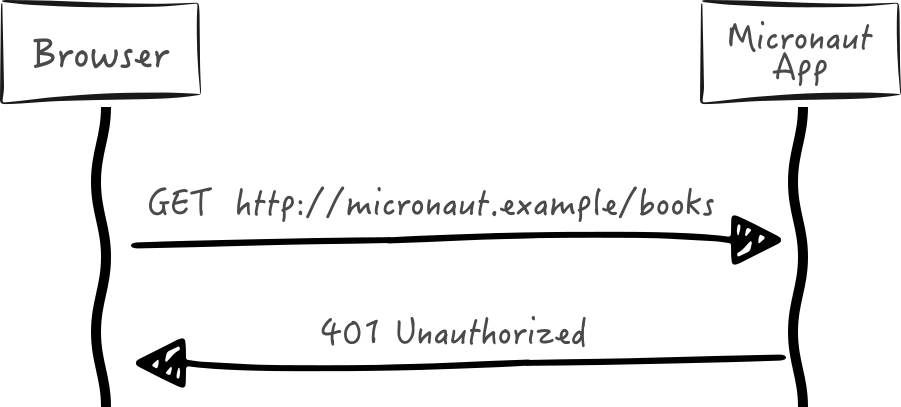
When you add the micronaut-security dependency, it contributes a Micronaut HTTP Server Filter - the SecurityFilter.
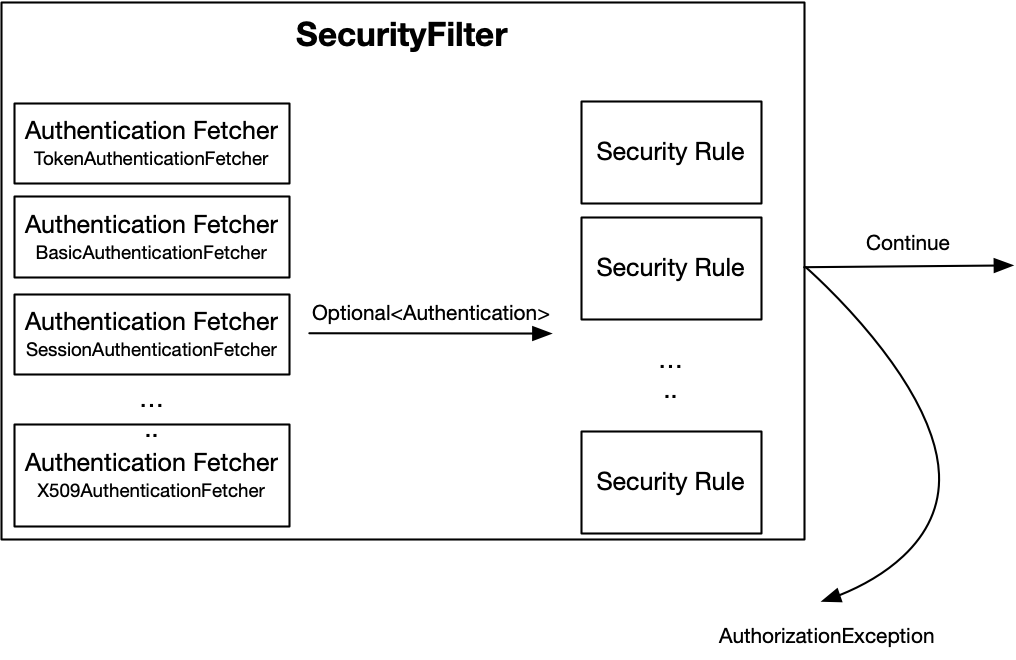
For each request, the filter evaluates the request against the beans of type AuthenticationFetcher. Fetchers are consulted sequentially in their Ordered precedence, and the first one to emit an Authentication wins; fetchers of lower precedence are not invoked once an authentication has been resolved.
|
Note
|
A custom AuthenticationFetcher must return a publisher that either emits a single Authentication or completes empty. When using Mono.create, emit only one terminal signal.
|
Then, the optional authentication is evaluated against every bean of type SecurityRule to determine if the request is authorized. If not authorized, an AuthorizationException is thrown.
You can write your own bean of type AuthenticationFetcher. However, Micronaut Security ships with several built-in authentication fetchers:
Bean |
Description |
It parses the credentials from an HTTP Request, which uses Basic Authentication. Then, it invokes every Authentication Provider using the parsed credentials. |
|
It attempts to retrieve a token from the HTTP Request, and then it tries to validate the token. |
|
It attempts to retrieve an Authentication from an HTTP session. |
|
Creates an Authentication if an X.509 client certificate is present and a name (CN) can be extracted. |
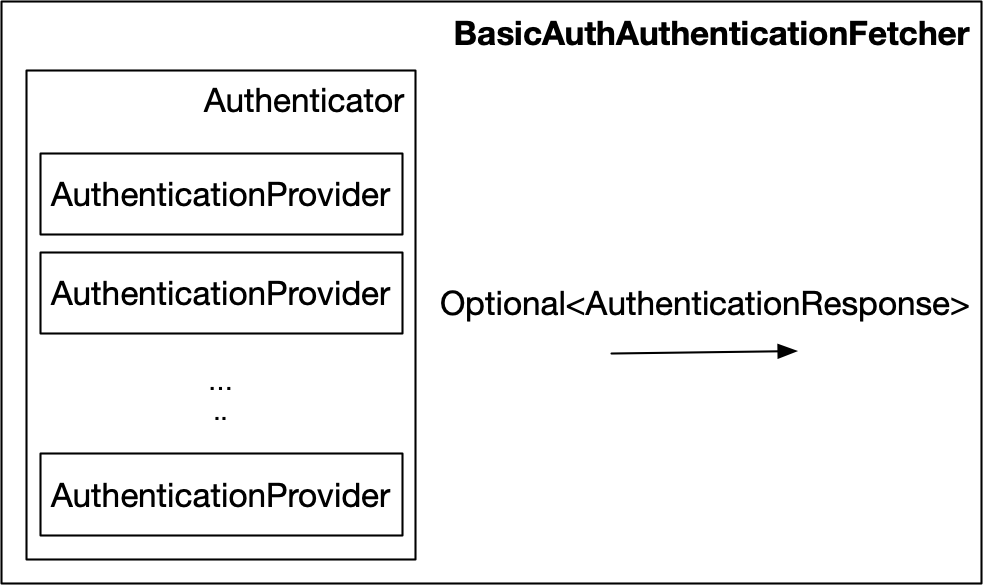
BasicAuthAuthenticationFetcher parses the credentials from an HTTP Request using Basic Authentication. Then, it invokes every Authentication Provider using the parsed credentials.
TokenAuthenticationFetcher attempts to retrieve a token from the HTTP Request via the TokenResolver API, and then it tries to validate the token via the TokenValidator API.
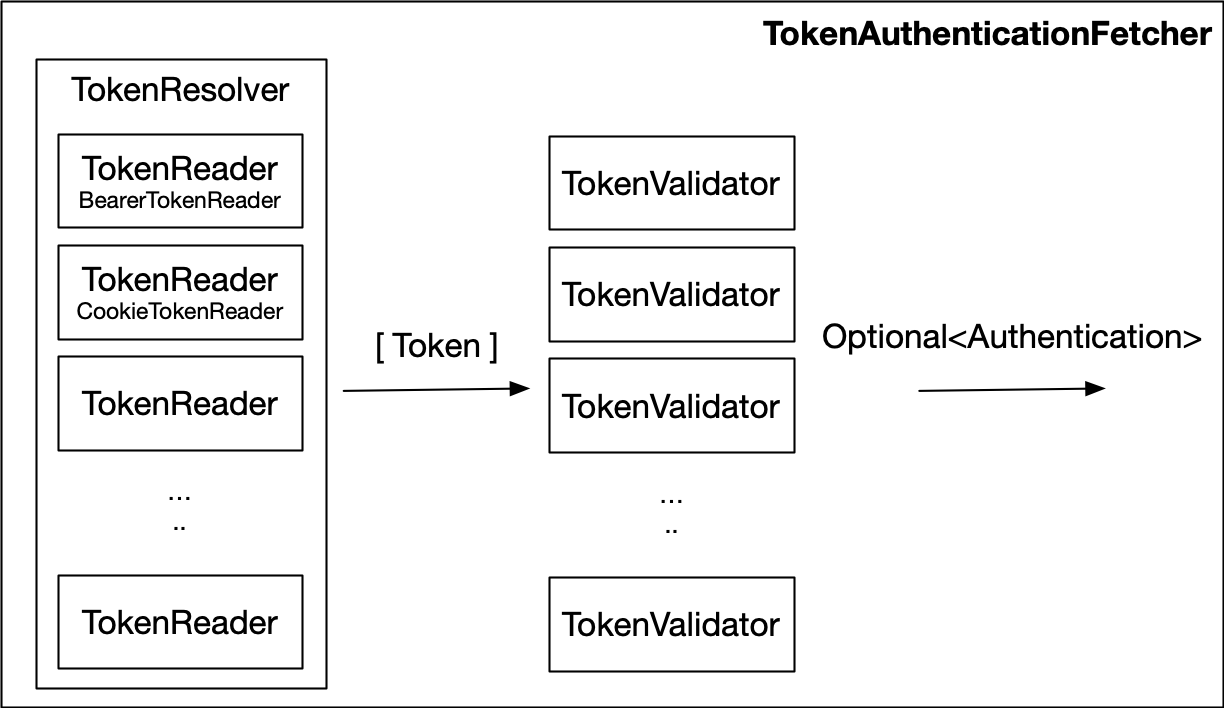
The TokenValidator beans are consulted sequentially, in order. The first validator which authenticates the token wins, and the token is not handed to the remaining validators. A validator is only consulted once every validator preceding it has rejected the token.
|
Tip
|
Give validators which send the token to a remote service, such as the UserInfo endpoint token validator, the lowest precedence. That way they only receive tokens which no local validator (for example the JWT validator) accepted. |
You can write your own bean of type TokenReader. However, Micronaut Security ships with several built-in beans of type TokenReader.
BearerTokenReader attempts to read a RFC 6750 Bearer Token.
The following configuration properties are available to customize how the Bearer Token will be read:
CookieTokenReader attempts to read token from a request cookie.
The following configuration properties are available to customize how the token will be read from a cookie:
The decision to allow access to a particular endpoint to anonymous or authenticated users is determined by a collection of Security Rules which are executed from the SecurityFilter. Micronaut ships with several built-in security rules. If they don’t fulfil your needs, you can implement your own SecurityRule.
Security rules return a publisher that should emit a single SecurityRuleResult. See the following table for a description of each result.
| Result | Description |
|---|---|
Access to the resource should be granted and no further rules will be considered. |
|
Access to the resource should be rejected and no further rules will be considered. |
|
The rule doesn’t apply to the request resource, or it cannot be determined either way. This result will cause other security rules to be considered. |
|
Important
|
If all security rules return UNKNOWN, the request will be rejected!
|
|
Important
|
SecurityFilter evaluates security rules in order. The remaining rules are not evaluated once a rule returns ALLOWED or REJECTED.
|
Security rules implement the ordered interface and so all of the existing rules have a static variable ORDER that stores the order of that rule. The rules they are executed in order from lower to higher values. You can use those variables to place your custom rule before or after any of the existing rules.
In the following table you can find the order and a short description of the behavior of built-in security rules. You can find more details about theese rules in their own guide sections.
| Rule | Order | ACCEPT condition | REJECT condition | UNKNOWN confition |
|---|---|---|---|---|
-300 |
Never |
None of the IP patterns matched the hostaddress |
The address matches at least one of the patterns or no address could be resolved |
|
-200 |
At least one required role is granted to the authenticated user |
None of the required roles is granted to the authenticated user |
No secured annotation is specified on the requested method |
|
-100 |
At least one required role is granted to the authenticated user |
None of the required roles is granted to the authenticated user |
No path pattern is matched |
|
0 |
User is authenticated |
User is not authenticated |
Path is not a sensitive one |
|
Warning
|
Do not execute any blocking operations in the rule implementation without offloading those operations to another thread pool. |
|
Warning
|
Since version 2.5, the Micronaut Framework executes the filters and then it reads the HTTP Request’s body. SecurityFilter evaluates the beans of type SecurityRule. Because of that, SecurityRule cannot rely on HTTP Request’s body because the Micronaut Framework has not read the body yet. |
When you turn on security, traffic coming from any ip address is allowed by default.
You can however reject traffic not coming from a white list of IP Patterns as illustrated below:
micronaut.security.ip-patterns[0]=127.0.0.1
micronaut.security.ip-patterns[1]=192.168.1.*In the previous code, the IpPatternsRule rejects traffic not coming
either 127.0.0.1 or 192.168.1.* range.
Each entry of micronaut.security.ip-patterns is interpreted in one of two ways:
-
A pattern made only of hexadecimal digits, dots, colons and
(for example127.0.0.1,192.168.1.orfe80:*) is an IP wildcard. Dots and colons match literally. Ainside the pattern matches within one address segment (192.168..1matches192.168.2.1but not192.168.2.3.1), and a trailingmatches the rest of the address, so192.168.1.matches192.168.1.0to192.168.1.255and does not match192.168.10.5. Hexadecimal digits match regardless of case, soFE80:*andfe80:*are equivalent. -
Any other pattern (for example
192\.168\.1\.\d+or^10\.0\.(1|2)\.[0-9]{1,3}$) is compiled as a Java regular expression that must match the whole remote host address. Escape dots as\.in regular expressions; an unescaped dot matches any character. A pattern that contains192.168.1.together with other characters (for example192.168.1.|10.0.0.1) is a regular expression, not a wildcard. A pattern starting with a dot, such as.*, is always a regular expression.
The special value 0.0.0.0 (the default) matches every address; and the regular expression . do too.
The address compared is the one returned by HttpRequest#getRemoteAddress(), the TCP peer, so behind a proxy or load balancer it is the proxy’s address (X-Forwarded-For is not consulted). IPv6 addresses are compared in their uncompressed form (0:0:0:0:0:0:0:1, not ::1).
The IP patterns rule never explicitly allows requests, it only rejects requests if the address does not match. There must be other security rules that determine whether a resource should be accessed.
If the desired behavior is to allow access to all resources as long as the address matches, create a security rule that executes after this one that returns ALLOWED.
As illustrated below, you can use the @Secured annotation to control access to controllers or controller methods.
Alternatively, you can use Jakarta Annotations:
-
jakarta.annotation.security.PermitAll -
jakarta.annotation.security.RolesAllowed -
jakarta.annotation.security.DenyAll
|
Note
|
The use of JSR 250 annotations requires io.micronaut.security:micronaut-security-processor to be in the annotation processor classpath (annotationProcessor, kapt, compileOnly) respectively for Java, Kotlin, Groovy.
|
|
Important
|
When the @Secured annotation has a set of roles, the SecuredAnnotationRule grants access to a user if they have any of the roles. |
|
Warning
|
Don’t use both annotations, @Secured and @RolesAllowed, in the same method. If you use it, the first occurrence (either @RolesAllowed or @Secured) is used. The other annotation is ignored.
|
In combination with @Secured, you can use expressions, introduced in Micronaut Framework 4.0, to access the authenticated user:
@Controller("/authenticated")
public class ExampleController {

    @Secured("#{ user?.attributes?.get('email') == 'sherlock@micronaut.example' }")
    @Produces(MediaType.TEXT_PLAIN)
    @Get("/email")
    public String authenticationByEmail(Principal principal) {
        return principal.getName() + " is authenticated";
    }
}user is of type Authentication
user is null for anonymous requests. A request is allowed only if the expression evaluates to true. If the expression evaluates to false or to null, for example because it navigates the user with user?. and no user is authenticated, the request is rejected. Later security rules, such as an intercept URL map entry, do not get the chance to allow it.
Moreover, you can configure endpoint authentication and authorization access with an Intercept URL Map:
micronaut.security.intercept-url-map[0].pattern=/images/*
micronaut.security.intercept-url-map[0].http-method=GET
micronaut.security.intercept-url-map[0].access[0]=isAnonymous()
micronaut.security.intercept-url-map[1].pattern=/books
micronaut.security.intercept-url-map[1].access[0]=isAuthenticated()
micronaut.security.intercept-url-map[2].pattern=/books/grails
micronaut.security.intercept-url-map[2].http-method=POST
micronaut.security.intercept-url-map[2].access[0]=ROLE_GRAILS
micronaut.security.intercept-url-map[2].access[1]=ROLE_GROOVY
micronaut.security.intercept-url-map[3].pattern=/books/grails
micronaut.security.intercept-url-map[3].http-method=PUT
micronaut.security.intercept-url-map[3].access[0]=ROLE_ADMIN-
pattern
/images/*enables access to authenticated and not authenticated users -
pattern
/booksenables access for everyone authenticated -
pattern
/books/grailsenables access for users who are granted any of the specified roles.
As you see in the previous code listing, any endpoint is identified by a combination of pattern and an optional HTTP method.
If a given request URI matches more than one intercept url map, the one that specifies an http method that matches the request method will be used. If there are multiple mappings that do not specify a method and match the request URI, then the first mapping will be used. For example:
The example below defines that all HTTP requests to URIs matching the pattern /v1/myResource/** and using HTTP method GET will be accessible to everyone. Requests matching the same URI pattern but using a different HTTP method than GET require fully authenticated access.
micronaut.security.intercept-url-map[0].pattern=/v1/myResource/**
micronaut.security.intercept-url-map[0].httpMethod=GET
micronaut.security.intercept-url-map[0].access[0]=isAnonymous()
micronaut.security.intercept-url-map[1].pattern=/v1/myResource/**
micronaut.security.intercept-url-map[1].access[0]=isAuthenticated()-
accessing
/v1/myResource/**with a GET request does not require authentication -
accessing
/v1/myResource/**with a request that isn’t GET requires authentication
|
Note
|
Patterns are matched against the request path the router uses to select a route: the percent-encoded path, with each segment decoded. A segment is kept percent-encoded if decoding it would introduce a slash or leave it blank. Thus, a path variable such as x%2Fy or %20 cannot skip a fixed-depth pattern such as /admin/*.
|
|
Note
|
When micronaut.server.context-path is set, the patterns are prepended with the context path by default (see micronaut.security.intercept-url-map-prepend-pattern-with-context-path). Requests for the context root, for example /context and /context/, are matched as the root path / is matched when no context path is set. Thus, root patterns such as / or /* keep protecting the application’s root route.
|
|
Important
|
When the @Secured annotation has a set of roles, the SecuredAnnotationRule grants access to a user if they have any of the roles. |
When you turn on security, Built-in endpoints are secured depending on their sensitive value.
endpoints.beans.enabled=true
endpoints.beans.sensitive=true
endpoints.info.enabled=true
endpoints.info.sensitive=false-
the
/beansendpoint is secured -
the
/infoendpoint is open for unauthenticated access
You need to replace the default implementation SensitiveEndpointRule and implement SensitiveEndpointRule::checkSensitiveAuthenticated to allow authenticated users access to sensitive endpoints. For example, you may want to restrict access to users with a specific role:
imports
import io.micronaut.context.annotation.Replaces;
import io.micronaut.context.annotation.Requires;
import org.jspecify.annotations.NonNull;
import io.micronaut.http.HttpRequest;
import io.micronaut.inject.ExecutableMethod;
import io.micronaut.management.endpoint.EndpointSensitivityProcessor;
import io.micronaut.security.authentication.Authentication;
import io.micronaut.security.rules.SecurityRuleResult;
import io.micronaut.security.rules.SensitiveEndpointRule;
import io.micronaut.security.token.RolesFinder;
import jakarta.inject.Singleton;
import java.util.Collections;
import org.reactivestreams.Publisher;
import reactor.core.publisher.Mono;@Replaces(SensitiveEndpointRule.class)
@Singleton
public class SensitiveEndpointRuleReplacement extends SensitiveEndpointRule {
private final RolesFinder rolesFinder;
public SensitiveEndpointRuleReplacement(EndpointSensitivityProcessor endpointSensitivityProcessor,
RolesFinder rolesFinder) {
super(endpointSensitivityProcessor);
this.rolesFinder = rolesFinder;
}
@Override
@NonNull
protected Publisher<SecurityRuleResult> checkSensitiveAuthenticated(@NonNull HttpRequest<?> request,
@NonNull Authentication authentication,
@NonNull ExecutableMethod<?, ?> method) {
return Mono.just(rolesFinder.hasAnyRequiredRoles(Collections.singletonList("ROLE_SYSTEM"), authentication.getRoles())
? SecurityRuleResult.ALLOWED : SecurityRuleResult.REJECTED);
}
}You can use @RunAs to apply an authentication to intercepted method invocations.
@RunAs(
    name = "aegon",
    roles = {"TARGARYEN"},
    attributes = {
        @Attribute(key = "family_name", value = "Targaryen"),
        @Attribute(key = "given_name", value = "Aegon")
    }
)
@Singleton
public class RunAsService {
    public Authentication changeAuth() {
        return SecurityContextHolder.getSecurityContext().getAuthentication();
    }
}Micronaut Security builds an Authentication from @RunAs and sets it in the current security context for the invocation.
For synchronous methods, Micronaut Security restores the previous authentication when the method returns.
For asynchronous methods (for example, CompletionStage and reactive return types), Micronaut Security restores the previous authentication when the asynchronous result completes.
The annotation does not authenticate the incoming request or permanently replace the caller’s identity.
By default, @RunAs appends the supplied roles and attributes to the current authentication.
The annotation value is an alias for roles, so @RunAs("ROLE_ADMIN") is equivalent to @RunAs(roles = "ROLE_ADMIN").
Set appendRoles or appendAttributes to false to replace the current values instead.
If name is omitted or blank and an authentication already exists, Micronaut Security keeps the current user name.
You can also use jakarta.annotation.security.RunAs; Micronaut Security maps it to @RunAs and uses the Jakarta annotation value as the run-as role.
|
Note
|
The use of jakarta.annotation.security.RunAs requires io.micronaut.security:micronaut-security-processor to be in the annotation processor classpath (annotationProcessor, kapt, compileOnly) respectively for Java, Kotlin, Groovy.
|
One good use case is a bean with Scheduled methods. Because scheduled tasks do not run as part of an incoming authenticated request, @RunAs lets the scheduled job delegate to services that expect an authenticated user.
Resolving an Authentication can be expensive; for example, an AuthenticationFetcher may hit a database on every request. For static resources served anonymously, that work is wasted.
Set micronaut.security.filter.static-resource-authentication-bypass to true to skip every AuthenticationFetcher for requests which are served as anonymous static resources:
micronaut.router.static-resources.default.mapping=/assets/**
micronaut.router.static-resources.default.paths=classpath:assets
micronaut.security.filter.static-resource-authentication-bypass=true
micronaut.security.intercept-url-map[0].pattern=/assets/**
micronaut.security.intercept-url-map[0].access[0]=isAnonymous()The bypass is disabled by default. When enabled, SecurityFilter skips authentication resolution only if all of the following hold:
-
The request method is
GETorHEAD. -
The request did not match a route. A route always takes precedence over a static resource, and routed requests are never bypassed.
-
The request path resolves to a static resource.
-
The first
micronaut.security.intercept-url-mapentry which applies to the request grantsisAnonymous()access.
An explicit isAnonymous() intercept URL map entry is required. Without one, no request is bypassed.
Bypassing only skips authentication resolution. Every bean of type SecurityRule is still evaluated, so the request is authorized exactly as an anonymous request would be. Because the entry grants isAnonymous() access, the outcome cannot depend on who is making the request.
|
Warning
|
The rules are evaluated with a null authentication, and no Authentication is available for the rest of the filter chain. If your application defines a SecurityRule ordered before ConfigurationInterceptUrlMapRule, or a filter which reads the authentication for bypassed paths, it observes an anonymous request.
|
To decide which requests bypass authentication resolution yourself, replace the default implementation with your own bean of type StaticResourceAuthenticationBypass. The configuration property must still be set to true.
Micronaut Security ships with several built-in Exception Handlers:
Exception |
Handler |
You may need to replace some of those beans to customize Micronaut Security exception handling to your needs.
The Security Filter section describes how for each request an Authentication maybe resolved. It maybe a token placed in an HTTP Header, in a cookie, or an HTTP session. How do you obtain such a token or how is the user saved into the HTTP Session in the first place?. In a Micronaut application, you can expose the LoginController.
To enable the LoginController, you need to have a bean of type LoginHandler. A custom implementation can, of course, be provided. However, several Login Handlers implementations are available out of the box.
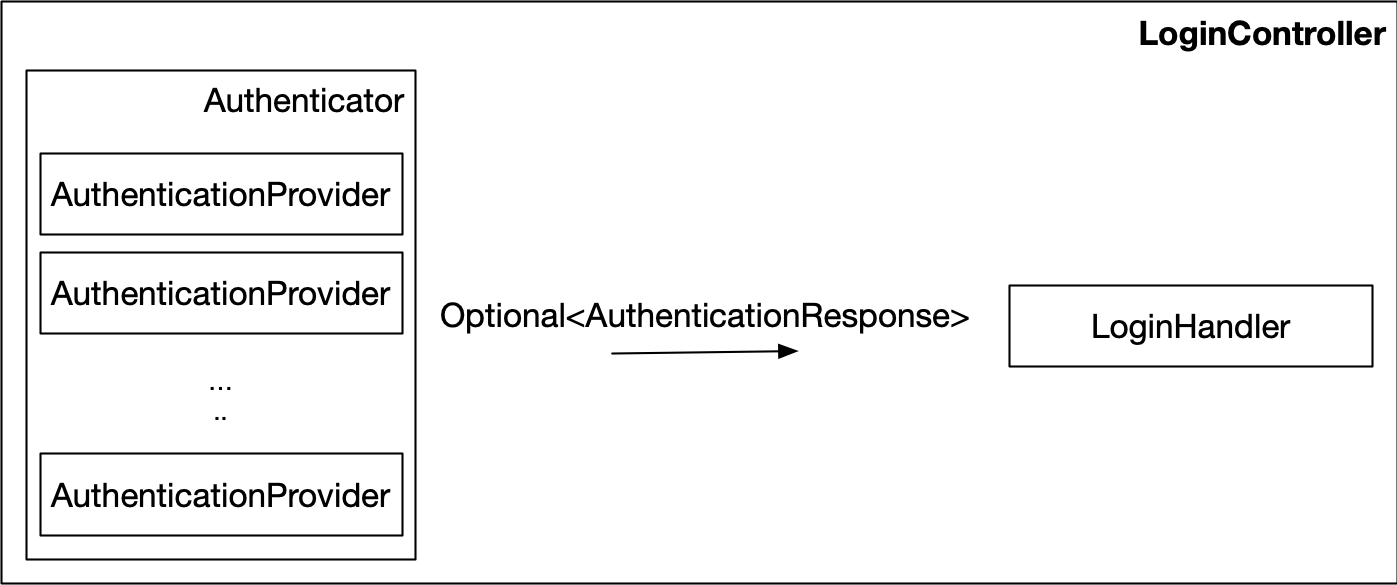
You can configure the LoginController with:
The LoginHandler API defines how to respond to a successful or failed login attempt. For example, with the Login Controller or with OAuth 2.0 support.
To enable the logout controller you need a bean of type LogoutHandler. The behaviour of the controller is delegated to it. A custom implementation can, of course, be provided. However, several Logout Handlers implementations are available out of the box.
You can configure the logout endpoint with:
|
Tip
|
If you are using JWT authentication not stored in a cookie, you may not need to invoke the /logout endpoint. Since logging out normally means simply deleting the JWT token in the client.
|
The LogoutHandler API defines how to respond to a logout attempt. For example, with the Logout Controller.
You can provide your own implementations of LoginHandler and LogoutHandler.
However, Micronaut security modules ship with several implementations which you can enable by setting the configuration micronaut.security.authentication
micronaut.security.authentication Value |
Required Module | Login Handler | Logout Handler |
|---|---|---|---|
|
|
||
|
|
||
|
|
||
|
|
These handlers allow you to set the following scenarios:
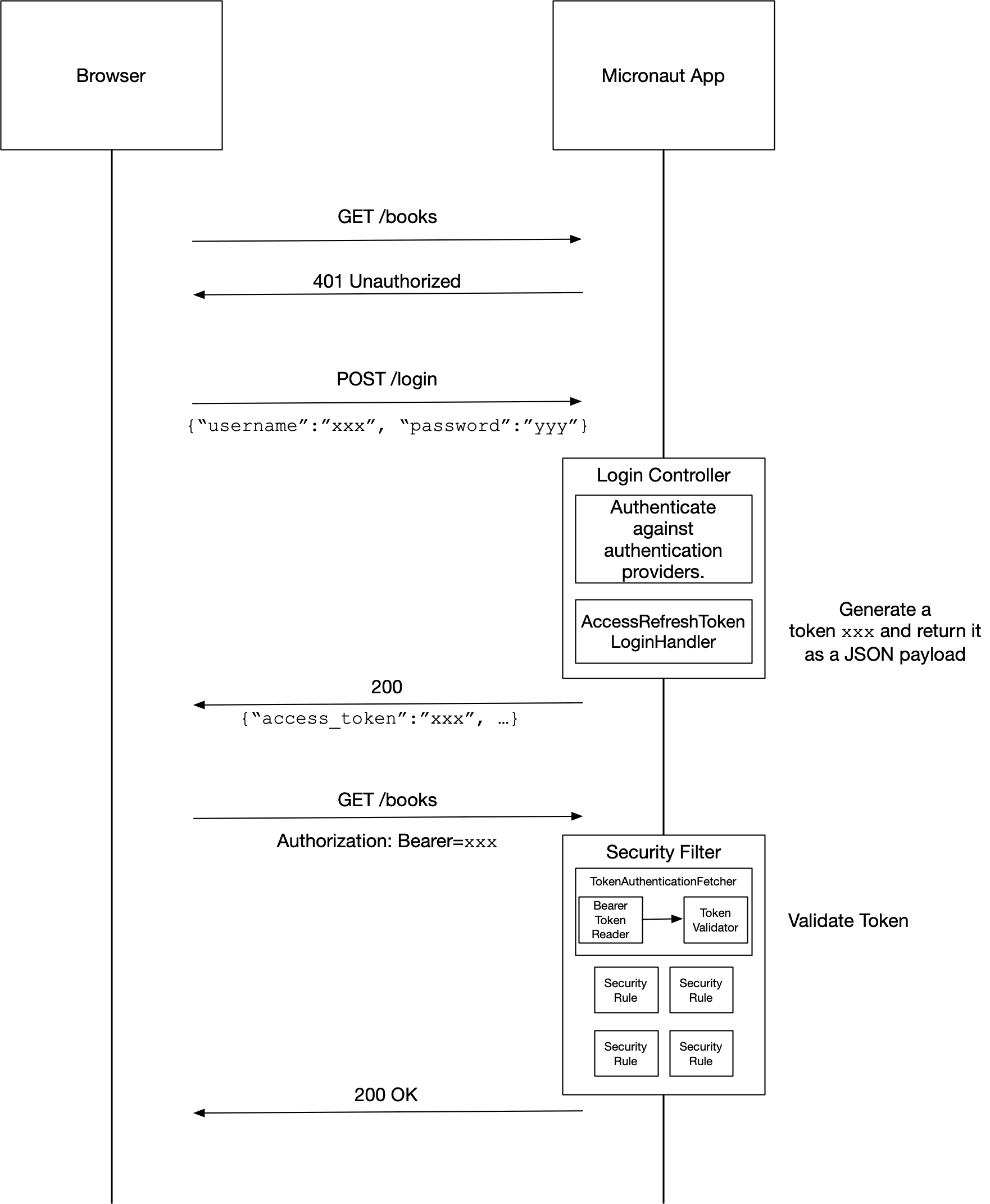
When you set micronaut.security.authentication=bearer, AccessRefreshTokenLoginHandler a bean of type LoginHandler is enabled.
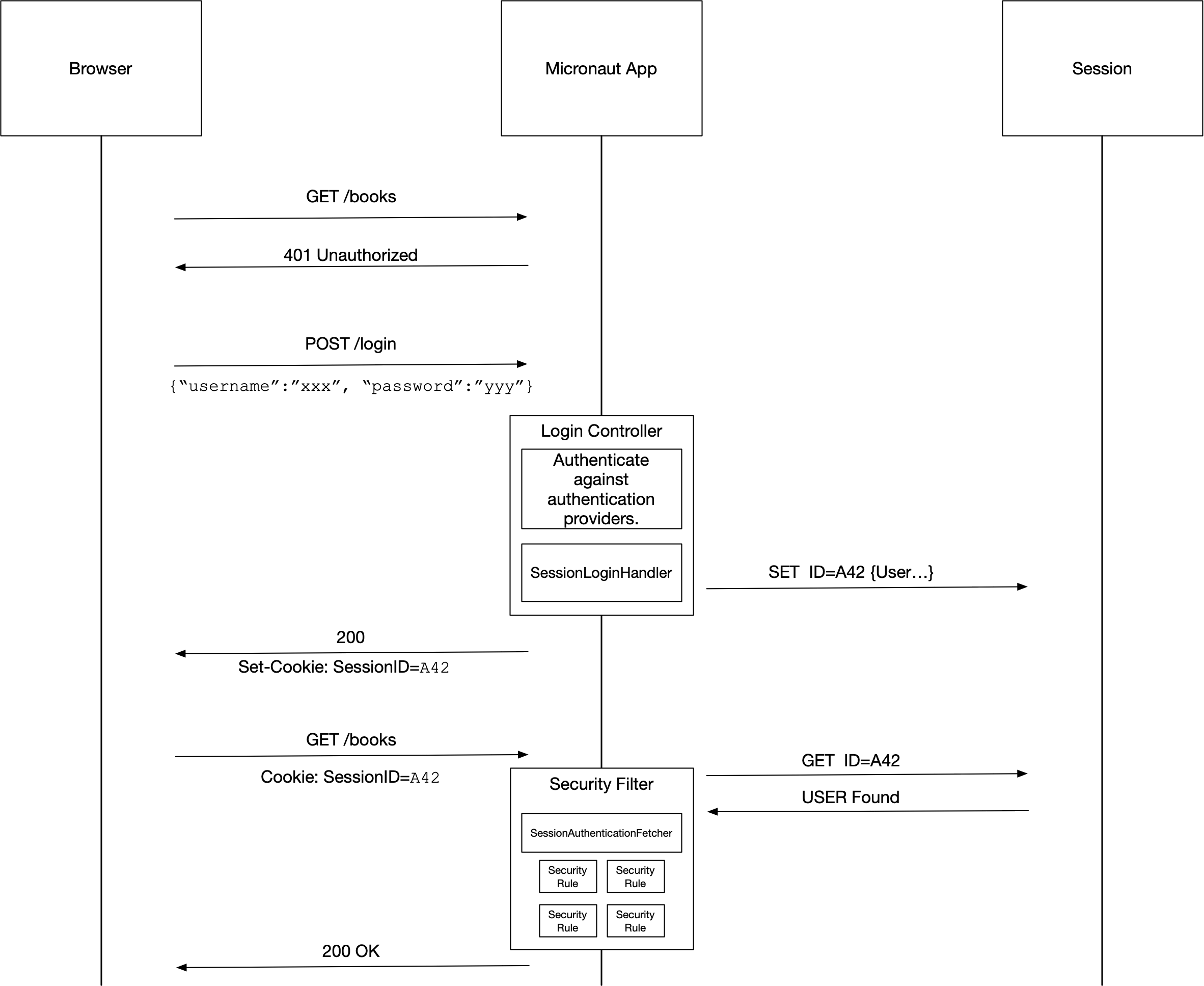
When you set micronaut.security.authentication=session, SessionLoginHandler a bean of type LoginHandler and SessionLogoutHandler a bean of type LogoutHandler are enabled.
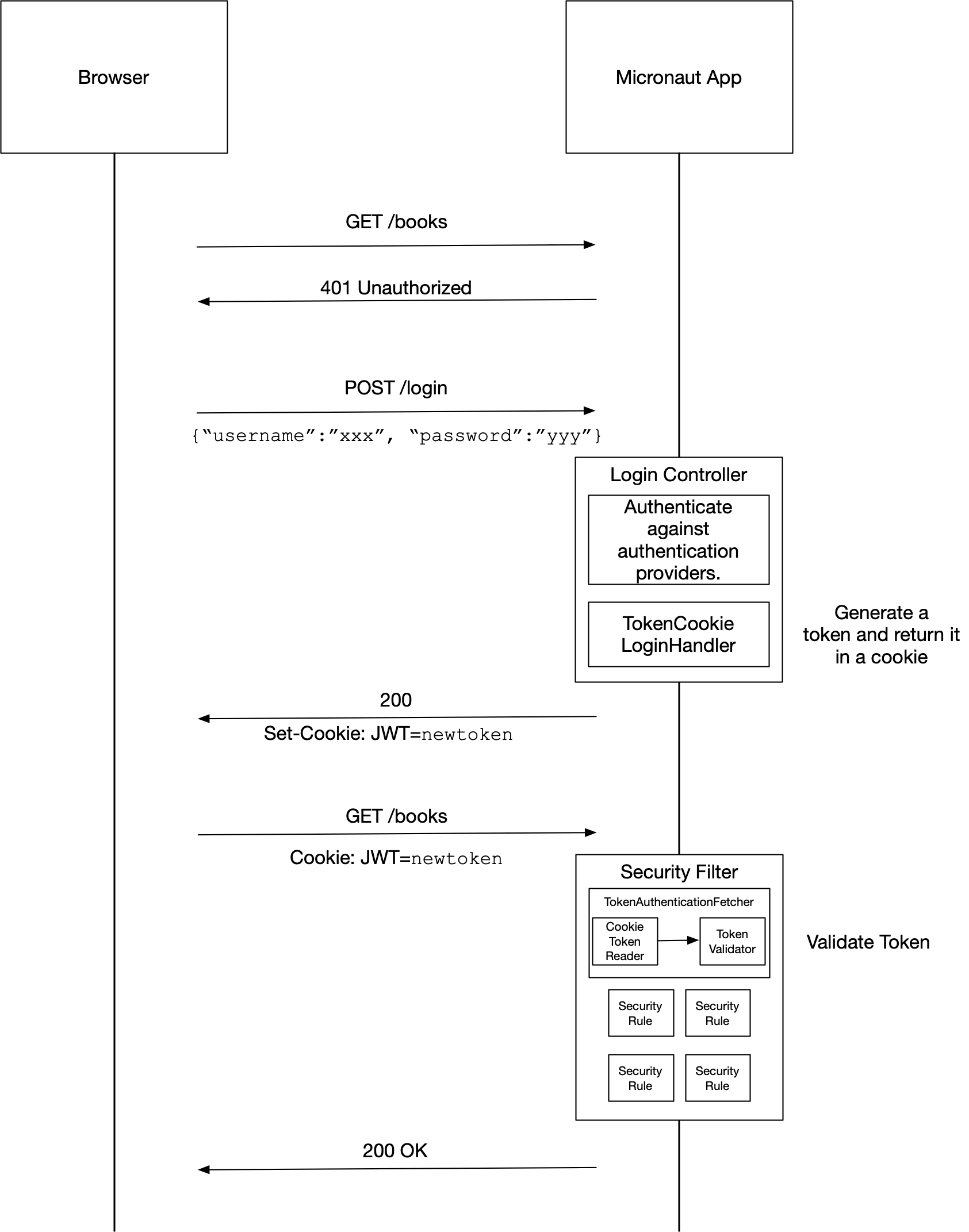
When you set micronaut.security.authentication=cookie, TokenCookieLoginHandler a bean of type LoginHandler and JwtCookieClearerLogoutHandler a bean of type LogoutHandler are enabled.
When you set micronaut.security.authentication=idtoken, IdTokenLoginHandler a bean of type LoginHandler and JwtCookieClearerLogoutHandler a bean of type LogoutHandler are enabled. Additionally, a ReactiveJwksSignature bean is registered for the jwks_uri of each OpenID provider, so ID tokens issued by the provider can be used as request credentials, and IdTokenClaimsValidator verifies that they were issued to this client. Only enabled OAuth 2.0 clients are considered. A disabled client contributes no provider metadata and no JWKS, but that removes only its own trust: when several clients share the same OpenID provider, only IdTokenClaimsValidator checks that the aud claim names an enabled client, so disabling it with micronaut.security.token.jwt.claims-validators.openid-idtoken: false lets a token issued to a disabled client authenticate through the signing keys of an enabled sibling. ID token authentication never accepts unsigned JWTs: even when every OAuth 2.0 client is disabled, or none is configured, and therefore no JWKS is registered, a token without a signature is rejected.
The iss claim of such a token must be identical to the expected issuer of an OpenID client: micronaut.security.oauth2.clients..openid.issuer-identifier if set, otherwise micronaut.security.oauth2.clients..openid.issuer. Only the case of the scheme and a trailing slash are tolerated; the scheme, host, port and path must match. The same expected issuer is used by ProviderResolver to resolve the OpenID client of a token from its iss claim.
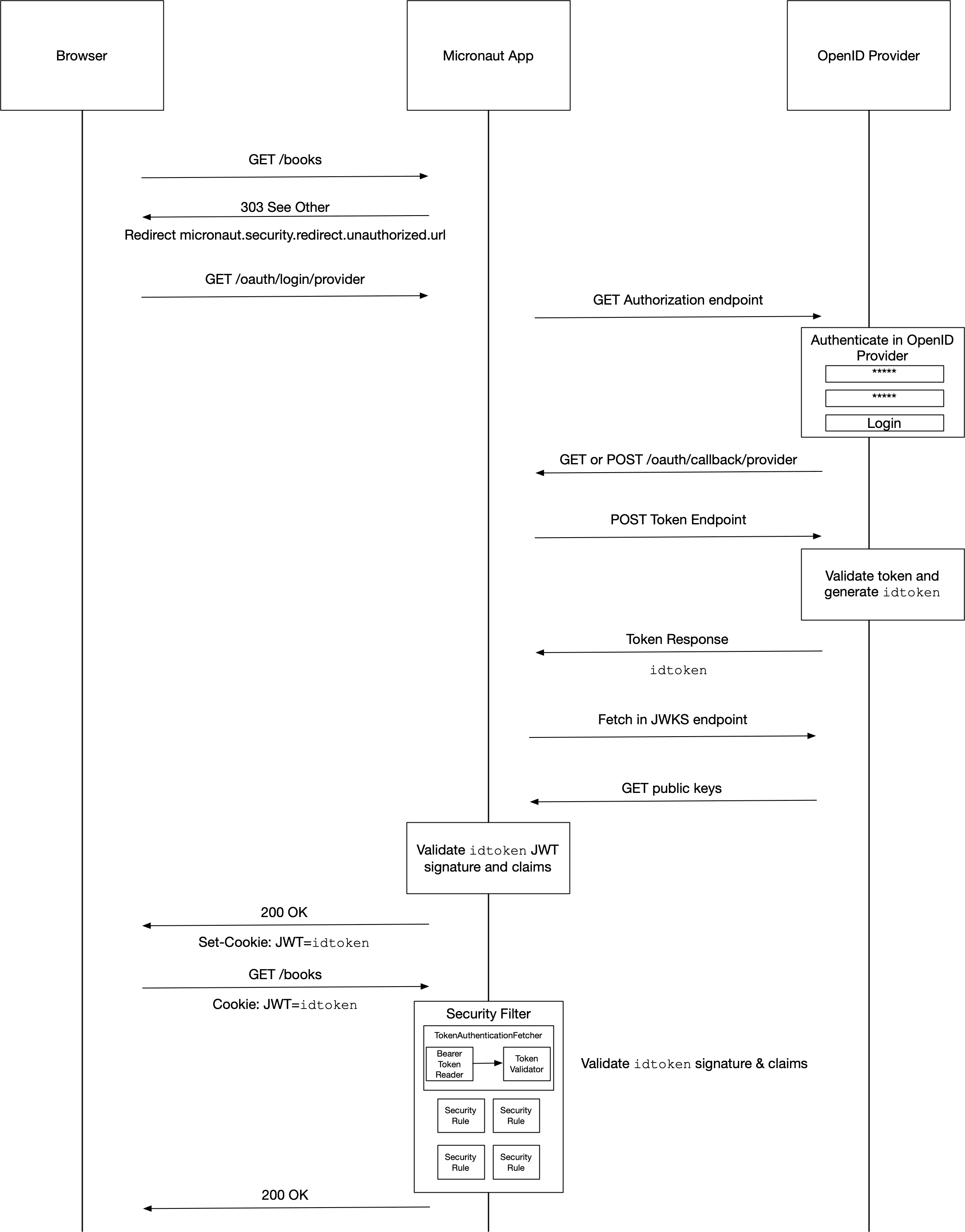
The following global configuration options are available:
By default, when you include Micronaut security the app returns 401 or 403 even for non existing routes. The behavior prevents attackers from discovering what endpoints are available in your application. However, if you wish to return 404 for non found routes you can set micronaut.security.reject-not-found: false in your configuration.
By default, Micronaut requires just one Authentication Provider to return a successful authentication response. You can set micronaut.security.authentication-provider-strategy: ALL to require all AuthenticationProviders to return a successful authentication response.
Some built-in handlers respond with a 303 (See other) response to the urls defined in the Redirection Configuration
If you disable redirection configuration with by setting micronaut.security.redirect.enabled to false, these handlers respond with 200 responses instead.
Several security flows (e.g. session based authentication, Cookie Token authentication) may involve redirection after the user logs in.
You can configure the redirection destinations with:
|
Important
|
Use the API RedirectService, which prepends the context path, if defined, to the redirect URLs. |
Redirecting to the URI requested prior to login
When micronaut.security.redirect.prior-to-login is true, CookiePriorToLoginPersistence stores the URI of the request that was rejected as unauthorized in an ORIGINAL_URI cookie and the login handlers redirect to it after a successful login instead of to login-success.
To prevent an open redirect (CWE-601), only the path and query of the unauthorized request are stored, and only a local path, one that starts with a single /, is honoured when the cookie is read back. A request line such as GET ///evil.example/x, which browsers would follow as a scheme-relative URL to another host, or a planted cookie carrying an absolute or scheme-relative URL, falls back to login-success.
To authenticate users you must provide implementations of ReactiveAuthenticationProvider or HttpRequestReactiveAuthenticationProvider.
The following code snippet illustrates a naive implementation:
@Singleton
class CustomAuthenticationProvider<B> implements HttpRequestReactiveAuthenticationProvider<B> {
    @Override
    @SingleResult
    public Publisher<AuthenticationResponse> authenticate(HttpRequest<B> requestContext, AuthenticationRequest<String, String> authRequest) {
        AuthenticationResponse rsp = authRequest.getIdentity().equals("user") && authRequest.getSecret().equals("password")
                ? AuthenticationResponse.success("user")
                : AuthenticationResponse.failure(AuthenticationFailureReason.CREDENTIALS_DO_NOT_MATCH);
        return Mono.create(emitter -> {
            emitter.success(rsp);
        });
    }
}The ReactiveAuthenticationProvider interface is a reactive API. If you prefer an imperative style, you can instead implement the AuthenticationProvider or HttpRequestAuthenticationProvider interface:
@Singleton
class CustomAuthenticationProvider<B> implements HttpRequestAuthenticationProvider<B> {

    @Override
    public AuthenticationResponse authenticate(HttpRequest<B> requestContext, AuthenticationRequest<String, String> authRequest) {
        return (authRequest.getIdentity().equals("user") && authRequest.getSecret().equals("password"))
                ? AuthenticationResponse.success("user")
                : AuthenticationResponse.failure(AuthenticationFailureReason.CREDENTIALS_DO_NOT_MATCH);
    }
}|
Important
|
If your implementation is blocking (e.g., you fetch the user credentials from a database in a blocking way to check against the supplied authentication request), implement the ExecutorAuthenticationProvider or HttpRequestExecutorAuthenticationProvider interface. Those APIs specify the executor name, by default TaskExecutors.BLOCKING, where the code gets executed to avoid blocking the main reactive flow.
|
The built-in Login Controller uses every available authentication provider. The first provider that returns a successful authentication response will have its value used as the basis for the JWT token or session state.
Basic authentication which is implemented as an AuthenticationFetcher will also trigger the available AuthenticationProviders.
Micronaut comes with authentication providers for LDAP (LdapAuthenticationProvider) and the OAuth 2.0 password grant authentication flow (OauthPasswordAuthenticationProvider and OpenIdPasswordAuthenticationProvider). For any custom authentication, an authentication provider must be created.
Out-of-the-box, Micronaut supports RFC7617 which defines the "Basic" Hypertext Transfer Protocol (HTTP) authentication scheme, which transmits credentials as user-id/password pairs, encoded using Base64.
Basic authentication is enabled by default if you have any Authentication Provider. You can disable it by setting micronaut.security.basic-auth.enabled to false.
The following sequence illustrates the authentication flow:
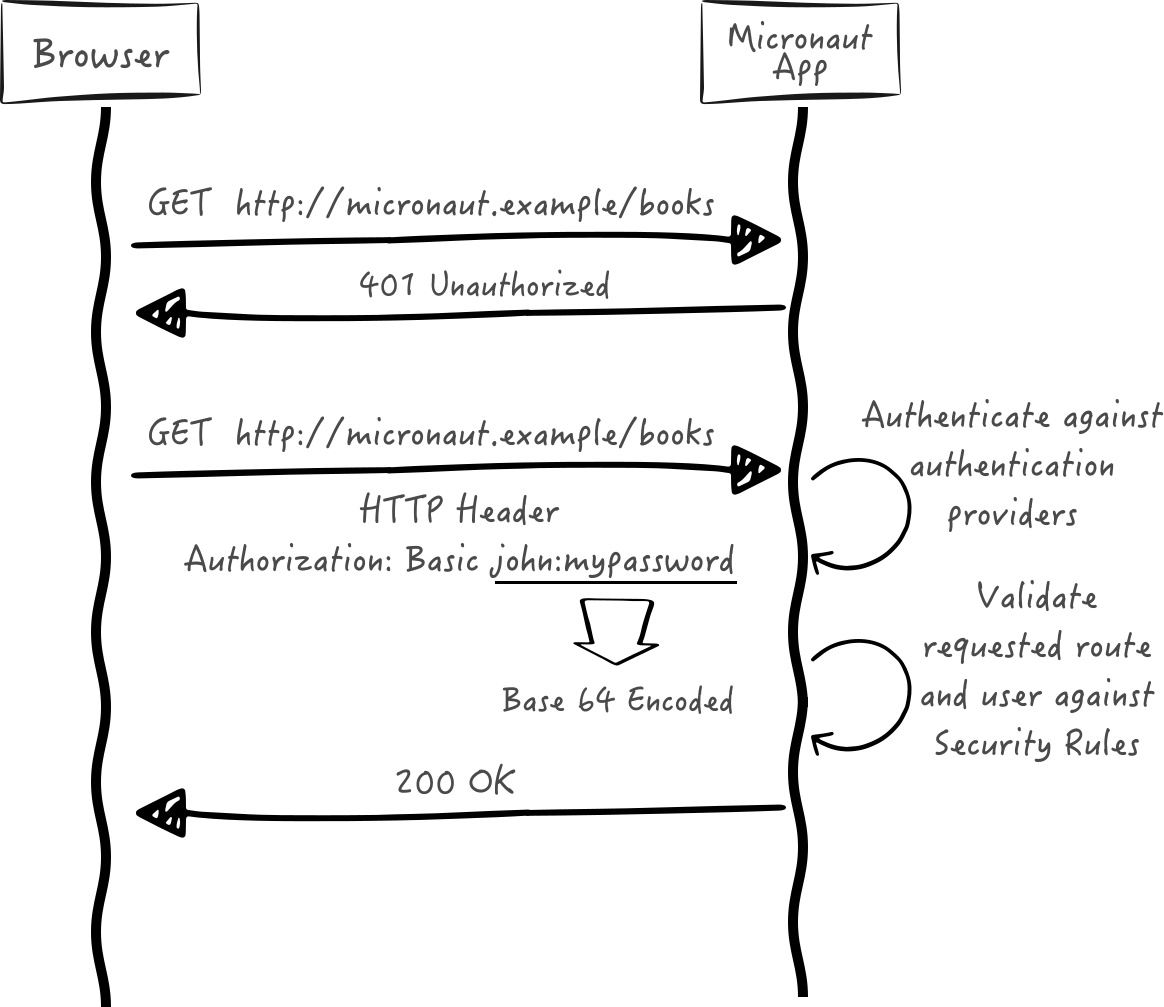
Below is a sample of a cURL command using basic auth:
curl "http://localhost:8080/info" \
     -u 'user:password'
After credentials are read from the HTTP Header, they are feed into an Authenticator which attempts to validate them.
The code snippet below illustrates how to send credentials using the basicAuth method from MutableHttpRequest method:
HttpRequest<?> request = HttpRequest.GET("/home").basicAuth("sherlock", "password");|
Tip
|
Read the Basic Authentication Micronaut Guide to learn more. |
Micronaut supports Session based authentication.
|
Tip
|
Using the CLI
If you are creating your project using the Micronaut CLI, supply either the |
To use the Micronaut’s session based authentication capabilities, you must have the security-session dependency on your classpath. For example:
annotationProcessor("io.micronaut.security:micronaut-security-processor")implementation("io.micronaut.security:micronaut-security-session")|
Note
|
The micronaut-security-processor dependency is only required to use JSR 250 annotations
|
The following sequence illustrates the authentication flow:
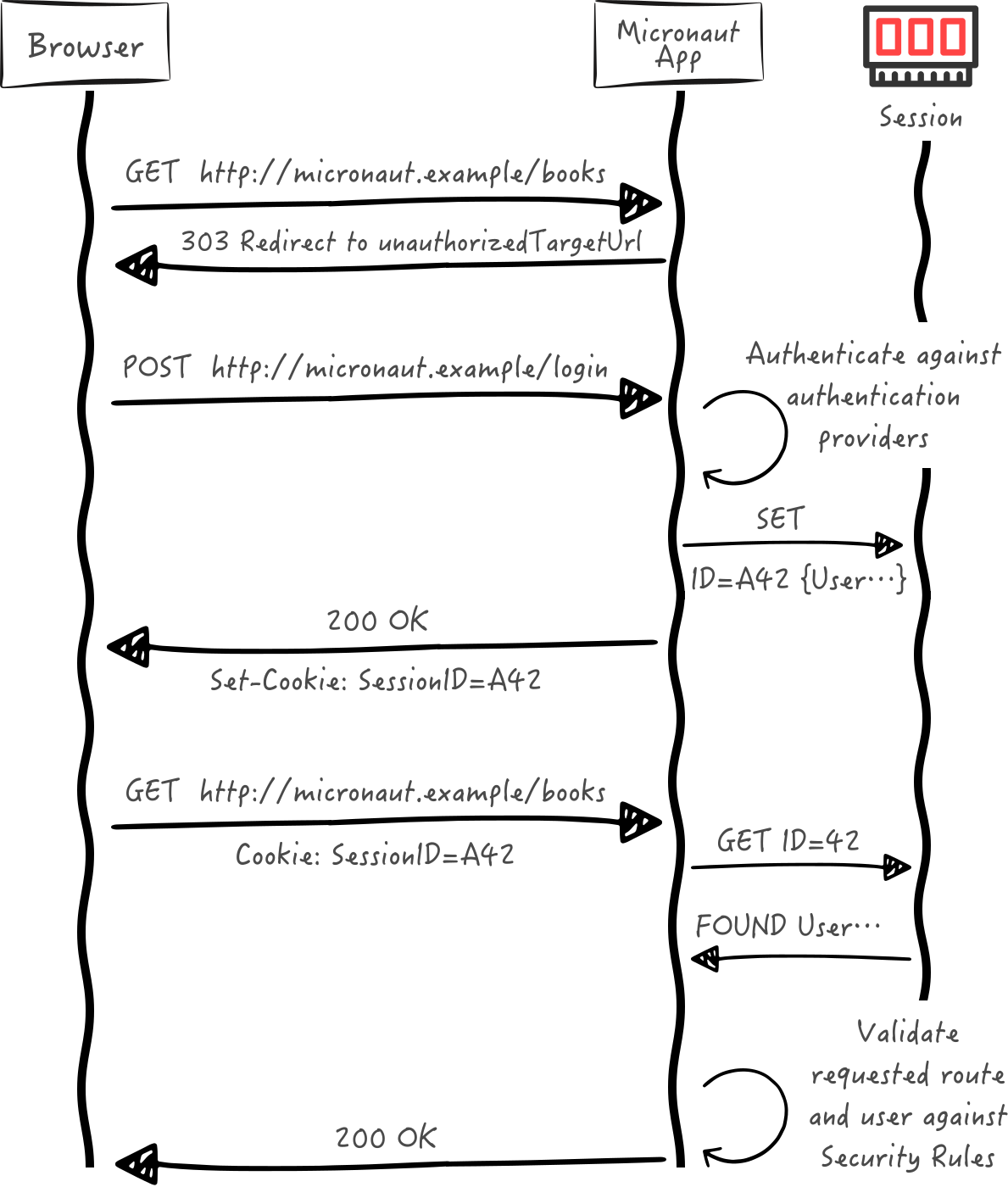
Check the Redirection configuration to customize session based authentication behaviour.
Example of Session-Based Authentication configuration
micronaut.security.authentication=session
micronaut.security.redirect.login-failure=/login/authFailedRead the following guides to learn more about session based authentication:
Session lifecycle
SessionLoginHandler issues a new session on every successful login. If the request already carries a session, its attributes are migrated to the new session and the previous session is deleted from the SessionStore. Renewing the session identifier when the privilege level changes protects against session fixation attacks.
SessionLogoutHandler deletes the session from the SessionStore and expires the session cookie on logout, so the session identifier cannot be reused after the user logs out.
Session-based authentication without redirection
When you set micronaut.security.authentication to session, you enable SessionLoginHandler and SessionLogoutHandler.
These handlers return 303 responses to the urls defined in the Redirection Configuration. Disable redirection configuration with micronaut.security.redirect.enabled=false to respond with 200 responses instead.
The following configuration properties are available to customize token based authentication:
Micronaut ships with security capabilities based on Json Web Token (JWT). JWT is an IETF standard which defines a secure way to encapsulate arbitrary data that can be sent over unsecure URL’s.
|
Tip
|
Using the CLI
If you are creating your project using the Micronaut CLI, supply the |
To use the Micronaut’s JWT based authentication capabilities you must have the security-jwt dependency on your classpath. For example:
annotationProcessor("io.micronaut.security:micronaut-security-processor")implementation("io.micronaut.security:micronaut-security-jwt")|
Note
|
The micronaut-security-processor dependency is only required to use JSR 250 annotations
|
The following configuration properties are available to customize JWT based authentication behaviour:
What does a JWT look like?
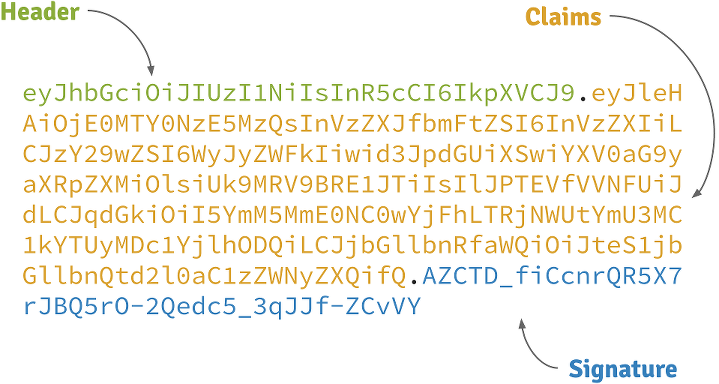
Header
A base64-encoded JSON like:
{
    "alg": "HS256",
    "typ": "JWT"
}
Claims
A base64-encoded JSON like:
{
    "exp": 1422990129,
    "sub": "jimi",
    "roles": [
        "ROLE_ADMIN",
        "ROLE_USER"
    ],
    "iat": 1422986529
}
Signature
Depends on the algorithm specified on the header, it can be a digital signature of the base64-encoded header and claims, or an encryption of them.
Micronaut supports the RFC 6750 Bearer Token specification for transmitting JWT tokens. The following sequence illustrates the RFC 6750 authentication flow:
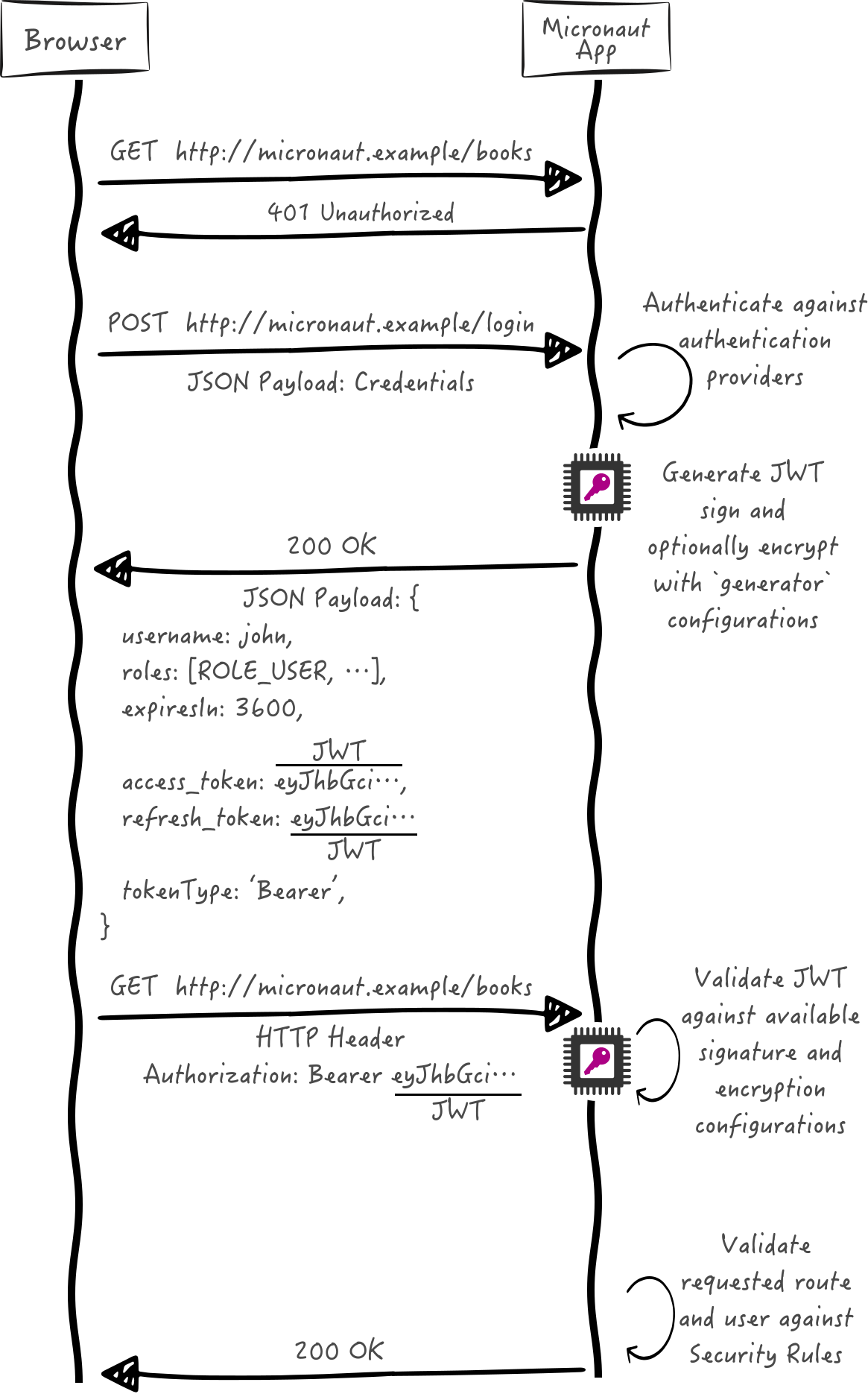
The following configuration properties are available to customize how the Bearer Token will be read:
Sending tokens in the request
The code snippet below illustrates how to send a JWT token in the Authorization request header, using the bearerAuth method from MutableHttpRequest method:
String accessToken = rsp.body().getAccessToken();
List<Book> books = client.retrieve(HttpRequest.GET("/api/gateway")
.bearerAuth(accessToken), Argument.listOf(Book.class));GET /protectedResource HTTP/1.1
Host: micronaut.example`
Authorization: Bearer eyJhbGciOiJIUzI1NiJ9.eyJleHAiOjE0MjI5OTU5MjIsInN1YiI6ImppbWkiLCJyb2xlcyI6WyJST0xFX0FETUlOIiwiUk9MRV9VU0VSIl0sImlhdCI6MTQyMjk5MjMyMn0.rA7A2Gwt14LaYMpxNRtrCdO24RGrfHtZXY9fIjV8x8o|
Tip
|
Check out the Micronaut JWT authentication for a tutorial on Micronaut’s JWT support. |
You can send/read a JWT token from a Cookie too.
The following sequence illustrates the authentication flow:
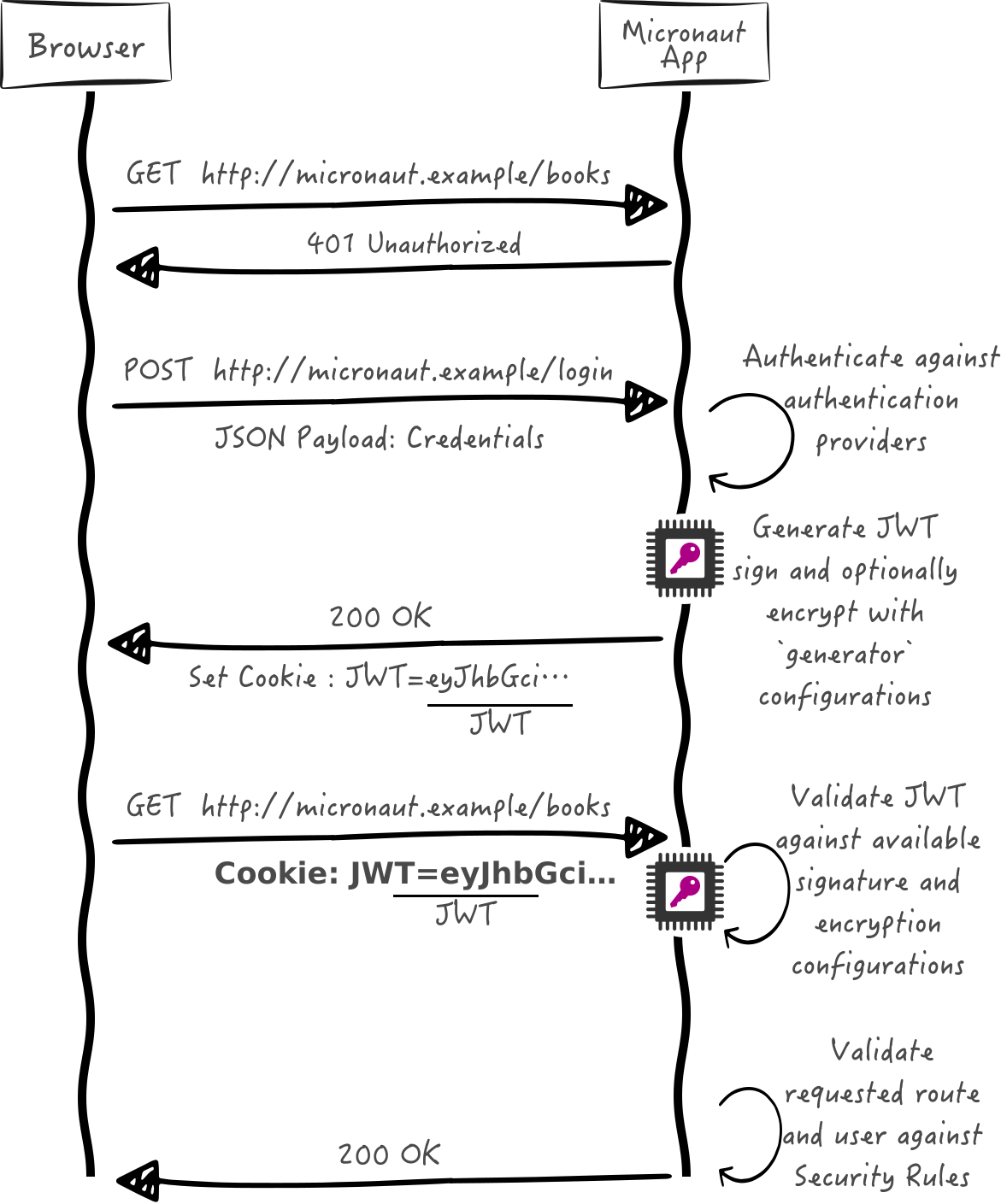
Reading tokens from Cookies is disabled by default. Note that using JWT tokens from cookies requires JWT Authentication to be enabled.
|
Tip
|
Read the Micronaut JWT Authentication with Cookies to learn more. |
You can inject a bean of type The JsonWebTokenParser to parse a JWT token. The parser decrypts the token if encrypted.
The AuthenticationMapper API maps a token value to an Authentication.
Micronaut Security registers a primary composite mapper that delegates to every available AuthenticationMapper bean.
The first mapper that returns a non-null Authentication wins.
If a mapper cannot map the token, it should return null so that another mapper can try.
AuthenticationMapper extends Ordered, so you can control mapper precedence by overriding getOrder() or using Micronaut ordering annotations.
The micronaut-security-jwt module provides a mapper for JWT tokens parsed with Nimbus JOSE + JWT.
NOTE: This mapper only parses the token to extract claims; it does not validate signatures or claims. Validate tokens first (for example with JsonWebTokenValidator).
It maps the token subject claim to the authentication name, resolves roles with RolesFinder, and copies the OpenID Connect profile claims exposed by ProfileClaims into the authentication attributes.
Micronaut Security ships with a bean of type HttpLocaleResolver that attempts to resolve the locale from locale claims, as defined in OpenID Connect Standard Claims.
Micronaut security capabilities use signed JWT’s as specified by the JSON Web Signature specification.
Micronaut’s JWT validation supports multiple signature configurations. Thus, you can validate JSON Web tokens signed by different issuers in the same application.
To verify the signature of JWT tokens, you need beans of type SignatureConfiguration or ReactiveSignatureConfiguration
The easiest way is to create a bean of type SignatureConfiguration is to have in your app a bean of type RSASignatureConfiguration,
ECSignatureConfiguration, or
SecretSignatureConfiguration which must be qualified with @Named since the configuration beans are used by factories (RSASignatureFactory,
ECSignatureConfiguration) or other beans (SecretSignature) which use
@EachBean to drive configuration.
The APIs JsonWebTokenSignatureValidator, and ReactiveJsonWebTokenSignatureValidator allows you to validate the signature of a JWT token.
ReactiveJsonWebTokenSignatureValidator validates the signature using both SignatureConfiguration or ReactiveSignatureConfiguration.
JsonWebTokenSignatureValidator validates the signature using beans of type SignatureConfiguration.
A JSON Web Key (JWK) is a JSON object that represents a cryptographic key. You can use a remote JWK Set, A JSON object that represents a set of JWKs, to validate JWT signatures.
You can configure a remote JWKS as a signature validator:
micronaut.security.token.jwt.signatures.jwks.awscognito.url=https://cognito-idp.eu-west-1.amazonaws.com/eu-west-XXXX/.well-known/jwks.jsonThe previous snippet creates a ReactiveJwksSignature bean with a awscognito name qualifier.
If you have the Micronaut HTTP Client on the classpath, then it will be used to retrieve the remote JWK Set. This allows for the configuration settings of the HTTP Client to be applied when fetching the resource. If a service-specific client configuration (micronaut.http.services.<name>.) exists whose name matches the configured JWKS provider name, then a client created from that configuration (and its service url) will be used, otherwise a default HTTP Client instance (with any global configuration settings from micronaut.http.client. applied) will be used. If the Micronaut HTTP Client is not on the classpath, then the implementation will fall back to the internal resource fetching mechanism of the external JWT library dependency.
|
Important
|
The default HTTP Client used to retrieve a remote JWK Set never follows redirects, regardless of micronaut.http.client.follow-redirects. A redirect to another address is treated as a failure to load the JWK Set. A named service-specific client configured for a JWKS provider (micronaut.http.services.<name>.*) only contributes its settings: redirects are never followed, even with follow-redirects: true. Client filters scoped to a service id (@Filter(serviceId = "<name>")) are not applied to the client that retrieves the JWK Set.
|
For example, to use an HTTP proxy for the fetching of the JWK Set from the above example:
micronaut.http.services.awscognito.url=https://cognito-idp.eu-west-1.amazonaws.com
micronaut.http.services.awscognito.proxy-type=http
micronaut.http.services.awscognito.proxy-address=proxy.company.net:8080
micronaut.security.token.jwt.signatures.jwks.awscognito.url=/eu-west-XXXX/.well-known/jwks.jsonNote that the same approach will be applied when using a jwks_uri supplied via Open ID Connect metadata. Such a JWKS is registered as a signature configuration for request tokens only when micronaut.security.authentication is set to idtoken.
Binding a JWKS to an issuer
When an application trusts the key sets of several identity providers, a key trusted for one provider must not be able to sign tokens that claim to be issued by another provider. A JWKS can be bound to an issuer with the issuer property. A bound JWKS only verifies tokens whose iss claim is equal to that issuer, tolerating only the case of the scheme and a trailing slash, the same comparison IssuerClaimValidator applies to ID tokens. A different scheme, suffixes, parent domains and an empty iss never match; tokens issued by anyone else, or without an iss claim, are not verified with its keys, even if their signature validates against one of them.
micronaut.security.token.jwt.signatures.jwks.awscognito.url=https://cognito-idp.eu-west-1.amazonaws.com/eu-west-XXXXX/.well-known/jwks.json
micronaut.security.token.jwt.signatures.jwks.awscognito.issuer=https://cognito-idp.eu-west-1.amazonaws.com/eu-west-XXXXXThe JWKS created for the jwks_uri of an Open ID Connect client is always bound to the issuer of that client (the issuer asserted by the provider metadata or, if it asserts none, micronaut.security.oauth2.clients.*.openid.issuer). If neither openid.issuer is configured nor the provider metadata asserts an issuer (for example fetch-configuration: false with openid.jwks-uri), the JWKS is not bound and the application logs a warning at startup. Always set openid.issuer when several providers are trusted. A JWKS configured explicitly without an issuer verifies tokens regardless of their iss claim.
Restricting the key type
By default, every key of the JWKS is used to verify token signatures, whatever its type (kty). If the identity provider publishes keys of several types but tokens must only be accepted when signed with one of them, restrict the JWKS with the key-type property. Only keys of the configured type are then used to verify a token; a token signed with a key of another type is rejected, even if that key is part of the JWKS. The value is case-insensitive and must be RSA, EC, OKP or oct; any other value fails application startup.
micronaut.security.token.jwt.signatures.jwks.awscognito.url=https://cognito-idp.eu-west-1.amazonaws.com/eu-west-XXXXX/.well-known/jwks.json
micronaut.security.token.jwt.signatures.jwks.awscognito.key-type=RSAThe Micronaut HTTP Client based implementation can be explicitly disabled in favor of the JWT library’s internal resource fetching implementation by explicitly setting micronaut.security.token.jwt.signatures.jwks-client.http-client.enabled=false. For example:
micronaut.security.token.jwt.signatures.jwks-client.http-client.enabled=false
micronaut.security.token.jwt.signatures.jwks.awscognito.url=/eu-west-XXXX/.well-known/jwks.jsonExposing your Application’s Json Web Key Set (JKWS)
If you want to expose your own JWK Set, read the Keys Controller section.
Json Web Key Set (JWKS) fetched from a remote web server are cached. By default, they are cached via the internal bean ReactorCacheJwkSetFetcher using
Project Reactor’s Mono::cacheInvalidateIf. You can configure the cache expiration with micronaut.security.token.jwt.signatures.jwks.*.cache-expiration. It defaults to 60 seconds.
|
Note
|
However, we recommend you enable caching via Micronaut Cache. This will be the only option in the future. |
Caching via Micronaut Cache
To cache JWKS with Micronaut Cache, you need to add an implementation of Micronaut Cache (E.g. Caffeine, Redis, Ehcache, Hazelcast, Coherence, Infinispan, EclipseStore, or MicroStream) and configure the expiration.
For example, you could add Caffeine implementation:
implementation("io.micronaut.cache:micronaut-cache-caffeine")The cache name is jwks. You can configure the cache expiration with:
micronaut.caches.jwks.expire-after-write=24hFailure back-off
If a remote JWK Set cannot be retrieved (for example, the connection is refused, the endpoint responds with a non-2xx status or the body cannot be parsed) or the retrieved JWK Set contains no keys, the JWK Set is not requested again until a back-off elapses. While the back-off lasts, tokens which cannot be verified by another signature configuration are rejected without contacting the JWKS endpoint. This prevents an unauthenticated client from triggering one outbound JWKS request (and one error log entry) per request while the authorization server is unavailable.
The back-off applies to every JwkSetFetcher implementation, including the Micronaut Cache based one. It is keyed by signature configuration name and JWKS url, since each configuration may use its own HTTP client settings, so a failure for one configuration does not prevent another configuration sharing the url from retrieving the JWK Set. You can configure its duration with:
micronaut.security.token.jwt.signatures.jwks-client.failure-backoff=10s
micronaut.security.token.jwt.signatures.jwks-client.retrieval-timeout=30sfailure-backoff defaults to 10 seconds. Set it to 0s to disable the back-off and retry the retrieval for every token.
Concurrent requests share one retrieval per signature configuration and url. retrieval-timeout (default 30 seconds) bounds that shared retrieval even when the JwksClient has no timeout of its own, so a retrieval which never completes does not block every token for that configuration. A retrieval which times out counts as a failure and starts the back-off. Set it to 0s to disable the timeout.
You can specify a path starting with classpath: or file: to serve a JSON JWKS from anywhere on disk or in the classpath. For example to serve static resources from src/main/resources/jwks/certs.json, you would use classpath:jwks/certs.json as the path.
micronaut.security.token.jwt.signatures.jwks-static.google.path=classpath:jwks/certs.jsonThe APIs JsonWebTokenValidator, and ReactiveJsonWebTokenValidator allows you to validate a JWT token.
The validation performs the following steps:
-
- Parses the Token (if encrypted, it decrypts).
-
- Validates the Signature
-
- Validates the Claims with beans of type GenericJwtClaimsValidator.
JsonWebTokenValidator will not use remote signature configuration. E.g. it will not validate the signature with remote JWKs.
Only, ReactiveJsonWebTokenValidator implements
TokenValidator.
Micronaut relies on Nimbus JOSE + JWT library to provide JWT token signature and encryption.
The following configuration options are available:
To generate a signed JWT you need to have in your app a bean of type
RSASignatureGeneratorConfiguration,
ECSignatureGeneratorConfiguration,
, or
SecretSignatureConfiguration which must be qualified with @Named generator since the configuration beans are used by factories (
RSASignatureGeneratorFactory,
ECSignatureGeneratorFactory) or other beans (SecretSignature) which use
@EachBean to drive configuration.
|
Important
|
Remember to qualify with @Named generator your signature configuration beans which you wish to use to sign your JSON web tokens.
|
You can setup a SecretSignatureConfiguration qualified with @Named generator easily via configuration:
micronaut.security.token.jwt.signatures.secret.generator.secret=pleaseChangeThisSecretForANewOne
micronaut.security.token.jwt.signatures.secret.generator.jws-algorithm=HS256-
Change the
secretproperty to your own secret and keep it safe. -
jws-algorithmspecifies the Json Web Token Signature name. In this example, HMAC using SHA-256 hash algorithm.
You can supply the secret with Base64 encoding.
micronaut.security.token.jwt.signatures.secret.generator.secret=cGxlYXNlQ2hhbmdlVGhpc1NlY3JldEZvckFOZXdPbmU=
micronaut.security.token.jwt.signatures.secret.generator.base64=true
micronaut.security.token.jwt.signatures.secret.generator.jws-algorithm=HS256-
This example of
secretis Base64 encoded -
Set
base64to signal that the secret is Base64 encoded
A programmatic setup of a RSA signature generation may look like
Signed claims prevent an attacker from tampering with its contents to introduce malicious data or try a privilege escalation by adding more roles. However, the claims can be decoded just by using Base 64.
If the claims contain sensitive information, you can use a JSON Web Encryption algorithm to prevent them from being decoded.
Micronaut’s JWT validation supports multiple encryption configurations.
Beans of type RSAEncryptionConfiguration, ECEncryptionConfiguration, SecretEncryptionConfiguration participate as encryption configurations in the JWT validation.
Those beans need to be qualified with @Named since the configuration beans are used by factories (RSAEncryptionFactory,
ECEncryptionFactory) or other beans (SecretEncryptionFactory) which use
@EachBean to drive configuration.
Use generator as the @Named qualifier if you want to use encryption configuration in the tokens your app generates.
The API JsonWebTokenEncryption allows you to decrypt an encrypted token.
You can setup a SecretEncryptionConfiguration qualified with @Named generator easily via configuration:
micronaut.security.token.jwt.encryptions.secret.generator.secret=pleaseChangeThisSecretForANewOne
micronaut.security.token.jwt.encryptions.secret.generator.jwe-algorithm=dir
micronaut.security.token.jwt.encryptions.secret.generator.encryption-method=A256GCM-
Change the
secretproperty to your own secret and keep it safe. -
jwe-algorithmspecifies the JSON Web Encryption algorithm. In this example,dir(Direct Encryption with a Shared Symmetric Key). -
encryption-methodspecifies the encryption method. In this example,A256GCM(AES GCM using 256-bit key).
You can supply the secret with Base64 encoding.
micronaut.security.token.jwt.encryptions.secret.generator.secret=cGxlYXNlQ2hhbmdlVGhpc1NlY3JldEZvckFOZXdPbmU=
micronaut.security.token.jwt.encryptions.secret.generator.base64=true
micronaut.security.token.jwt.encryptions.secret.generator.jwe-algorithm=dir
micronaut.security.token.jwt.encryptions.secret.generator.encryption-method=A256GCM-
This example of
secretis Base64 encoded -
Set
base64to signal that the secret is Base64 encoded
Setup a SecretSignatureConfiguration through configuration properties
micronaut.security.token.jwt.signatures.secret.generator.secret=pleaseChangeThisSecretForANewOne
micronaut.security.token.jwt.signatures.secret.generator.jws-algorithm=HS256
pem.path=/home/user/rsa-2048bit-key-pair.pem-
Name the Signature configuration
generatorto make it participate in JWT token generation. -
pem.pathspecifies the location of PEM file
Generate a 2048-bit RSA private + public key pair:
openssl genrsa -out rsa-2048bit-key-pair.pem 2048imports
import com.nimbusds.jose.EncryptionMethod;
import com.nimbusds.jose.JWEAlgorithm;
import io.micronaut.context.annotation.Requires;
import io.micronaut.context.annotation.Value;
import io.micronaut.security.token.jwt.encryption.rsa.RSAEncryptionConfiguration;
import jakarta.inject.Named;
import jakarta.inject.Singleton;

import java.security.KeyPair;
import java.security.interfaces.RSAPrivateKey;
import java.security.interfaces.RSAPublicKey;
import java.util.Optional;@Named("generator") //
@Singleton
public class RSAOAEPEncryptionConfiguration implements RSAEncryptionConfiguration {
private RSAPrivateKey rsaPrivateKey;
private RSAPublicKey rsaPublicKey;
private final JWEAlgorithm jweAlgorithm = JWEAlgorithm.RSA_OAEP_256;
private final EncryptionMethod encryptionMethod = EncryptionMethod.A128GCM;
public RSAOAEPEncryptionConfiguration(@Value("${pem.path}") String pemPath) {
Optional<KeyPair> keyPair = KeyPairProvider.keyPair(pemPath);
if (keyPair.isPresent()) {
this.rsaPublicKey = (RSAPublicKey) keyPair.get().getPublic();
this.rsaPrivateKey = (RSAPrivateKey) keyPair.get().getPrivate();
}
}
@Override
public RSAPublicKey getPublicKey() {
return rsaPublicKey;
}
@Override
public RSAPrivateKey getPrivateKey() {
return rsaPrivateKey;
}
@Override
public JWEAlgorithm getJweAlgorithm() {
return jweAlgorithm;
}
@Override
public EncryptionMethod getEncryptionMethod() {
return encryptionMethod;
}
}-
Name Bean
generatorto designate this bean as participant in the JWT Token Generation.
To parse the PEM key, use a collaborator as described in OpenSSL key generation.
imports
import org.bouncycastle.jce.provider.BouncyCastleProvider;
import org.bouncycastle.openssl.PEMException;
import org.bouncycastle.openssl.PEMKeyPair;
import org.bouncycastle.openssl.PEMParser;
import org.bouncycastle.openssl.jcajce.JcaPEMKeyConverter;
import org.slf4j.Logger;
import org.slf4j.LoggerFactory;

import java.io.FileNotFoundException;
import java.io.IOException;
import java.io.InputStreamReader;
import java.nio.file.Files;
import java.nio.file.NoSuchFileException;
import java.nio.file.Paths;
import java.security.KeyPair;
import java.security.Security;
import java.util.Optional;
public class KeyPairProvider {
private static final Logger LOG = LoggerFactory.getLogger(KeyPairProvider.class);
/**
* @param pemPath Full path to PEM file.
* @return returns KeyPair if successfully for PEM files.
*/
public static Optional<KeyPair> keyPair(String pemPath) {
// Load BouncyCastle as JCA provider
Security.addProvider(new BouncyCastleProvider());
// Parse the EC key pair
try (PEMParser pemParser = new PEMParser(new InputStreamReader(Files.newInputStream(Paths.get(pemPath))))) {
PEMKeyPair pemKeyPair = (PEMKeyPair) pemParser.readObject();
// Convert to Java (JCA) format
JcaPEMKeyConverter converter = new JcaPEMKeyConverter();
KeyPair keyPair = converter.getKeyPair(pemKeyPair);
return Optional.of(keyPair);
} catch (FileNotFoundException | NoSuchFileException e) {
LOG.warn("file not found: {}", pemPath);
} catch (PEMException e) {
LOG.warn("PEMException {}", e.getMessage());
} catch (IOException e) {
LOG.warn("IOException {}", e.getMessage());
}
return Optional.empty();
}
}If the built-in JWTClaimsSetGenerator, does not fulfil your needs, you can provide your own replacement of ClaimsGenerator.
The built-in JWTClaimsSetGenerator adds the aud claim when the application provides a bean of type ClaimsAudienceProvider.
The value returned by audience() is used as the JWT audience:
@Singleton
class CustomClaimsAudienceProvider implements ClaimsAudienceProvider {
    private static final List<String> AUDIENCE = List.of("https://api.example.com");

    @Override
    public List<String> audience() {
        return AUDIENCE;
    }
}If another Micronaut application validates the generated JWT, configure the expected audience with micronaut.security.token.jwt.claims-validators.audience:
micronaut.security.token.jwt.claims-validators.audience=https://api.example.comThe claims of a JSON Web Token are validated using every bean of type GenericJwtClaimsValidator.
Micronaut Security includes some validators by default:
Bean |
Description |
Enabled |
JWT |
Enabled when the |
|
JWT is not expired. It uses the |
Enabled by default. You can disable it by setting |
|
JWT |
Enabled when the |
|
If the JWT |
Disabled by default. Enabled when the |
|
JWT |
Enabled by default. You can disable it by setting |
If you are using micronaut.security.authentication: idtoken, IdTokenClaimsValidator, a bean of type GenericJwtClaimsValidator, is registered in the bean context as well. IdTokenClaimsValidator validates points 2-5 of the ID Token Validation section of the OpenID Connect Spec. Only enabled OAuth 2.0 clients are considered: an ID token issued to a client configured with micronaut.security.oauth2.clients.*.enabled: false is rejected. You can disable the validator by setting micronaut.security.token.jwt.claims-validators.openid-idtoken to false.
When you use bearer authentication and the built-in LoginController,
the JWT tokens are returned to the client as part of an OAuth 2.0 RFC6749 access token response.
An example of such a response is:
HTTP/1.1 200 OK
Content-Type: application/json;charset=UTF-8
Cache-Control: no-store
Pragma: no-cache
{
"access_token":"eyJhbGciOiJIUzI1NiJ9...",
"token_type":"Bearer",
"expires_in":3600,
"refresh_token":"tGzv3JOkF0XG5Qx2TlKWIA...",
"username": "euler",
"roles": [
"ROLE_USER"
],
}If you wish to customize the previous JSON payload, you may want to provide a bean replacement for BearerTokenRenderer. If that is not enough, check the AccessRefreshTokenLoginHandler to accommodate it to your needs.
Read the following guides to learn more about JSON Web Token and JSON Web Keys:
Micronaut supports authentication with LDAP out of the box. To get started, add the security-ldap dependency to your application.
implementation("io.micronaut.security:micronaut-security-ldap")|
Tip
|
Read the LDAP and Database authentication providers to see an example. |
LDAP authentication can be globally disabled by setting micronaut.security.ldap.enabled to false, or on a provider
basis, eg micronaut.security.ldap.default.enabled: false.
Each key under micronaut.security.ldap that has nested properties (for example micronaut.security.ldap.default.*) defines one LDAP configuration and one LdapAuthenticationProvider. Single-valued keys directly under micronaut.security.ldap, such as the global switch micronaut.security.ldap.enabled, are not configuration names and never create a configuration or a provider.
Failed authentication responses
LdapAuthenticationProvider does not disclose whether a username exists in the directory. When the search for the username returns no entry, the provider returns the same AuthenticationFailureReason (CREDENTIALS_DO_NOT_MATCH) it returns for a wrong password, so login responses and WWW-Authenticate challenges carry the same message in both cases.
To keep the work done by the application similar as well, the provider performs a bind with the submitted password against a decoy entry. By default the decoy is a random, non-existent entry under the search base (cn=<random uuid>,<search base>), so the directory may log a failed bind for that DN whenever an unknown username is submitted; the random value avoids a fixed fingerprint in audit logs.
|
Important
|
Only the client-side cost is equalised. A directory may still answer faster for a non-existent DN than for a wrong password, because it does not check a password hash, update bad-password or lockout counters or apply a password policy delay. Where that difference matters, create a real decoy account with an unmatchable password and set micronaut.security.ldap.default.search.decoy-dn to its DN, for example micronaut.security.ldap.default.search.decoy-dn: uid=decoy,ou=people,dc=example,dc=com. Exclude the decoy account from any account-lockout policy: a locked decoy answers unknown-username binds with a distinct, faster lockout error for the rest of the lockout window, which reopens the gap the decoy is meant to close. Remember too that whatever password a client submits with an unknown username is bound against the decoy entry, so a user who mistypes their username sends their real password to the decoy bind, and the directory may record that failed bind.
|
The LDAP authentication in Micronaut supports configuration of one or more LDAP servers to authenticate with. Each server has it’s own settings and can be enabled or disabled.
Each server is configured under its own name, for example micronaut.security.ldap.default.*. A name only becomes a configuration when it has nested properties; a single-valued key directly under micronaut.security.ldap, such as micronaut.security.ldap.enabled, is not a configuration name.
|
Tip
|
To connect to an LDAP server with SSL, set the standard Java system properties to the values appropriate for your server. |
-Djavax.net.ssl.trustStore="<path to truststore file>"
-Djavax.net.ssl.trustStorePassword="<passphrase for truststore>"This section will outline some common requirements that will require custom code to implement and describe what to do in those cases.
Authentication Data
The authentication object returned from a successful authentication request is by default an instance of Authentication, which only contains the username and any roles associated with the user. You can use Authentication attributes to store additional data. Replace DefaultContextAuthenticationMapper and provide your own implementation.
Groups
By default the groups found in LDAP, if enabled, will be returned as is without any processing. Each value of the group attribute becomes exactly one role, even if it contains a comma: a group named Sales,Marketing results in the single role Sales,Marketing. No additional groups from any other sources will be added to the list. It is a common requirement to retrieve additional groups from other sources, or to normalize the names of the groups in a specific format.
To extend this behavior, it is necessary to create your own implementation of LdapGroupProcessor. Likely it will be desired to extend the default implementation because it has the logic for querying the groups from LDAP and executes the other methods to process the groups and query for additional groups.
Search Logic
To customize how LDAP searches are done, replace the default implementation with your own. See LdapSearchService.
@Singleton
@Replaces(DefaultLdapSearchService.class)
public class MyLdapSearchService implements LdapSearchService {
}Context Building
To customize how the LDAP context is built, replace the default implementation with your own. See ContextBuilder.
@Singleton
@Replaces(DefaultContextBuilder.class)
public class MyContextBuilder implements ContextBuilder {
}|
Tip
|
Read LDAP and database authentication providers to learn more about LDAP Authentication: |
Micronaut Security supports using X.509 client certificates with HTTPS to enable mutual authentication.
Once you have configured HTTPS in your application, users can install X.509 browser certificates to provide authentication information and access restricted URLs.
When X.509 is enabled, in addition to the client (e.g. browser or API client) verifying that the server certificate is valid (i.e. that it was issued and signed by a trusted certificate authority (CA)), the server can also verify the client with the certificate from the client SSL handshake. If the client certificate is valid and contains a username/principal that corresponds to an application user, access will be granted.
Configuration
There are two configuration options as seen in the following table:
Use micronaut.security.x509.enabled to enable X.509 support, or enable per-environment.
Use the micronaut.security.x509.subject-dn-regex property to override the default regular expression used to extract the principal (username) from the certificate. Typically, the principal is stored in the CN (Common Name) property, prefixed with "CN=". The default regular expression "CN=(.*?)(?:,|$)" will extract the text after "CN=" and up to the next (optional) delimiter, but if your certificates are configured differently, override the regex as needed.
In addition to X.509-specific configuration, you must also configure HTTPS for your server, and configure requesting client certificates during the SSL handshake. Set the value of the property micronaut.server.ssl.client-authentication to want or need (depending on whether client certificates are optional or required).
Here’s a sample configuration enabling and configuring HTTPS and X.509:
micronaut.application.name=your_application_name
micronaut.security.x509.enabled=true
micronaut.ssl.enabled=true
micronaut.server.ssl.client-authentication=want
micronaut.server.ssl.key-store.path=classpath:ssl/keystore.p12
micronaut.server.ssl.key-store.password=your_keystore_password
micronaut.server.ssl.key-store.type=PKCS12
micronaut.server.ssl.trust-store.path=classpath:ssl/truststore.jks
micronaut.server.ssl.trust-store.password=your_truststore_password
micronaut.server.ssl.trust-store.type=JKS|
Tip
|
Read the X.509 Authentication Micronaut Guide to learn about configuring applications to use X.509 and how to create the various certificates for testing. |
All authentication strategies implement the AuthenticationFetcher interface. The contract is designed to return an Authentication from the request. To implement custom logic to retrieve the currently logged in user, simply create a bean that implements the contract and it will be picked up automatically.
For example, if you use a product like SiteMinder that handles authentication for you, you can trust that users access your application are authenticated, and you can access their username via the SM_USER request header and build an Authentication from that:
imports
import io.micronaut.context.annotation.Requires;
import io.micronaut.core.util.StringUtils;
import io.micronaut.http.HttpRequest;
import io.micronaut.security.authentication.Authentication;
import io.micronaut.security.filters.AuthenticationFetcher;
import jakarta.inject.Singleton;
import java.util.Collection;
import java.util.Collections;
import org.reactivestreams.Publisher;
import reactor.core.publisher.Mono;@Singleton
public class SiteminderAuthenticationFetcher implements AuthenticationFetcher<HttpRequest<?>> {
public static final String SITEMINDER_USER_HEADER = "SM_USER";
@Override
public Publisher<Authentication> fetchAuthentication(HttpRequest<?> request) {
return Mono.<Authentication>create(emitter -> {
String siteminderUser = request.getHeaders().get(SITEMINDER_USER_HEADER);
if (StringUtils.isEmpty(siteminderUser)) {
emitter.success();
return;
}
Collection<String> roles = Collections.singleton("ROLE_USER");
emitter.success(Authentication.build(siteminderUser, roles));
});
}
}Micronaut allows the customization of the response that is sent when a request is not authorized to access a resource, or is not authenticated and the resource requires authentication.
When a request is rejected, the security filter emits an AuthorizationException. The default implementation (DefaultAuthorizationExceptionHandler) redirects based on the redirect configuration only if the request accepts text/html:
For an unauthorized request, a 401 http response will be sent if unauthorized.enabled is false, or the request does not accept text/html.
For a rejected request, a 403 http response will be sent if forbidden.enabled is false, or the request does not accept text/html.
To fully customize the behavior, replace the relevant bean with your own implementation.
For example:
imports
import io.micronaut.context.annotation.Replaces;
import io.micronaut.context.annotation.Requires;
import io.micronaut.http.HttpRequest;
import io.micronaut.http.MutableHttpResponse;
import io.micronaut.http.server.exceptions.response.ErrorResponseProcessor;
import io.micronaut.security.authentication.AuthorizationException;
import io.micronaut.security.authentication.DefaultAuthorizationExceptionHandler;
import io.micronaut.security.config.RedirectConfiguration;
import io.micronaut.security.config.RedirectService;
import io.micronaut.security.errors.PriorToLoginPersistence;
import io.micronaut.security.authentication.WwwAuthenticateChallengeProvider;
import jakarta.inject.Singleton;
import org.jspecify.annotations.Nullable;
import java.util.List;@Singleton
@Replaces(DefaultAuthorizationExceptionHandler.class)
public class MyRejectionHandler extends DefaultAuthorizationExceptionHandler {
public MyRejectionHandler(ErrorResponseProcessor<?> errorResponseProcessor,
RedirectConfiguration redirectConfiguration,
RedirectService redirectService,
List<WwwAuthenticateChallengeProvider<HttpRequest<?>>> wwwAuthenticateChallengeProviders,
@Nullable PriorToLoginPersistence priorToLoginPersistence) {
super(errorResponseProcessor, redirectConfiguration, redirectService, wwwAuthenticateChallengeProviders, priorToLoginPersistence);
}
@Override
public MutableHttpResponse<?> handle(HttpRequest request, AuthorizationException exception) {
//Let the DefaultAuthorizationExceptionHandler create the initial response
//then add a header
return super.handle(request, exception).header("X-Reason", "Example Header");
}
}The HTTP WWW-Authenticate response header advertises the HTTP authentication methods (or challenges) that might be used to gain access to a specific resource.
If any bean of type WwwAuthenticateChallengeProvider is available, Micronaut Security uses them to populate the WWW-Authenticate header when a 401 Unauthorized response is returned.
If you have basic auth enabled, an entry for "Basic" authentication scheme is added by default. You can disable it setting micronaut.security.basic-auth.www-authenticate to false.
If you have Resource Metadata enabled, an entry as defined in the WWW-Authenticate Response section of RFC9728 is added
Cross-Site Request Forgery (CSRF) is an attack that forces an end user to execute unwanted actions on a web application in which they’re currently authenticated
Add the Micronaut Security CSRF dependency to protect against CSRF:
implementation("io.micronaut.security:micronaut-security-csrf")The core of Micronaut Security CSRF implementation is io.micronaut.security.csrf.filter.CsrfFilter.
A Server Filter which attempts to resolve a CSRF Token with
every bean of type CsrfTokenResolver and validates it with beans of type CsrfTokenValidator.
The following configuration options are available for the CSRF Filter:
|
Important
|
Ensure your application does not perform state-changing actions via the GET request method. Your application should perform state-changing actions only via POST, PUT, PATCH, or DELETE methods. |
In a synchronized token pattern, the server generates a CSRF token and shares it with the client before returning it, usually through a hidden form parameter for the associated action. On form submission, the server checks the CSRF token against one stored in the user’s session. If they match, the request is approved; otherwise, it’s rejected
If you use Session-Based Authentication and Micronaut Security CSRF, a CSRF token is automatically generated upon login and saved into the HTTP Session. Micronaut Session provides an implementation CsrfTokenRepository which fetches the CSRF token from the user’s HTTP session. Thus, when the application sends new request to the sever with a CSRF token (e.g. in a hidden form field or HTTP Header), the server validates the supplied token against the value stored in the HTTP Session.
SessionCsrfTokenRepository takes precedence over CookieCsrfTokenRepository. When a request carries an HTTP session which holds a CSRF token, the supplied token is only validated against the session token; a CSRF cookie present in the request is ignored. This prevents a CSRF cookie planted in the user’s browser (for example, from a sibling subdomain) from replacing the token stored in the session.
You can disable the CSRF Session repository by setting micronaut.security.csrf.repositories.session.enabled to false.
The session is authoritative only when it holds a CSRF token. If a request carries an HTTP session without a CSRF token attribute (for example, a session created before CSRF was enabled or by a login path which does not run CsrfSessionPopulator), the next repository, such as CookieCsrfTokenRepository, is consulted and a planted CSRF cookie is not neutralized. Make sure every login path which creates a session runs CsrfSessionPopulator. The default SessionLoginHandler does. Setting micronaut.security.csrf.signature-key further limits this case: the HMAC binds the token to the session ID, so a token issued for another session is rejected even when only the cookie repository holds a token.
Repositories are consulted following their getOrder() and the first one holding a CSRF token wins. Custom CsrfTokenRepository beans should declare an explicit getOrder(): at the default order of 0 they tie with CookieCsrfTokenRepository, and the order between tied repositories is then unspecified.
In a double-submit cookie pattern, the server generates a CSRF token, and it sends the CSRF token to the client in a cookie.
Then, the server only needs to verify that following requests cookie’s value matches the CSRF token sent in a request parameter (a hidden form field) or header. This process is stateless, as the server doesn’t need to store any information about the CSRF token.
POST /transfer HTTP/1.1
Host: vulnerable bank
Content-Type: application/x-www-form-urlencoded
Cookie: session=<token>; __Host-csrfToken=o24b65486f506e2cd4403caf0d640024
[...]
amount=100&toUser=intended&csrfToken=o24b65486f506e2cd4403caf0d640024When you use Micronaut Security Authentication cookie, or
idtoken a CSRF Token is saved in a Cookie upon login.
You can configure different cookie attributes. For example, by default the cookie name uses a __Host- Cookie prefix, can extend security protections against CSRF Attacks.
|
Important
|
Signed Double-Submit Cookie. Sign the CSRF Token with to prevent attackers from overriding the cookie value with their own (e.g. with taken-over subdomain attacks) . |
To do sign the CSRF Token, set the property micronaut.security.csrf.signature-key.
micronaut.security.csrf.signature-key=pleaseChangeThisSecretForANewOnekoqQ-EstJQLr_T-1qS0gZH75aKtMN3Yj0iPS4hcgUuTwjAzZr1Z9CAowThe following configuration options are available for CSRF:
Micronaut Security CSRF resolves a CSRF Token with beans of type CsrfTokenResolver
Micronaut Security CSRF ships a io.micronaut.security.csrf.resolver.HttpHeaderCsrfTokenResolver an implementation of CsrfTokenResolver which looks for a CSRF Token in a Request’s HTTP Header.
POST /transfer HTTP/1.1
Host: vulnerable bank
Content-Type: application/x-www-form-urlencoded
Cookie: session=<token>
X-CSRF-TOKEN: o24b65486f506e2cd4403caf0d640024
[...]
amount=100&toUser=intendedYou can disable it by setting micronaut.security.csrf.token-resolvers.http-header.enabled=false
The HTTP Header name used by HttpHeaderCsrfTokenResolver can be configured.
It is recommended to use a custom HTTP Header Name. By using a custom HTTP Header name, it will not be possible to send them cross-origin without a permissive CORS implementation.
Moreover, If possible, we recommend you to send the CSRF token via an HTTP Header instead of a form field as it is harder to attack.
For example, Turbo sends the CSRF token via a custom HTTP Header upon form submission. You can find information about Micronaut Turbo integration.
Micronaut Security CSRF ships a io.micronaut.security.csrf.resolver.FieldCsrfTokenResolver an implementation of CsrfTokenResolver which looks for a CSRF Token in a Request’s form-url-encoded field.
POST /transfer HTTP/1.1
Host: vulnerable bank
Content-Type: application/x-www-form-urlencoded
Cookie: session=<token>
[...]
amount=100&toUser=intended&csrfToken=o24b65486f506e2cd4403caf0d640024You can disable it by setting micronaut.security.csrf.token-resolvers.field.enabled=false
If the form body cannot be decoded (for example, because it contains an invalid percent escape such as %zz), no CSRF token is resolved and the request is rejected like any other request without a valid CSRF token. The raw request body is never logged; the type of the decoding failure is logged at DEBUG level by io.micronaut.security.csrf.resolver.FieldCsrfTokenResolver.
A request body larger than micronaut.server.max-request-size is not treated as a missing token: the request is answered with 413 Request Entity Too Large.
The main APIs for CSRF protection are:
The Reporting API provides a common browser mechanism for delivering reports generated by features such as Content Security Policy and Network Error Logging.
The micronaut-security-reporting module advertises named report destinations in the Reporting-Endpoints response header. It does not receive or persist reports. Applications are responsible for implementing the advertised endpoints and safely processing the report formats produced by the browser feature that uses each endpoint.
Reporting is a best-effort mechanism. Browsers can delay, discard, or decline to deliver reports, so an application must not rely on reporting for security enforcement, auditing completeness, or other critical communication.
To use it, add the dependency:
implementation("io.micronaut.security:micronaut-security-reporting")Declare one or more named reporting endpoints under micronaut.security.reporting-endpoints:
micronaut.security.reporting-endpoints.csp.url=/csp/report
micronaut.security.reporting-endpoints.network.url=https://reports.example.com/networkThe configuration above adds this response header:
Reporting-Endpoints: csp="/csp/report", network="https://reports.example.com/network"The name of each configuration entry is a reporting group. Browser features refer to that name when selecting a destination. Group names must be valid HTTP Structured Fields dictionary keys: they start with a lowercase ASCII letter or and contain only lowercase letters, digits, _, -, ., or .
The Reporting API specification defines an endpoint value as a URI-reference. Therefore, it can be absolute or relative. The browser resolves a relative reference against the URL of the response that supplied the header. After resolution, the endpoint must be potentially trustworthy; browsers ignore non-secure endpoints.
The module sorts entries by group name to produce a deterministic header. It does not add the header when no endpoints are available, and it does not overwrite a Reporting-Endpoints header already supplied by application code.
You can provide a bean of type ReportingEndpointProvider for dynamic registering reporting endpoints.
The filter combines provider results with endpoints declared in configuration. A provider can return null when it does not contribute an endpoint for a particular request. Endpoint group names must remain unique after all configured and provider-generated endpoints are combined.
Micronaut Security includes an optional HTML sanitizer module that adapts OWASP Java HTML Sanitizer to the Micronaut Core HtmlSanitizer API.
Add the dependency to enable the OWASP-backed sanitizer:
implementation("io.micronaut.security:micronaut-security-html-sanitizer")When this module is present, it contributes an HtmlSanitizer bean backed by OWASP Java HTML Sanitizer. The bean replaces the Core entity-encoding fallback and is secondary to an application-provided HtmlSanitizer bean.
The configured policies define the allowlist for sanitized output: only HTML elements and attributes allowed by those OWASP policies are preserved.
By default, the module combines the OWASP BLOCKS, FORMATTING, and LINKS policies, so sanitized output can include common block elements, formatting elements, and safe links. It does not allow scripts, event-handler attributes, javascript: URLs, CSS style handling, images, or tables by default.
You can opt into additional OWASP policies with configuration. For example, adding IMAGES allows the image elements and attributes defined by the OWASP image policy:
micronaut.security.html-sanitizer.policies[0]=BLOCKS
micronaut.security.html-sanitizer.policies[1]=FORMATTING
micronaut.security.html-sanitizer.policies[2]=LINKS
micronaut.security.html-sanitizer.policies[3]=IMAGESTo replace the module completely, provide your own HtmlSanitizer bean. To disable the module without removing the dependency, set micronaut.security.html-sanitizer.enabled=false.
When rendering untrusted HTML, discard the original input and render only the sanitized output returned by HtmlSanitizer. Keep contextual output encoding and template escaping enabled, and do not treat removed tags or attributes as proof that the original input was safe.
Applications that store passwords must store a salted, one-way hash of each password and never the password itself. Micronaut Security defines the PasswordEncoder API for this purpose:
public interface PasswordEncoder {
String encode(@NotBlank String rawPassword);
boolean matches(@NotBlank String rawPassword, @NotBlank String encodedPassword);
}encode returns the value to store. It includes the salt and the parameters required to verify the password later. matches verifies a password against a stored value.
The parameters of both methods are constrained with @NotBlank. A value that is null, empty or contains only whitespace is rejected with a ConstraintViolationException.
Every implementation honours the same contract:
-
Encoding the same password twice produces different results, and the result never contains the password.
-
Every character of the password is significant. Implementations do not truncate the password or alter its case or whitespace.
-
Blank passwords and blank stored values are rejected with a
ConstraintViolationException. -
matchesreturnsfalse, instead of throwing an exception, for a stored value that is not blank and that the implementation cannot parse. -
Implementations are safe for use by multiple threads.
The API is in its own module and has no dependency on the rest of Micronaut Security:
implementation("io.micronaut.security:micronaut-security-password")You do not normally add that dependency yourself. Instead, add an implementation, such as Argon2id, which contributes a PasswordEncoder bean.
Usage
Encode a password when a user registers or changes their password:
Verify the password in an authentication provider:
The example hashes the supplied password and returns the same response whether or not the user exists, so neither the response nor the time it takes reveals which usernames are registered. A stored password that was encoded with other parameters than the configured ones still takes a different time to verify.
Because matches rejects blank values with an exception, check for them first if they can reach your code, for example when a user has no stored password.
Multiple password encoders
If the application has more than one PasswordEncoder bean, for example your own encoder next to Argon2id, an injection point without a qualifier is ambiguous and fails with a NonUniqueBeanException. Select the encoder to inject with a name qualifier, such as @Named("bouncycastle").
The Argon2id encoder is named bouncycastle. Give your own encoders a name with @Named.
Argon2id is a memory-hard password hashing function and the first choice of the OWASP Password Storage Cheat Sheet. To use the Bouncy Castle implementation, add the dependency:
implementation("io.micronaut.security:micronaut-security-argon2-bouncycastle")The module contributes a PasswordEncoder bean implemented with Bouncy Castle. The bean is named bouncycastle. Use that name to select it if the application has more than one encoder.
Encoded passwords
Passwords are encoded in the PHC string format:
$argon2id$v=19$m=19456,t=2,p=1$<salt>$<hash>m is the memory cost in kibibytes, t the number of iterations and p the degree of parallelism. The salt and the hash are Base64 encoded without padding. A new random salt is generated for every password.
Size the column that stores the encoded password for the longest value your configuration can produce. With the default configuration an encoded password has 97 characters. With the longest salt and hash, and the largest parameters accepted by default, it has less than 200.
Configuration
The defaults are the minimum configuration recommended by OWASP: 19 MiB of memory, two iterations and one degree of parallelism. OWASP lists other configurations that provide the same level of defense and trade CPU for memory. For example, to use 46 MiB of memory and one iteration:
micronaut.security.password.argon2.memory=47104
micronaut.security.password.argon2.iterations=1The application fails to start if the configuration is invalid: the memory must be at least eight times the parallelism, the parallelism must be between 1 and 255, the salt length between 8 and 48 bytes, and the hash length between 12 and 64 bytes. The memory and iterations cannot exceed max-memory and max-iterations.
Choosing parameters
Hashing is deliberately expensive. Measure how long encode takes on your production hardware and choose the highest parameters your login latency and concurrency allow.
Each call to encode uses the configured memory, while matches uses the memory declared in the encoded password. Concurrent logins multiply that amount.
Hashing blocks the calling thread. Do not call the encoder on an event loop thread.
Verifying passwords encoded with other parameters
A password is always verified with the parameters stored in its encoded value, not with the configured ones. Passwords encoded before you changed the configuration keep matching.
An encoded password does not match if it declares more memory than max-memory or more iterations than max-iterations. These limits bound the resources a single stored value can consume. If you lower the configured memory or iterations, keep the limits at or above the highest values present in your stored passwords.
Only Argon2id version 19 is supported. Encoded passwords that use Argon2i, Argon2d, version 16, or the optional keyid and data parameters do not match.
Passwords encoded with other algorithms, such as bcrypt, do not match. To migrate them, keep verifying them with the previous library and encode the password with PasswordEncoder the next time the user logs in successfully.
Micronaut Security publishes a Technology Compatibility Kit (TCK), a JUnit test suite that verifies that a PasswordEncoder honours the contract of the API. Use it to test your own implementation.
The TCK requires JUnit 6. Add it and the JUnit Platform Suite as test dependencies:
testImplementation("io.micronaut.security:micronaut-security-password-tck")testImplementation("org.junit.platform:junit-platform-suite")Then create a suite that selects the package of the TCK:
imports
import org.junit.platform.suite.api.SelectPackages;
import org.junit.platform.suite.api.Suite;
import org.junit.platform.suite.api.SuiteDisplayName;@Suite
@SelectPackages("io.micronaut.security.password.tck")
@SuiteDisplayName("My PasswordEncoder TCK")
public class MyPasswordEncoderSuite {
}The tests start an application context and inject the PasswordEncoder bean, so the test classpath must contain exactly one.
The parameters of PasswordEncoder are constrained with @NotBlank, and the TCK verifies that your implementation enforces those constraints. For Micronaut Validation to apply them, compile your implementation with its annotation processor:
annotationProcessor("io.micronaut.validation:micronaut-validation-processor")The TCK verifies that:
-
Encoding the same password twice produces different results, and that the result does not contain the password.
-
A password matches its encoded value, and a different password does not.
-
Case, whitespace and non-ASCII characters are significant, and passwords are not truncated, neither by length nor at a NUL character.
-
encodeandmatchesrejectnull, empty and whitespace-only values with aConstraintViolationException. -
matchesreturnsfalsefor a malformed or truncated encoded value. -
The encoder is safe for concurrent use.
Imagine you have a Gateway microservice which consumes three other microservices:
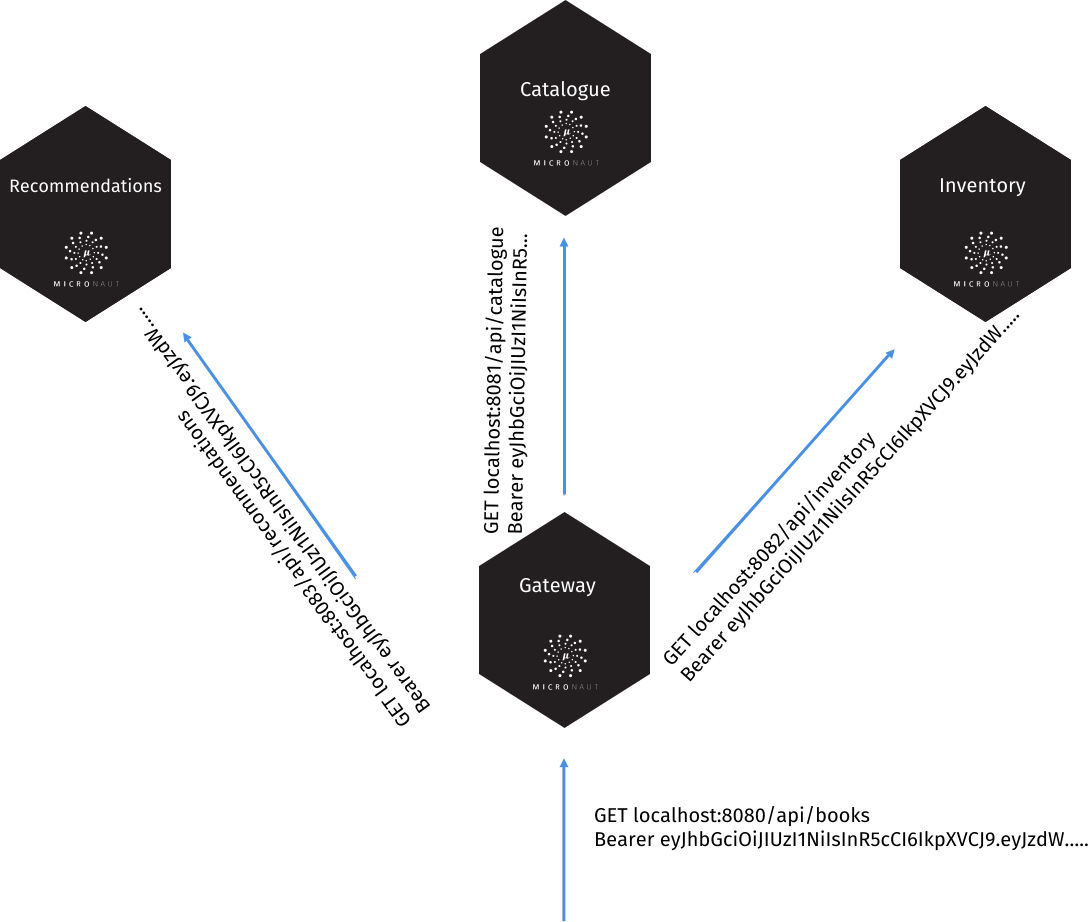
If the incoming request localhost:8080/api/books contains a valid JWT token, you may want to propagate
that token to other requests in your network.
You can configure token propagation to achieve that.
micronaut.application.name=gateway
micronaut.security.token.jwt.signatures.secret.generator.secret=pleaseChangeThisSecretForANewOne
micronaut.security.token.jwt.signatures.secret.generator.jws-algorithm=HS256
micronaut.security.token.propagation.header.enabled=true
micronaut.security.token.propagation.header.headerName=Authorization
micronaut.security.token.propagation.header.prefix=Bearer
micronaut.security.token.propagation.enabled=true
micronaut.security.token.propagation.service-id-regex=http://localhost:(8083|8081|8082)The previous configuration, configures a HttpHeaderTokenPropagator and a propagation filter, TokenPropagationHttpClientFilter, which will propagate the security token seamlessly.
If you use Service Discovery features, you can use the service id in your service id regular expression:
micronaut.security.token.propagation.service-id-regex="catalogue|recommendations|inventory"Several configuration options are available:
For propagation via an HTTP Header, you can configure:
Token propagation requires Context Propagation dependencies, as explained in Reactor context propagation section.
implementation("io.micrometer:context-propagation")|
Tip
|
Read the Token Propagation tutorial to learn more. |
|
Important
|
The refresh token functionality has changed dramatically starting in Micronaut Security 2.0. Please read this section if you are upgrading as it now behaves differently. |
Refresh tokens can be used to obtain a new access token. By default, refresh tokens are not generated.
The RefreshTokenGenerator API is responsible for generating the token that gets included in the response. The RefreshTokenValidator is responsible for validating the refresh token. Note that this validation step is not related to the persistence of the token, but instead is intended to verify the token is not a random/guessed value.
An implementation of both RefreshTokenGenerator and RefreshTokenValidator has been provided by default. The SignedRefreshTokenGenerator creates and verifies a JWS (JSON web signature) encoded object whose payload is a UUID with a hash-based message authentication code (HMAC). See the following configuration options:
To enable it, you must provide a secret:
micronaut.security.token.jwt.generator.refresh-token.secret=pleaseChangeThisSecretForANewOneAfter a token is generated, this library has no knowledge of it. The value is not cached or stored anywhere. It is up to each application to decide how to store the token, support revocation, and retrieve user details when given a token.
In addition to the above requirements, each application must provide an implementation of RefreshTokenPersistence.
The RefreshTokenPersistence implementation will receive an event when a refresh token is generated and then is responsible for persisting the token along with a link to the user that it was generated for. The user information and the token are both available in the RefreshTokenGeneratedEvent.
Refreshing the Token
Micronaut security comes with a controller to allow for the refresh of access tokens. The context loads the OauthController if your context contains beans of type: AccessRefreshTokenGenerator, RefreshTokenPersistence, RefreshTokenValidator
Moreover, the controller can be configured with:
The controller exposes an endpoint as defined by section 6 of the OAuth 2.0 spec - Refreshing an Access Token.
The refresh token endpoint uses the RefreshTokenValidator API to verify the token matches the format that is expected. SignedRefreshTokenGenerator attempts to verify the signature and returns the payload. Any validator implementations should not be concerned with revocation status, existence, or any other persistence related validation.
If the validator successfully validates the token, it is then passed to a RefreshTokenPersistence implementation, which each application must provide. A new access token is then created from the user details returned by RefreshTokenPersistence::getAuthentication and then sent in the response.
Here is an example of a refresh token request. Send a POST request to the /oauth/access_token endpoint:
POST /oauth/access_token HTTP/1.1
Host: micronaut.example
Content-Type: application/x-www-form-urlencoded
grant_type=refresh_token&refresh_token=eyJhbGciOiJSU0EtT0FFUCIsImVuYyI6IkEyNTZHQ00ifQ....As you can see, is a form request with 2 parameters:
grant_type: must be refresh_token always.
refresh_token: the refresh token obtained previously.
|
Tip
|
Refresh tokens must be securely stored in your client application. See section 10.4 of the OAuth 2.0 spec for more information. |
|
Note
|
This controller can only be enabled if you are using JWT authentication. |
A JSON Web Key (JWK) is a JSON object that represents a cryptographic key. The members of the object represent properties of the key, including its value.
Meanwhile, a JWK Set is a JSON object that represents a set of JWKs. The JSON object MUST have a "keys" member, which is an array of JWKs.
To enable the KeysController you have to provide at least a bean of type: JwkProvider.
Moreover, you can configure it with:
The Introspection endpoint exposes an endpoint to inquire the current state of a token.
POST /token_info
Accept: application/json
Content-Type: application/x-www-form-urlencoded
Authorization: Basic dXNlcjpwYXNzd29yZA==
token=eyJ0eXAiOiJKV1QiLCJhbGciOiJIUzI1NiJ9.eyJzdWIiOiIxMjM0NTY3ODkwIiwibmFtZSI6IkpvaG4gRG9lIiwiYWRtaW4iOnRydWUsImp0aSI6IjM1NjhjM2EzLWFlMmMtNDFiMy1hYzU5LTU0ZTkxODVkM2ViOCIsImlhdCI6MTYwMTA0OTU5OCwiZXhwIjoxNjAxMDUzMTk4fQ.Sc5Xh7jI6e_F3FAUo3n3AUCHNSxWH8t-WlM6JxeHZGI&token_type_hint=access_tokenMoreover, you can access a secured GET endpoint which responds the introspection response for the authenticated user:
GET /token_info
Accept: application/json
Authorization: Bearer eyJ0eXAiOiJKV1QiLCJhbGciOiJIUzI1NiJ9.eyJzdWIiOiIxMjM0NTY3ODkwIiwibmFtZSI6IkpvaG4gRG9lIiwiYWRtaW4iOnRydWUsImp0aSI6IjM1NjhjM2EzLWFlMmMtNDFiMy1hYzU5LTU0ZTkxODVkM2ViOCIsImlhdCI6MTYwMTA0OTU5OCwiZXhwIjoxNjAxMDUzMTk4fQ.Sc5Xh7jI6e_F3FAUo3n3AUCHNSxWH8t-WlM6JxeHZGIresponds:
{
"active": false
"username": "1234567890",
"sub": "1234567890",
"name": "John Doe",
"admin": true,
"jti": "3568c3a3-ae2c-41b3-ac59-54e9185d3eb8",
"iat": 1601049598,
"exp": 1601053198
}Often, you may want to retrieve the authenticated user.
You can bind java.security.Principal as a method parameter in a controller.
imports
import io.micronaut.core.util.CollectionUtils;
import io.micronaut.http.annotation.Controller;
import io.micronaut.http.annotation.Get;
import io.micronaut.security.annotation.Secured;
import org.jspecify.annotations.Nullable;
import java.security.Principal;
import java.util.Collections;
import java.util.Map;@Controller("/user")
public class UserController {
@Secured("isAnonymous()")
@Get("/myinfo")
public Map<String, Object> myinfo(@Nullable Principal principal) {
if (principal == null) {
return Collections.singletonMap("isLoggedIn", false);
}
return CollectionUtils.mapOf("isLoggedIn", true, "username", principal.getName());
}
}If you need more detail, you can bind Authentication as a method parameter in a controller.
imports
import io.micronaut.core.util.CollectionUtils;
import io.micronaut.http.annotation.Controller;
import io.micronaut.http.annotation.Get;
import io.micronaut.security.annotation.Secured;
import io.micronaut.security.authentication.Authentication;
import org.jspecify.annotations.Nullable;
import java.util.Collections;
import java.util.Map;@Controller("/user")
public class UserController {
@Secured("isAnonymous()")
@Get("/myinfo")
public Map<String, Object> myinfo(@Nullable Authentication authentication) {
if (authentication == null) {
return Collections.singletonMap("isLoggedIn", false);
}
return CollectionUtils.mapOf("isLoggedIn", true,
"username", authentication.getName(),
"roles", authentication.getRoles()
);
}
}When using WebSocket Servers, you can bind the authenticated user in a method annotated with @OnMessage or @OnOpen.
@OnOpen
void onOpen(WebSocketSession session, Authentication authentication) {
broadcaster.broadcastSync("joined! " + authentication.getName(), isValid(session));
}You can create a custom argument binder to bind the authenticated user to a custom class tailored to your application needs.
If, in your application, the authenticated user has an email address, you can create a class such as:
imports
package io.micronaut.security.docs.customauthentication;
import io.micronaut.security.authentication.Authentication;
import io.micronaut.serde.annotation.Serdeable;@Serdeable
public record AuthenticationWithEmail(String username,
String email) {
public static AuthenticationWithEmail of(Authentication authentication) {
Object obj = authentication.getAttributes().get("email");
String email = obj == null ? null : obj.toString();
return new AuthenticationWithEmail(authentication.getName(), email);
}
}and then a TypedRequestArgumentBinder:
imports
package io.micronaut.security.docs.customauthentication;
import io.micronaut.context.annotation.Requires;
import io.micronaut.core.convert.ArgumentConversionContext;
import io.micronaut.core.type.Argument;
import io.micronaut.http.HttpRequest;
import io.micronaut.http.bind.binders.TypedRequestArgumentBinder;
import io.micronaut.security.authentication.Authentication;
import io.micronaut.security.filters.SecurityFilter;
import jakarta.inject.Singleton;
import java.util.Optional;@Requires(property = "spec.name", value = "CustomAuthenticationTest")
@Singleton
public class AuthenticationWithEmailArgumentBinder implements TypedRequestArgumentBinder<AuthenticationWithEmail> {
private final Argument<AuthenticationWithEmail> argumentType;
public AuthenticationWithEmailArgumentBinder() {
argumentType = Argument.of(AuthenticationWithEmail.class);
}
@Override
public Argument<AuthenticationWithEmail> argumentType() {
return argumentType;
}
@Override
public BindingResult<AuthenticationWithEmail> bind(ArgumentConversionContext<AuthenticationWithEmail> context, HttpRequest<?> source) {
if (!source.getAttributes().contains(SecurityFilter.KEY)) {
return BindingResult.UNSATISFIED;
}
final Optional<Authentication> existing = source.getUserPrincipal(Authentication.class);
return existing.isPresent() ? (() -> existing.map(AuthenticationWithEmail::of)) : BindingResult.EMPTY;
}
}Then you can bind it in a controller method parameter:
@Secured(SecurityRule.IS_AUTHENTICATED)
@Produces(MediaType.TEXT_PLAIN)
@Get("/custom-authentication")
String index(AuthenticationWithEmail authentication) {
return authentication.email();
}If you need to access the currently authenticated user outside of a controller, you can inject SecurityService bean, which provides a set of convenient methods related to authentication and authorization.
Under the hood, it uses the SecurityContextHolder and SecurityContext APIs.
The default supplier for SecurityContext uses server request attributes. You can replace it by providing an implementation of SecurityContextSupplier via a Java SPI.
SecurityService with Project Reactor
If you use Micronaut Reactor and access SecurityService within a reactive chain, add the following dependency to handle the Reactor Context Propagation.
implementation("io.micrometer:context-propagation")Micronaut Security provides integration with Micronaut Data for automatically capturing the identity of the user that created or updated a particular entity.
The annotations @CreatedBy and @UpdatedBy annotations are provided for application to your Micronaut Data entities. The annotated fields will be automatically populated with the currently authenticated user’s identity. For example:
A PrincipalToStringConverter is provided to map the current Authentication object to the annotated String fields. The default implementation maps the value of Principal.getName() to the fields. To customize this mapping, you can provide your own TypeConverter implementation that replaces PrincipalToStringConverter. For example:
The type conversion mechanism could also be used to map Authentication to more complex field types other than String, such as a custom domain-specific User object.
Micronaut security classes generate several ApplicationEvents which you can subscribe to.
Event Name |
Description |
Triggered when an unsuccessful login takes place. |
|
Triggered when a successful login takes place. |
|
Triggered when the user logs out. |
|
Triggered when a token is validated. |
|
Triggered when a JWT access token is generated. |
|
Triggered when a JWT refresh token is generated. |
To learn how to listen for events, see the Context Events section of the documentation.
|
Note
|
Micronaut Framework logs every published event at DEBUG level through the io.micronaut.context.event.ApplicationEventPublisher logger using the event’s toString(). The events that carry a token (TokenValidatedEvent, AccessTokenGeneratedEvent and RefreshTokenGeneratedEvent) redact it from their string representation, and the other security events (for example LoginSuccessfulEvent and LogoutEvent) do not print their source, so that enabling DEBUG logging never writes tokens to the log. Listeners obtain the token through getSource() (or getRefreshToken() for the refresh token event). Avoid logging the token yourself in your listeners.
|
Micronaut supports authentication with OAuth 2.0 servers, including support for the OpenID standard.
The easiest way to get started is by configuring a provider that supports OpenID. Platforms such as Okta, Auth0, AWS Cognito, Keycloak, and Google are common examples.
Once you create an application client with a provider, you will get a client id and a client secret. The client id and secret combined with the issuer URL is all that is needed to enable the authentication code grant flow with an OpenID provider.
For example, to configure Google as a provider:
micronaut.security.oauth2.clients.google.client-secret=<<your client secret>>
micronaut.security.oauth2.clients.google.client-id=<<your client id>>
micronaut.security.oauth2.clients.google.openid.issuer=https://accounts.google.comFor normal OAuth 2.0, different steps are required to allow for the authorization code grant flow.
For the full authorization code flow to work there are also some additional requirements. A LoginHandler must be in the context to determine how to respond after a failed or successful login. A custom implementation can, of course, be provided. However, several Login Handlers implementations are available out of the box.
implementation("io.micronaut.security:micronaut-security-oauth2")To use the BUILD-SNAPSHOT version of this library, check the documentation to use snapshots.
Code can be found at the micronaut-security repository.
OpenID Connect 1.0 is a simple identity layer on top of the OAuth 2.0 protocol. It allows Clients to verify the identity of the End-User based on the authentication performed by an Authorization Server, as well as to obtain basic profile information about the End-User in an interoperable and REST-like manner.
If you are new to OpenID Connect, we recommend watching OAuth 2.0 and OpenID Connect to get a better understanding.
|
Note
|
To use OpenID client flows, the security-jwt dependency must be in your build because OpenID relies on JWT tokens.
|
implementation("io.micronaut.security:micronaut-security-jwt")|
Important
|
Even though OpenID providers return JWT tokens, that token is not used directly to authorize requests with Micronaut by default. Instead a new token is created if the application is using JWT. This allows for authorization to be standardized across custom authentication providers, normal OAuth 2.0 flows, and OpenID flows. It also allows for purely session based authorization as a result of OpenID authentication. To use the provider token directly, set the authentication mode to idtoken.
|
|
Important
|
Only in idtoken authentication mode is the provider’s JSON Web Key Set (the jwks_uri of the OpenID metadata) registered as a signature configuration to validate request tokens, and IdTokenClaimsValidator then ensures the token was issued to this client. In any other mode, tokens signed by the provider’s keys, including ID tokens issued to other clients, are not accepted as request credentials. If your application is a resource server that must accept the provider’s access tokens, configure the JWKS explicitly with micronaut.security.token.jwt.signatures.jwks.*. The ID token obtained during the authorization code flow is always verified against the issuing provider’s JWKS.
|
The authorization code grant flow is the most typical authentication flow with OAuth 2.0 and OpenID providers. The same main steps apply to the flow whether or not the provider supports OpenID, and is described in RFC6749 - Authorization Code Grant.
The OAuth 2.0 authorization code flow requires a callback endpoint. In addition, a login endpoint is available to trigger the flow. The URIs are configurable.
The URI templates for login and callback have a template variable in them {provider}. That variable is used by the route builder to build routes for each provider that is configured. The name provider is special in this context and cannot be changed. The URI may be manipulated however in any way as long as the provider variable is part of the path of the URI.
For example /oauth/login{?provider} is not a valid configuration because Micronaut does not consider the query segment of a URL when routing requests. The provider variable must be part of the path.
|
Tip
|
It is possible to designate a default provider. The value of the configuration must match one of the client names. The default provider will have the same uri template, but with null passed as the provider parameter. By default that will result in /oauth/login being redirected to the default provider authentication page.
|
OAuth Login and CSRF
In order to prevent forced login attacks, you must implement CSRF protection on the oauth login endpoints. Because this library is not in control of the forms where login may originate from, we cannot ensure that CSRF is applied. In addition, there is no sensible defaults with regards to how the token is stored or how it should be retrieved. Implementing CSRF is relatively simple.
-
When rendering the login form where users can choose to login via OAuth, the server should store a value either in state on the server specific to that user (session), or state on the client (http-only cookies, etc), or some other mechanism.
-
That value gets sent with the response and subsequently included in the request to login with OAuth. The value could be sent as a query parameter, or sent as a cookie, etc.
-
A server filter is written to compare the value in the user specific state and the value sent in the request. If they do not match, the request is rejected.
Here is an example:
imports
import io.micronaut.context.annotation.Requires;
import io.micronaut.core.async.publisher.Publishers;
import io.micronaut.http.HttpRequest;
import io.micronaut.http.HttpResponse;
import io.micronaut.http.HttpStatus;
import io.micronaut.http.MutableHttpResponse;
import io.micronaut.http.annotation.Filter;
import io.micronaut.http.cookie.Cookie;
import io.micronaut.http.filter.HttpServerFilter;
import io.micronaut.http.filter.ServerFilterChain;
import org.reactivestreams.Publisher;@Filter(value = {"/oauth/login", "/oauth/login/*"})
public class OAuthCsrfFilter implements HttpServerFilter {
@Override
public Publisher<MutableHttpResponse<?>> doFilter(HttpRequest<?> request, ServerFilterChain chain) {
String requestParameter = request.getParameters().get("_csrf");
String cookieValue = request.getCookies().findCookie("_csrf").map(Cookie::getValue).orElse(null);
if (cookieValue == null || !cookieValue.equals(requestParameter)) {
return Publishers.just(HttpResponse.status(HttpStatus.FORBIDDEN));
}
return chain.proceed(request);
}
}It’s possible to configure authorization with an OpenID provider simply with this library because OpenID standardizes how to retrieve user information from the provider. Because a user information endpoint is not part of the OAuth 2.0 specification, it is up to you to provide an implementation to retrieve that information.
Here is a high level diagram of how the authorization code grant flow works with an OAuth 2.0 provider.
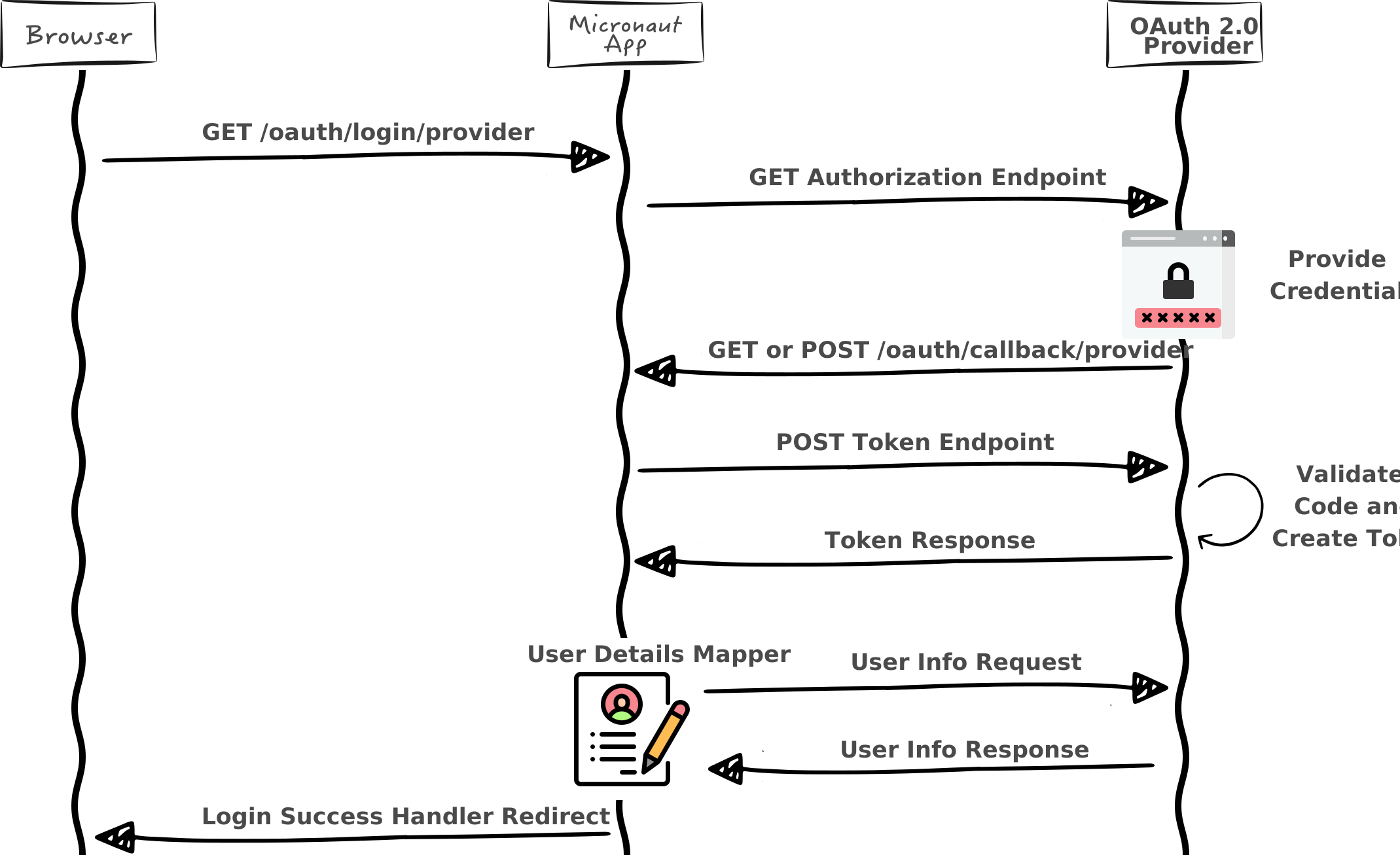
The minimum requirements to allow authorization with an OAuth 2.0 provider are:
-
Configuration of the authorization endpoint
-
Configuration of the token endpoint
-
Configuration of the client id and secret
-
An implementation of OauthAuthenticationMapper
Configuration is quite simple. For example to configure authorization with Github:
micronaut.security.oauth2.clients.github.client-id=<<my client id>>
micronaut.security.oauth2.clients.github.client-secret=<<my client secret>>
micronaut.security.oauth2.clients.github.scopes[0]=user:email
micronaut.security.oauth2.clients.github.scopes[1]=read:user
micronaut.security.oauth2.clients.github.authorization.url=https://github.com/login/oauth/authorize
micronaut.security.oauth2.clients.github.token.url=https://github.com/login/oauth/access_token
micronaut.security.oauth2.clients.github.token.auth-method=client-secret-post-
Configure a client. The name
githubis arbitrary -
Provide values for
client-idandclient-secret -
Optionally specify desired
scopes -
Provide an
authorizationendpoint URL -
Additionally, the
tokenendpoint URL and authentication method -
auth-methodis one of AuthenticationMethod. Choose the one your provider requires.
Authentication methods are not clearly defined in RFC 6749, however most OAuth 2.0 providers either accept client-secret-basic (basic authentication with id and secret), or client-secret-post (client id and secret are sent in the request body).
|
Tip
|
To disable a specific client for any given environment, set enabled: false within the client configuration.
|
Beyond configuration, an implementation of OauthAuthenticationMapper is required by the user to be implemented. The implementation must be qualified by name that matches the name present in the client configuration.
The purpose of the user details mapper is to transform the TokenResponse into a Authentication. That will entail calling some endpoint the provider exposes to retrieve the user’s information. Once that information is received, the user details can be populated per your requirements.
Common requirements of a user details mapper may be to combine data from the OAuth 2.0 provider with data from a remote database and/or create new user records. The Authentication object stores three basic properties: username, roles, and arbitrary attributes. All data stored in the user details will be retrievable in controllers that accept an Authentication.
For example, here is how it might be implemented for Github.
Create a class to store the response data:
imports
import tools.jackson.databind.PropertyNamingStrategies;
import tools.jackson.databind.annotation.JsonNaming;
import io.micronaut.core.annotation.Introspected;@Introspected
@JsonNaming(PropertyNamingStrategies.SnakeCaseStrategy.class)
public class GithubUser {
private String login;
private String name;
private String email;
// getters and setters ...
}Create an HTTP client to make the request:
imports
import io.micronaut.http.annotation.Get;
import io.micronaut.http.annotation.Header;
import io.micronaut.http.client.annotation.Client;
import org.reactivestreams.Publisher;@Header(name = "User-Agent", value = "Micronaut")
@Client("https://api.github.com")
public interface GithubApiClient {
@Get("/user")
Publisher<GithubUser> getUser(@Header("Authorization") String authorization);
}Create the user details mapper that pulls it together:
Adding support for authorization code flow with an OpenID provider is extremely easy with Micronaut.
Here is a high level diagram of how the authorization code grant flow works with an OpenID provider.
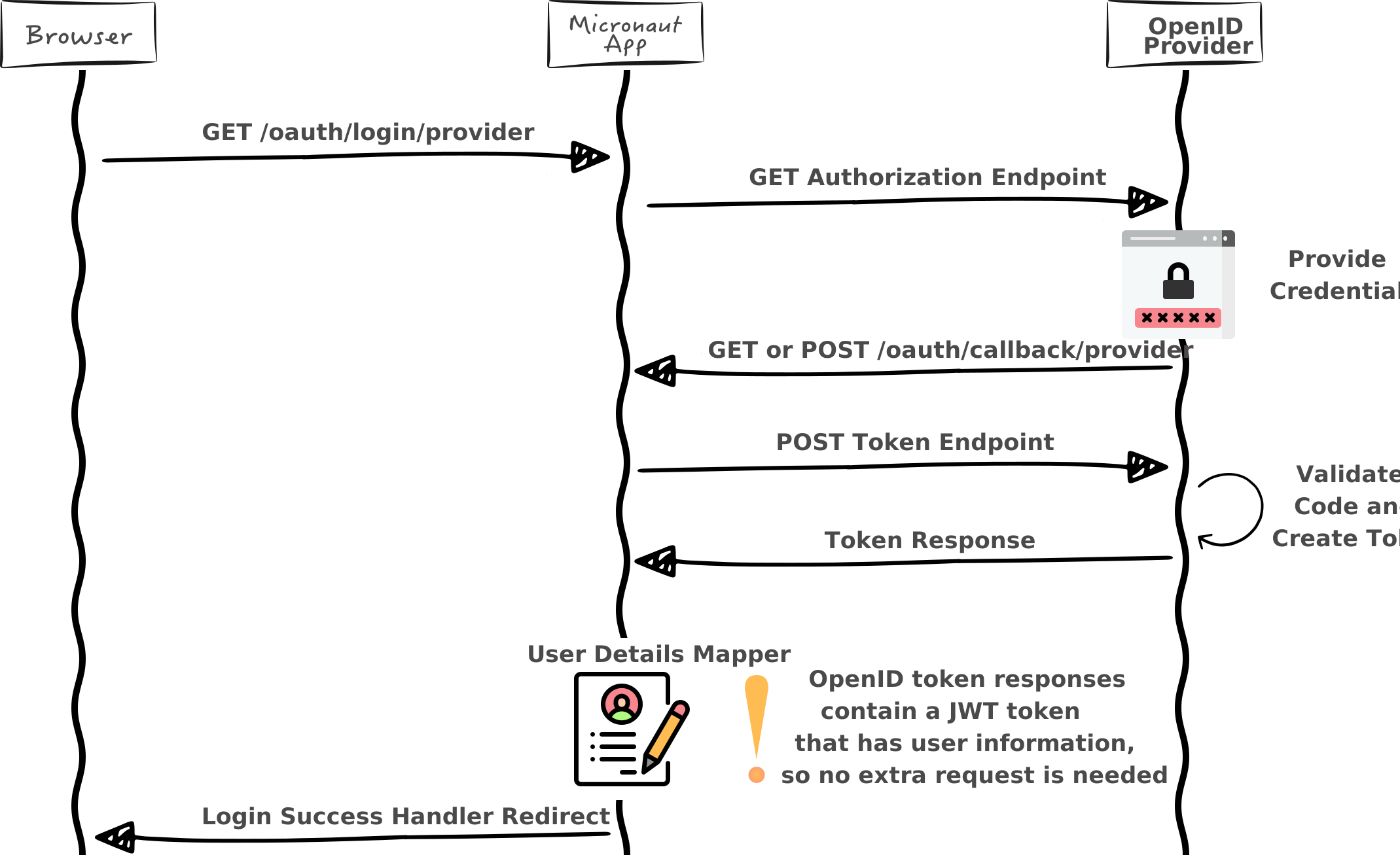
The requirements to allow authorization with an OpenID provider are:
-
Configuration of the client id and secret
-
Configuration of the issuer
micronaut.security.oauth2.clients.okta.client-id=<<my client id>>
micronaut.security.oauth2.clients.okta.client-secret=<<my client secret>>
micronaut.security.oauth2.clients.okta.openid.issuer=<<my openid issuer>>-
Configure a client. The name
oktais arbitrary -
Provide values for
client-idandclient-secret -
Specify an OpenID provider issuer url
The issuer URL will be used to discover the endpoints exposed by the provider.
|
Tip
|
To disable a specific client for any given environment, set enabled: false within the client configuration.
|
See the following tables for the configuration options:
Because the OpenID standard returns a JWT token in the token response, it is possible to retrieve information about the user without having to make an additional call. In addition, the data stored in the JWT is standardized so you can use the same code to retrieve that information across providers.
A default implementation of OpenIdAuthenticationMapper has been provided for you to map the JWT token to a Authentication. The default implementation will carry over any of the specific OpenID JWT claims, as well as potentially include other claims based on configuration. The original provider name will always be included in the JWT with the claim key "oauth2Provider". The following table explains the additional claims.
|
Important
|
Enabling all of the above with cookie JWT storage has been known to cause issues with Keycloak due to their tokens being very large and causing the resulting cookie to be larger than what browsers allow. |
Username
The default mapper derives the username returned by Authentication.getName() from the sub claim of the ID token. A sub is only unique within the provider which issued it: two different users at two providers may well share the same sub, especially with providers that let users pick an account name or that issue sequential or e-mail based subjects. For that reason:
-
When more than one enabled OAuth 2.0 client, other than client-credentials-only clients, is configured under
micronaut.security.oauth2.clients, the username is the provider name followed by:and thesubclaim, for exampleokta:248289761001. This is the same convention and the same property used for authentications validated through the UserInfo endpoint, so a user has the same name in a browser login and in a bearer request. The unqualified subject remains available in thesubattribute. -
With a single client the username is the bare
subclaim.
|
Tip
|
Set micronaut.security.oauth2.openid.qualify-username-with-provider to true explicitly in any application which keys data on the username. The automatic rule depends on the clients configured, so adding another client later would otherwise rename every user.
|
|
Note
|
micronaut.security.authentication set to idtoken is not covered. In that mode the cookie holds the raw ID token and every request after login is authenticated from its claims, so the username is the bare sub claim whatever the property value and the same sub issued by two providers still maps to the same user. When you configure several providers and key data on the username, do not use idtoken; use cookie or session, or derive the key from the iss and sub claims.
|
The provider name is always available in the oauth2Provider attribute as well. You can force or disable the qualification with micronaut.security.oauth2.openid.qualify-username-with-provider:
|
Warning
|
Disabling the qualification while several clients are configured lets a user at one provider act as the user with the same sub at another provider in any application that keys data on the username.
|
If the default implementation is not sufficient, it is possible to override the global default or provide an implementation specific to a provider.
|
Important
|
You cannot use micronaut.security.authentication = idtoken, if you wish to use a custom OpenIdAuthenticationMapper. You should use micronaut.security.authentication = cookie or provide your own implementation of Login Handler and Logout Handler.
|
To override the global default mapper, register a bean that replaces DefaultOpenIdAuthenticationMapper.
imports
import io.micronaut.context.annotation.Replaces;
import org.jspecify.annotations.NonNull;
import org.jspecify.annotations.Nullable;
import io.micronaut.security.authentication.AuthenticationResponse;
import io.micronaut.security.oauth2.endpoint.authorization.state.State;
import io.micronaut.security.oauth2.endpoint.token.response.DefaultOpenIdAuthenticationMapper;
import io.micronaut.security.oauth2.endpoint.token.response.OpenIdAuthenticationMapper;
import io.micronaut.security.oauth2.endpoint.token.response.OpenIdClaims;
import io.micronaut.security.oauth2.endpoint.token.response.OpenIdTokenResponse;
import jakarta.inject.Singleton;
import org.reactivestreams.Publisher;
import reactor.core.publisher.Flux;@Singleton
@Replaces(DefaultOpenIdAuthenticationMapper.class)
public class GlobalOpenIdAuthenticationMapper implements OpenIdAuthenticationMapper {
@Override
@NonNull
public Publisher<AuthenticationResponse> createAuthenticationResponse(String providerName, OpenIdTokenResponse tokenResponse, OpenIdClaims openIdClaims, @Nullable State state) {
return Flux.just(AuthenticationResponse.success("name"));
}
}To override the user detail mapping behavior for a specific provider, register a bean with a named qualifier with a value equal to the name specified in the client configuration.
The OpenID specification for authorization requests allows for additional parameters beyond what is included in the OAuth 2.0 specification. Some of those parameters make sense to be provided by a bean and are described in this section. Other parameters are able to be controlled through configuration.
Here are the configuration option for authorization request parameters:
By default, this library will include a nonce parameter as described in the OpenID Connect specification in authentication requests.
Because the validation of the nonce requires the nonce to be stored somewhere temporarily, a NoncePersistence bean must be present to retrieve the nonce for validation.
Micronaut ships with two implementations of NoncePersistence. One implementation to store it in a HTTP cookie (CookieNoncePersistence) and another one to persist it with a HTTP Session (SessionNoncePersistence).
You can configure which implementation to use:
If you use the default implementation, which stores the nonce in a HTTP cookie, you can configure how the cookie is built. See the following configuration options:
To use (SessionNoncePersistence`). which stores the nonce in a HTTP session:
-
Add a dependency to
micronaut-sessionimplementation("io.micronaut.security:micronaut-session") -
Set the nonce persistence to
sessionmicronaut.security.oauth2.nonce.persistence=sessionNoteYou can provide your own implementation of NoncePersistence
|
Warning
|
If nonce validation fails, the user will not be authenticated. |
Customization
There are several interfaces that implementations can be provided for to override how the nonce parameter is handled.
Interface |
Responsibility |
Default Implementation |
Builds a |
||
Validates an OpenID token response (including the nonce). |
||
Validates the nonce claim in the token response |
||
Stores the nonce to be retrieved later to allow validation |
To override the behavior of any of those beans, provide an implementation and replace the default one.
This library does not include an login hint by default with authorization requests. A LoginHintResolver bean can be registered that will be called when the authorization request is being built.
This library does not include an ID Token hint by default with authorization requests. A IdTokenHintResolver bean can be registered that will be called when the authorization request is being built.
A OpenIdTokenResponseValidator bean is responsible for validating the JWT token. The default implementation follows the guidelines described in the OpenID Connect specification regarding token validation where possible.
By default all implementations of GenericJwtClaimsValidator and OpenIdClaimsValidator are used to validate the token.
To allow for additional or custom validations, register an OpenIdClaimsValidator bean.
Issuer validation
IssuerClaimValidator validates the iss claim of the ID token. The expected issuer is micronaut.security.oauth2.clients..openid.issuer-identifier if set, otherwise micronaut.security.oauth2.clients..openid.issuer. The iss claim must equal it (the only differences tolerated are the case of the scheme and a trailing slash) and must exactly match the Issuer Identifier of the provider metadata.
The issuer announced in the provider’s discovery document is controlled by the provider. Per OpenID Connect Discovery 1.0 section 4.3 it must be identical to the issuer used to retrieve the discovery document. If it does not match the expected issuer, Micronaut Security logs an error, discards the announced issuer and uses the expected issuer as the Issuer Identifier of the provider. Thus, a provider cannot get ID tokens issued by another configured provider accepted by announcing that provider’s issuer.
If the iss claim of the tokens legitimately differs from the URL used to fetch the discovery document, for example because discovery is fetched over a cluster-internal URL while tokens carry the public URL, or with Oracle IDCS, whose tokens carry the provider wide issuer https://identity.oraclecloud.com/, configure the expected value with issuer-identifier. The same value is the expected iss for IdTokenClaimsValidator and ProviderResolver when micronaut.security.authentication=idtoken:
micronaut.security.oauth2.clients.keycloak.openid.issuer=http://keycloak:8080/realms/app
micronaut.security.oauth2.clients.keycloak.openid.issuer-identifier=https://sso.example.com/realms/appIf you do not fetch the discovery document, set openid.issuer to the expected iss value and openid.fetch-configuration to false, instead of disabling issuer validation. If there is neither a configured issuer nor a discovery document, the provider metadata has no issuer and the validator rejects every token.
Issuer validation can be disabled with micronaut.security.oauth2.openid.claims-validation.issuer=false, but doing so removes this protection; prefer issuer-identifier.
By default, this library will include a state parameter as described in RFC 6749 to authentication requests. A JSON serialized object is stored that contains a nonce value used for validation.
Because the validation of the state requires the state to be stored somewhere temporarily, a StatePersistence bean must be present to retrieve the state for validation. The default implementation stores the state in an HTTP cookie. To configure how the cookie is built, see the following configuration options:
You can provide your own implementation, however an implementation of state persistence that stores the state in an http session has also been provided.
To enable state persistence with an http session:
-
Add a dependency to
micronaut-sessionimplementation("io.micronaut.security:micronaut-session") -
Set the state persistence to
sessionmicronaut.security.oauth2.state.persistence=sessionIf state validation fails, the user will not be authenticated.
Customization
There are several interfaces that implementations can be provided for to override how the state parameter is handled.
Interface |
Responsibility |
Default Implementation |
Builds a State |
||
Serializes and de-serializes the state object for use in the authorization request |
||
Validates the state received in the authorization response |
||
Stores the state to be retrieved later to allow validation |
To override the behavior of any of those beans, provide an implementation and replace the default one.
Using OpenID Connect Discovery by setting micronaut.security.oauth2.clients.*.openid.issuer and the Authorization server specifies via
code_challenge_methods either plain, S256, or both, Micronaut security automatically sends a code challenge in the authorization request as specified in Proof Key for Code Exchange (PKCE) Spec.
Using manual OAuth 2.0 Client configuration, you can specify the challenge method supported by setting micronaut.security.oauth2.clients.*.authorization.code-challenge-method.
If the built-in implementation does not fulfill your needs, you can provide a replacement of bean CodeVerifierGenerator or PkceGenerator.
You can obtain a bean of type ClientCredentialsClient to request an access token via a Client Credentials Grant for your OAuth 2.0 Clients.
For example:
micronaut.security.oauth2.clients.companyauthserver.client-id=XXX
micronaut.security.oauth2.clients.companyauthserver.client-secret=YYY
micronaut.security.oauth2.clients.companyauthserver.token.url=https://foo.bar/token
micronaut.security.oauth2.clients.companyauthserver.token.auth-method=client_secret_basic
micronaut.security.oauth2.clients.google.client-id=ZZZZ
micronaut.security.oauth2.clients.google.client-secret=PPPP
micronaut.security.oauth2.clients.google.openid.issuer=https://accounts.google.comYou can obtain a bean of type ClientCredentialsClient for any of the OAuth 2.0 clients using a Name Qualifier.
public MyClass(@Named("google") ClientCredentialsClient googleClientCredentialsClient) {
this.googleClientCredentialsClient = googleClientCredentialsClient;
}or
ClientCredentialsClient client = beanContext.getBean(ClientCredentialsClient.class, Qualifiers.byName("companyauthserver"));ClientCredentialsClient caches the token response. If the cached access token is expired, they renew it automatically.
Micronaut Security includes ClientCredentialsHttpClientFilter. This HTTP Client Filter allows you to automatically include an access token to an outgoing request HTTP Header. It obtains the access token via a Client Credentials request.
For example, the next configuration adds an access token to the requests' HTTP Headers done via the HTTP Client inventory. It obtains the access token with a Client Credentials request with the OAuth 2.0 client companyauthserver.
micronaut.security.oauth2.clients.companyauthserver.client-id=XXX
micronaut.security.oauth2.clients.companyauthserver.client-secret=YYY
micronaut.security.oauth2.clients.companyauthserver.client-credentials.service-id-regex=inventory
micronaut.security.oauth2.clients.companyauthserver.token.url=https://foo.bar/token
micronaut.security.oauth2.clients.companyauthserver.token.auth-method=client_secret_basicThe following configuration options are available per OAuth 2.0 client:
If you have a scenario where you don’t have a Micronaut Application context, you can obtain a static ClientCredentialsClient
ClientCredentialsClient clientCredentialsClient = ClientCredentialsClient.of(httpClient,
OauthClientConfiguration.builder().name("test")
.clientId(clientId)
.clientSecret(clientSecret)
.token(tokenUrl)
.build());Read the following guides to learn more abut Client Credentials Flow:
The resource owner password credentials grant is described in RFC 6749. In short, credentials are passed directly to the token endpoint and if authentication succeeds, the token endpoint responds with the appropriate token.
The process that handles the token response onward is the same for both authorization code and password grants. See the following high level flow diagrams:
OAuth 2.0 Provider
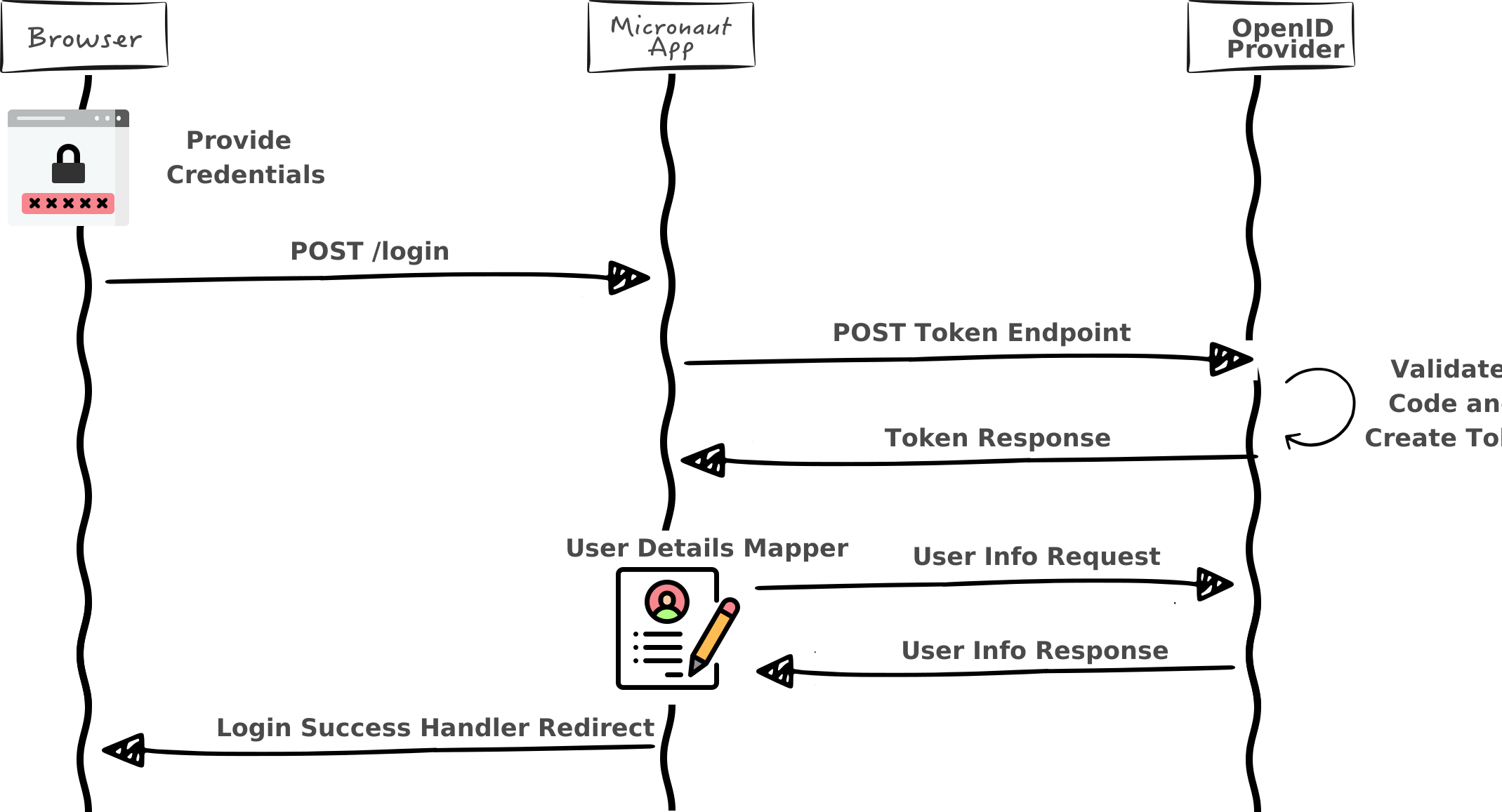
OpenID Provider
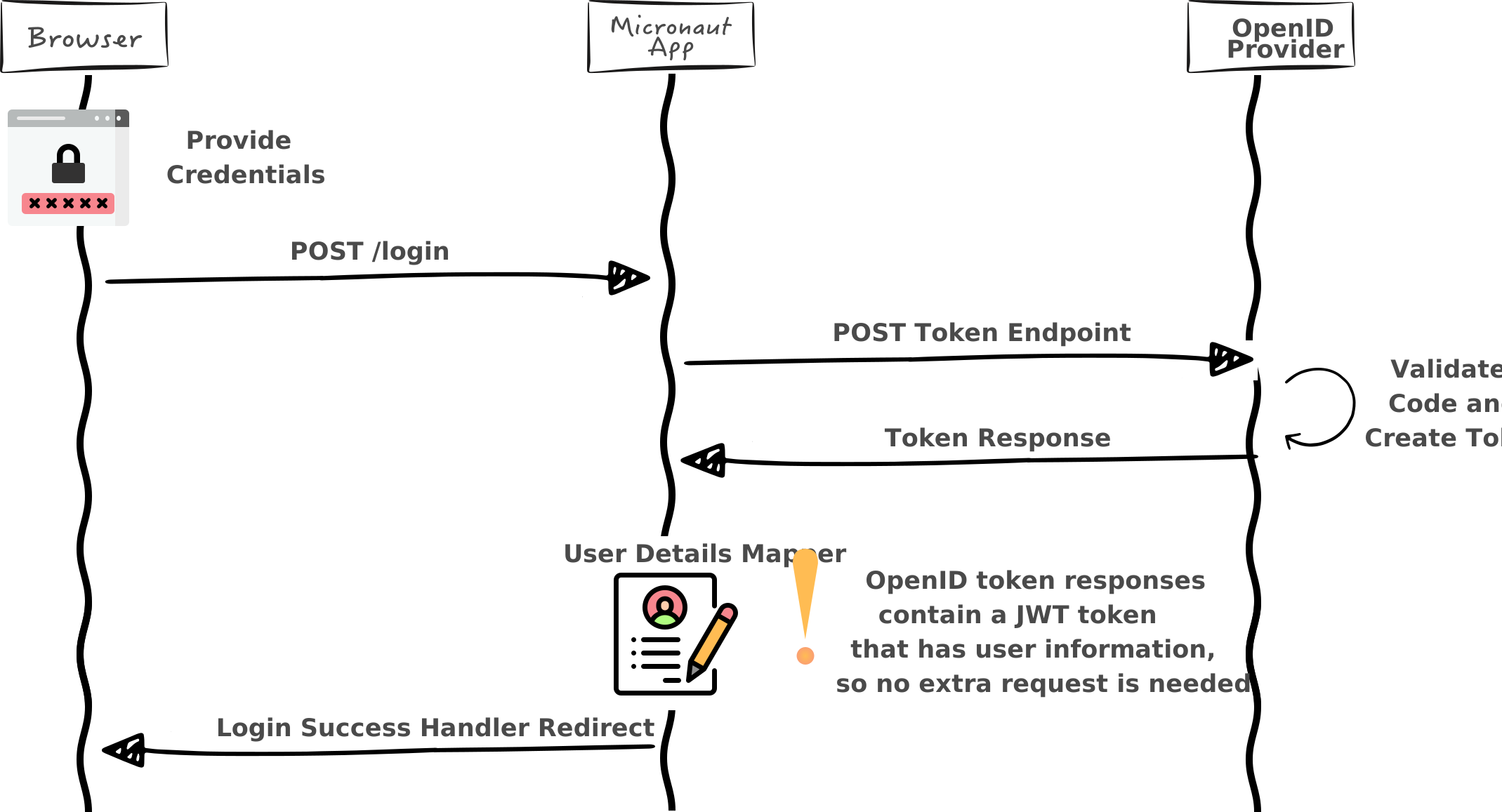
In Micronaut, the password grant is supported by setting the grant-type configuration option in the client configuration. For example:
micronaut.security.oauth2.clients.github.grant-type=password|
Note
|
This example above is not intended to be a complete configuration reference |
When a client is configured for the password grant type, the authorization code endpoints will not be available and instead an AuthenticationProvider will be created that will participate in the normal login flow.
Part of the OpenID Connect specification includes a draft document titled Session Management. Because the specification is a draft, some providers have implemented it differently or not at all. See the following diagram for how end session works with default configuration:
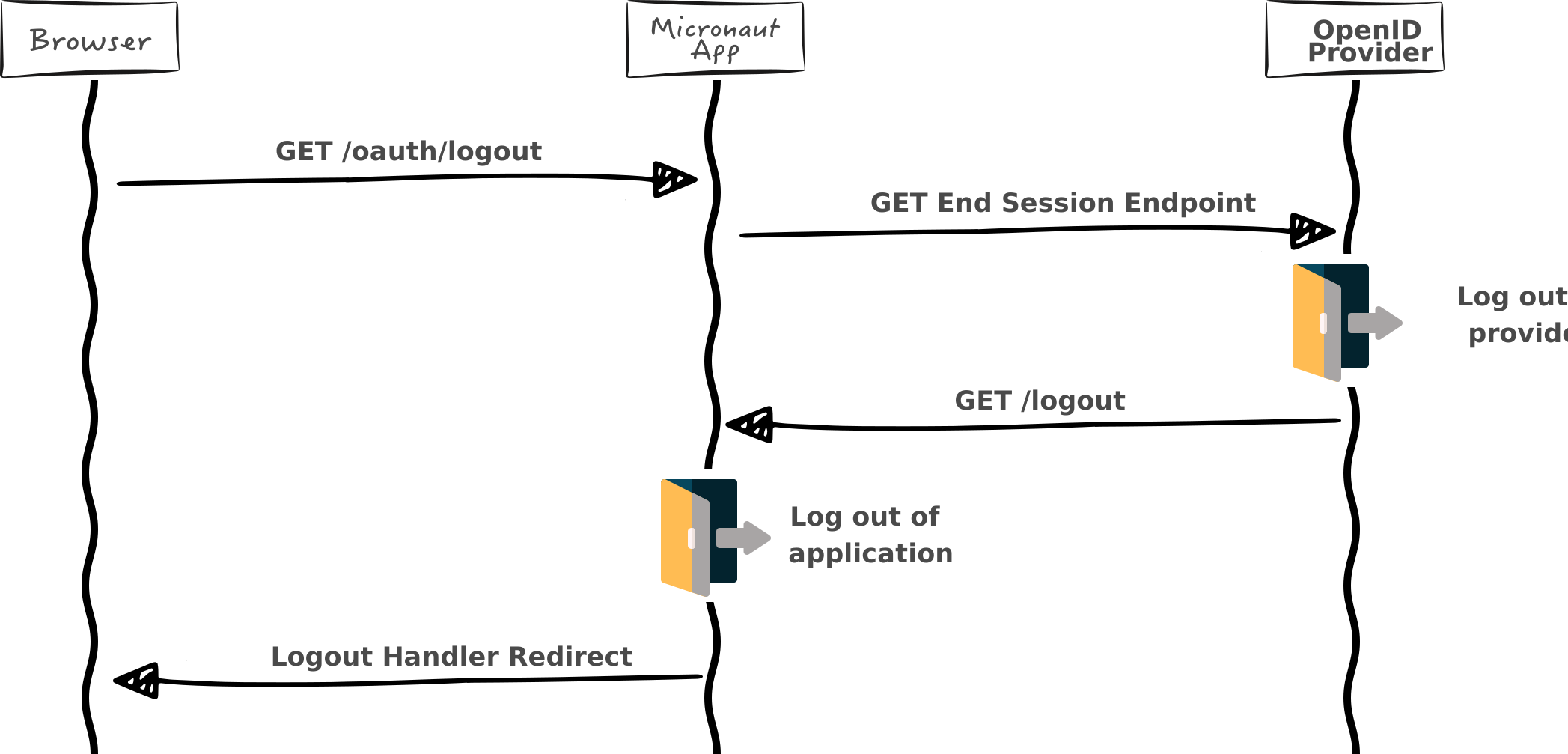
If any configured OpenID provider supports end session behavior, a route will be registered that responds to /oauth/logout and redirects to the provider to log the user out. A parameter is also sent to the provider that indicates what URL the provider should redirect the user to after logging out. The default URL is /logout which will cause the local authentication to also be cleared and a final redirect issued according to the LogoutHandler.
The end session URL advertised by the provider (the end_session_endpoint of its discovery document, or the URL derived from the issuer for providers that do not advertise one) is used as an opaque URI: the logout parameters, such as post_logout_redirect_uri or id_token_hint, are percent-encoded and appended to its query component, and any query component already present in the provider URL is preserved. The provider URL is never expanded as a URI template. The provider URL must be an absolute http or https URL with a host and without user information. If it is empty, takes another form (a relative URL, another scheme, or https://user:password@provider.example/logout) or is not a valid URI, no redirect is issued and /oauth/logout responds with 404.
All of the above is configurable through micronaut.security.oauth2.openid:
To enable the usage of the /logout endpoint, see the section on the Logout Endpoint.
|
Important
|
The get-allowed configuration option must be set to true because the OpenID provider will issue a redirect which is a GET request.
|
This library supports end session for Auth0, AWS Cognito, and Okta out of the box. The EndSessionEndpointResolver is responsible for determining which EndSessionEndpoint will be used for a given provider, if any.
|
Warning
|
If you are using a custom domain URL for your auth server, instead of inferring it, you can set the authorization server you use by setting the property micronaut.security.oauth2.clients.*.authorization-server.
|
For Okta and Oracle Cloud, OktaEndSessionEndpoint sends an id_token_hint parameter. It is the ID token obtained during the authorization code flow when that token is available in the authentication attributes. Otherwise, when micronaut.security.authentication is set to idtoken, it is the token which authenticated the current request, that is, the ID token cookie. Other tokens present in the request, such as an Authorization header added by a gateway or reverse proxy, are never sent to the OpenID provider.
Before choosing any of the default providers, the endpoint resolver will first look for an EndSessionEndpoint bean with a named qualifier that matches the name of the client in configuration. If no bean is found then the default endpoints will be matched against the issuer URL.
If for example you are using one of the providers that is supported out of the box and you don’t want the end session support, it is possible to disable it per client.
It is possible to configure the introspection endpoint URL for OAuth 2.0 and OpenID providers, however Micronaut currently does not use this configuration in any way.
See the following configuration table:
It is possible to configure the revocation endpoint URL for OAuth 2.0 and OpenID providers, however Micronaut currently does not use this configuration in any way.
See the following configuration table:
Micronaut Security OAuth2 registers a bean of type TokenValidator for each OpenID provider.
It provides token validation using the remote authorization server’s
UserInfo endpoint.
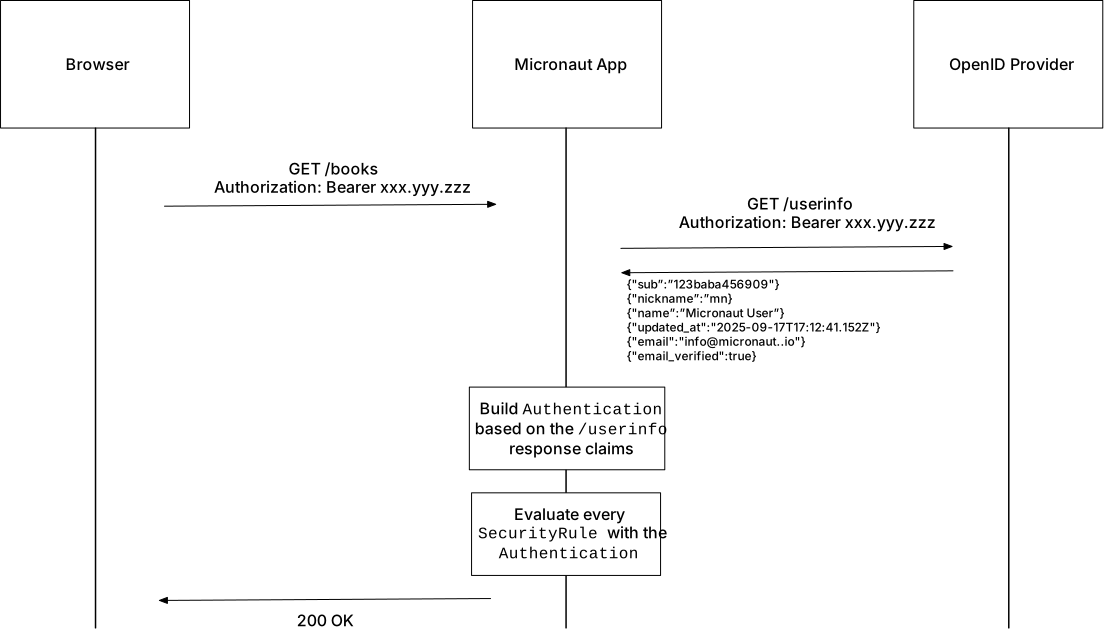
The UserInfo endpoint URL is obtained automatically from the authorization server’s metadata (obtained by visiting the .well-known/openid-configuration endpoint of the authorization server).
However, you can set it also via configuration:
|
Note
|
Set micronaut.security.oauth2.userinfo.validator to false to disable UserInfo endpoint token validation.
|
Provider binding
The Authentication created from a UserInfo response is bound to the provider whose UserInfo endpoint answered:
-
The attribute
oauth2Provider(OauthAuthenticationMapper.PROVIDER_KEY) is always set to the provider name. A value with that key in theUserInforesponse is ignored, so ProviderResolver always resolves the provider which validated the token. -
The username returned by
Authentication.getName()is qualified with the provider name, followed by:and thesubclaim, for exampleokta:248289761001, whenmicronaut.security.oauth2.openid.qualify-username-with-provideristrue. If the property is not set, the username is qualified when more than one enabled OAuth 2.0 client, other than client-credentials-only clients, is configured undermicronaut.security.oauth2.clients. Thesubattribute still holds the unqualified subject. Set the property explicitly if your application keys data on the name, so adding an unrelated client later does not rename every user. The default OpenIdAuthenticationMapper used at login applies the same rule and the same property, so a user has the same name in a browser login and in a bearer request. See User Details Mapping. -
Client names under
micronaut.security.oauth2.clientsmust not contain:. Such a name is not supported by the configuration binding, and theUserInfovalidator additionally rejects it with aConfigurationExceptionwhen usernames are qualified, because the provideralphawith the subjectbeta:victimand the provideralpha:betawith the subjectvictimwould both be namedalpha:beta:victim. Thesubclaim may contain:, since the provider name is everything before the first:of a qualified name.
A subject is only unique within its issuer. Without this binding, whoever controls one configured provider could answer a UserInfo request with the subject of a user at another configured provider and your application would treat the request as coming from that user.
|
Note
|
Only the identity is bound to the provider. Roles are still resolved from the attributes of the UserInfo response (for example by DefaultRolesFinder reading the roles claim), so a provider you configure is trusted to state the roles of its own users. Only configure providers you trust, and use micronaut.security.token.roles-name or a custom RolesFinder if the claim is not appropriate for a provider.
|
RFC 9728 metadata format that an OAuth 2.0 client or authorization server can use to obtain the information needed to interact with an OAuth 2.0 protected resource.
You can configure whether to expose the protected resource metadata:
A GET endpoint is exposed in /.well-known/oauth-protected-resource. The API to control the metadata is:
ProtectedResourceMetadataProvider
You can create a bean replacement for it if the default implementation does not fit your needs.
The center of the OAuth 2.0 authorization code grant support is the OauthClient for standard OAuth 2.0 and OpenIdClient for OpenID. The current implementation builds clients based on configuration. It is possible however to register a custom client and that client will automatically have the routes associated with it to enable the authorization code grant flow.
The OauthClient interface is simple and only requires three methods.
public interface OauthClient {
/**
* @return The provider name
*/
String getName();
/**
* Responsible for redirecting to the authorization endpoint.
*
* @param originating The originating request
* @return A response publisher
*/
Publisher<MutableHttpResponse<?>> authorizationRedirect(HttpRequest<?> originating);
/**
* Responsible for receiving the authorization callback request and returning
* an authentication response.
*
* @param request The callback request
* @return The authentication response
*/
Publisher<AuthenticationResponse> onCallback(HttpRequest<Map<String, Object>> request);
}-
The
getNamemethod is used to build the URLs used to trigger the client methods -
The
authorizationRedirectmethod returns a response that redirects to the provider -
The
onCallbackmethod receives a callback authorization response and returns a response including either an authentication failure or the user details.
Because of how generic this interface is, it is possible to implement authentication for any provider that follows the redirect / redirect back pattern. For example one could implement support for OAuth 1.0a providers (looking at you, twitter).
Micronaut Security creates HTTP clients to talk to the identity provider on behalf of your application:
-
DefaultTokenEndpointClient sends the token request (with the client credentials) to the token endpoint.
-
DefaultOpenIdProviderMetadataFetcher retrieves the OpenID provider metadata from the issuer’s discovery document.
-
The UserInfo token validator sends the bearer token to the UserInfo endpoint.
-
HttpClientJwksClient retrieves the JWK Set that verifies the token signatures.
These clients copy the settings of the default HTTP client configuration (micronaut.http.client.), such as timeouts, proxy or SSL settings, but they *never follow redirects, regardless of micronaut.http.client.follow-redirects. A redirect returned by the provider is never followed: the redirect target is not requested, and since the redirect response is not a valid provider response the operation fails: the token request fails, the provider metadata is not available, the token is not validated against the UserInfo endpoint or the JWK Set is not loaded.
Following a redirect from the identity provider would let a malicious or compromised provider make your application send the token request, together with the client credentials, or the user’s bearer token, to any address your application can reach, such as loopback, internal services or cloud metadata endpoints (Server-Side Request Forgery). The application would then treat whatever JSON it finds at that address as the response of the provider. The OAuth 2.0 and OpenID Connect specifications do not require clients to follow redirects for these endpoints.
If the token endpoint of a provider has moved, update the configuration of the provider (micronaut.security.oauth2.clients..token.url, micronaut.security.oauth2.clients..openid.issuer, etc.) instead of relying on redirects.
A named service-specific client configuration (micronaut.http.services.<name>.) whose name matches the provider name (for the token endpoint) or the JWKS provider name (for JWKS retrieval) only contributes its settings: redirects are never followed, even with follow-redirects: true. An HttpClient bean named after the provider is no longer used to call the token endpoint, because its redirect policy cannot be enforced. Micronaut Security creates a client from the named service configuration, or from the default configuration if there is none, with the load balancer of the service, and logs a warning. Use micronaut.http.services.<provider>. to customize the client of a provider.
The clients Micronaut Security creates have no client id, so client filters scoped to a service id (@Filter(serviceId = "<provider>")) are not applied to them; client filters without a service id are. A relative endpoint url is resolved against micronaut.http.services.<provider>.url; without such a configuration, configure absolute urls.
The programmatic entry points which take an HttpClient, such as ClientCredentialsClient.of(HttpClient, OauthClientConfiguration) or the DefaultTokenEndpointClient(HttpClient) constructor, use the given client as is: the caller is responsible for keeping redirects disabled.
You can proxy GET requests to /.well-known/oauth-authorization-server RFC8414
and /.well-known/openid-configuration Open ID Connect Discovery to an authorization server.
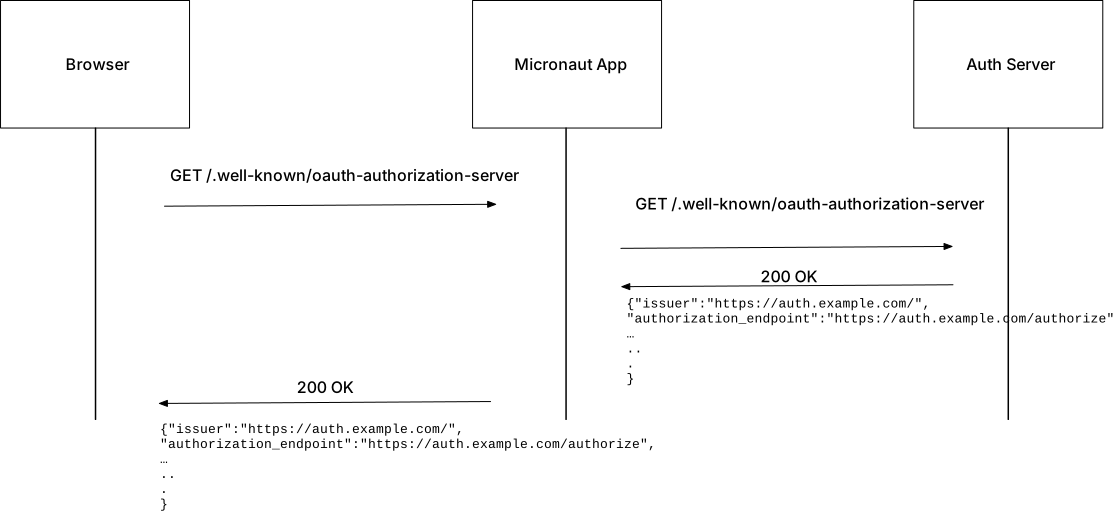
To proxy set the following configuration properties to true:
Path to proxy |
Property |
|
|
|
|
Read the following guides to learn more abut OAuth:
Micronaut Security provides the micronaut-security-ojdbc-extensions module for integration with Oracle JDBC Driver Extensions.
The module registers an Oracle JDBC EndUserSecurityContextProvider.
To use the module, add the following dependency:
implementation("io.micronaut.security:micronaut-security-ojdbc-extensions")Additionally, you must add an HTTP client implementation: either the Netty-based HTTP Client or the JDK HTTP Client.
The End User Security Context Provider provides a security context that enables
Deep Data Security features in Oracle Database.
This is a Resource Provider
identified by the name ojdbc-provider-micronaut-end-user-security-context.
This provider must be configured to authenticate as an OAuth 2.0 client. The client should be mapped to a DATA ROLE or APPLICATION IDENTITY defined in
an Oracle Database.
In the example below, the provider is configured to authenticate via a Client Credentials request against an Azure Entra ID authorization server.
datasources.default.data-source-properties.oracle.jdbc.provider.endUserSecurityContext=ojdbc-provider-micronaut-end-user-security-context
datasources.default.data-source-properties.oracle.jdbc.provider.endUserSecurityContext.clientId=${HRAPP_CLIENT_ID}
datasources.default.data-source-properties.oracle.jdbc.provider.endUserSecurityContext.clientSecret=${HRAPP_CLIENT_SECRET}
datasources.default.data-source-properties.oracle.jdbc.provider.endUserSecurityContext.tokenUrl=https://login.microsoftonline.com/${HRAPP_TENANT_ID}/oauth2/v2.0/token
datasources.default.data-source-properties.oracle.jdbc.provider.endUserSecurityContext.scope=${HRAPP_SCOPE}The previous example configures Oracle JDBC to load an EndUserSecurityContextProvider
with the name of this provider: ojdbc-provider-micronaut-end-user-security-context. With this configuration, Oracle JDBC receives an oracle.jdbc.EndUserSecurityContext each time it executes a database operation.
Almost every network request Oracle JDBC sends to the database is considered a database operation. This includes SQL execution, row fetching, commit/rollback,
and LOB data access. When an EndUserSecurityContext is provided to Oracle JDBC, all of these operations become subject to DATA GRANT policies defined in
Oracle Database.
A DATA GRANT policy can apply controls based on which user is accessing the database and which application they are using.
This offers a more granular approach to data security when compared to the traditional model, in which all application users access the database as the
same database user.
An EndUserSecurityContext provided to Oracle JDBC encapsulates two security tokens:
Database Access Token This token authorizes a Micronaut application to access the database. The provider requests this token by sending an OAuth 2.0 Client Credentials request to the server token endpoint defined by the parameter:
datasources.*.data-source-properties.oracle.jdbc.provider.endUserSecurityContext.tokenUrl
End User Token This token identifies the end user of a Micronaut application. It is typically received in the Authorization header of an incoming HTTP
request. Micronaut Security resolves the token with the TokenResolver API. The provider retrieves this token using Micronaut’s SecurityContextHolder.
These two tokens allow Oracle Database to make authorization decisions based on the application user who is accessing data and the application they are using.
The EndUserSecurityContext provided to Oracle JDBC may include application-managed DATA ROLE names or END USER CONTEXT attributes
that are derived from an Authentication present in Micronaut’s SecurityContextHolder.
If one or more roles in Authentication begin with a specified prefix, then the provider will
recognize them as application-managed DATA ROLE names that should be enabled for the end user.
The prefix is specified by the parameter:
datasources.*.data-source-properties.oracle.jdbc.provider.endUserSecurityContext.rolePrefix
The default value for this parameter is ORACLE_DATA_ROLE_.
The name of a DATA ROLE should appear after the specified prefix. For example, with the default prefix, if the authenticated user has a role with the value ORACLE_DATA_ROLE_ADMIN, the
provider recognizes a DATA ROLE named ADMIN.
In addition to the role prefix, the provider can also be configured with a fixed set of data role names using the parameter:
datasources.*.data-source-properties.oracle.jdbc.provider.endUserSecurityContext.dataRoles
You can use the RunAs annotation to grant a DATA ROLE for a method execution:
imports
package example.micronaut.repository;
import example.micronaut.domain.EmployeeEntity;
import example.micronaut.dto.SalaryAggregates;
import io.micronaut.data.annotation.Query;
import io.micronaut.data.jdbc.annotation.JdbcRepository;
import io.micronaut.data.model.query.builder.sql.Dialect;
import io.micronaut.data.repository.CrudRepository;
import io.micronaut.security.annotation.RunAs;@JdbcRepository(dialect = Dialect.ORACLE)
public interface EmployeeRepository extends CrudRepository<EmployeeEntity, Long> {
@RunAs("ORACLE_DATA_ROLE_COMPENSATION_ANALYST")
@Query("SELECT MIN(salary) AS min, MAX(salary) AS max, SUM(salary) AS sum, COUNT(*) AS count FROM hr.employees")
SalaryAggregates getSalaryAggregates();
}The provider can read END USER CONTEXT attributes from one or more named attributes of the Authentication.
The attribute names are specified as a comma-separated list by the parameter:
datasources.*.data-source-properties.oracle.jdbc.provider.endUserSecurityContext.attributeNames
The default value for this parameter is ORACLE_CONTEXT_ATTRIBUTES.
A JSON object containing the attributes of one or more END USER CONTEXT objects can appear as the value of one of the configured authentication attributes. For example, an authentication attribute named ORACLE_CONTEXT_ATTRIBUTES might have the following value:
{
"app_schema.user_details" : {
"first_name" : "George",
"last_name" : "Washington"
},
"app_schema.location_info" : {
"City" : "Mount Vernon",
"State" : "Virginia",
"Country" : "United States"
}
}The provider will recognize that attribute value as the attributes of two END USER CONTEXT objects named user_details and location_info, each declared within a database schema named app_schema.
In addition to authentication attributes, the provider can also be configured with a fixed set of attributes using the parameter:
datasources.*.data-source-properties.oracle.jdbc.provider.endUserSecurityContext.endUserContextAttributes
Configuration
The parameter names in the table below should be prefixed with
datasources.*.data-source-properties.oracle.jdbc.provider.endUserSecurityContext.
| Parameter Name | Description | Default Value |
|---|---|---|
|
OAuth 2.0 token endpoint URL. |
No default value. A value must be configured for this parameter. |
|
OAuth 2.0 client identifier. |
No default value. A value must be configured for this parameter. |
|
OAuth 2.0 client secret. This parameter is marked as a sensitive OJDBC provider parameter. |
No default value. A value must be configured for this parameter. |
|
Optional OAuth 2.0 scope sent with the Client Credentials request. |
No default value. This parameter is optional. |
|
A fixed set of |
No default value. This parameter is optional. |
|
The prefix used to match the user’s roles that the provider should recognize as a |
|
|
Optional JSON object containing fixed Oracle Database END USER CONTEXT attributes. The object keys are END USER CONTEXT names, and each value must be a JSON object containing the attributes for that context. |
No default value. This parameter is optional. |
|
A comma-separated list of Micronaut Security authentication attribute names whose values are used to derive END USER CONTEXT attributes from the current authentication. Each named authentication attribute value must be a JSON object value, or a string containing a JSON object. The object keys are END USER CONTEXT names, and each value must be a JSON object containing the attributes for that context. |
|
Micronaut AOT is a framework which implements ahead-of-time (AOT) optimizations for Micronaut application and libraries. Those optimizations consist of computing at build time things which would normally be done at runtime]
Micronaut Security offers several ahead-of-time optimizations.
With Micronaut Gradle Plugin, you can use aotPlugins configuration to declare additional AOT modules to be used:
dependencies {
...
..
//http://github.com/micronaut-projects/micronaut-security/releases
aotPlugins("io.micronaut.security:micronaut-security-aot:3.9.0")
}for Micronaut Maven Plugin you will need to do:
<build>
<plugins>
<plugin>
<groupId>io.micronaut.build</groupId>
<artifactId>micronaut-maven-plugin</artifactId>
<configuration>
<aotDependencies>
<dependency>
<groupId>io.micronaut.security</groupId>
<artifactId>micronaut-security-aot</artifactId>
<version>3.9.0</version>
</dependency>
...
</aotDependencies>
</configuration>
</plugin>
</plugins>
</build>When you use OpenID Connect in a Micronaut application, the application constructs a URL by appending .well-known/openid-configuration to the value you specify for each OAuth 2.0 client via
micronaut.security.oauth2.clients.*.openid.issuer. It visits the URL to fetch OpenID Connect metadata related to the specified authorization server and configure itself.
However, this is a network request which may be slow. Moreover, the application will probably need to execute this network request to serve the first request.
You can use Micronaut Security ahead-of-time build optimizations to do the request at build-time.
To enable this optimization, add
micronaut.security.openid-configuration.enabled=true to aot.properties.
|
Warning
|
The application uses the configuration present at the authorization server at build time. The configuration may be out-of-date if the authorization server changes the configuration between the build time and the application startup. |
Micronaut security supports JWKS (JSON Web Key Sets) either specifying them directly or via the jwks_uri obtained when fetching the OpenID Connect metadata. Micronaut security uses JWKS to validate the signature of tokens issued by another application or an authorization server.
Micronaut applications need to make a network request to fetch JWKS. You can use Micronaut Security ahead-of-time build optimizations to make the request at build-time.
To enable this optimization, add
micronaut.security.jwks.enabled.enabled=true to aot.properties.
|
Warning
|
The application uses the JWKS exposed by the authorization server at build time. The JWKS may be out-of-date if the authorization server changes them between build time and the application startup. You can clear keys with JwksSignature::clear or JwkSetFetcher::clearCache.
|
You can find the source code of this project in this repository: