Secure a Pyronaut application with Auth0
Learn how to create a Pyronaut application and secure it with an Authorization Server provided by Auth0.
1. Getting Started
In this guide, we will create a Python application built with Pyronaut.
2. What you will need
To complete this guide, you will need the following:
-
Some time on your hands
-
GraalPy installed and the Pyronaut CLI available locally
3. Solution
We recommend that you follow the instructions in the next sections and create the application step by step. However, you can go right to the completed example.
-
Download and unzip the source
4. OAuth 2.0
To provide authentication, sign in to your Auth0 account.
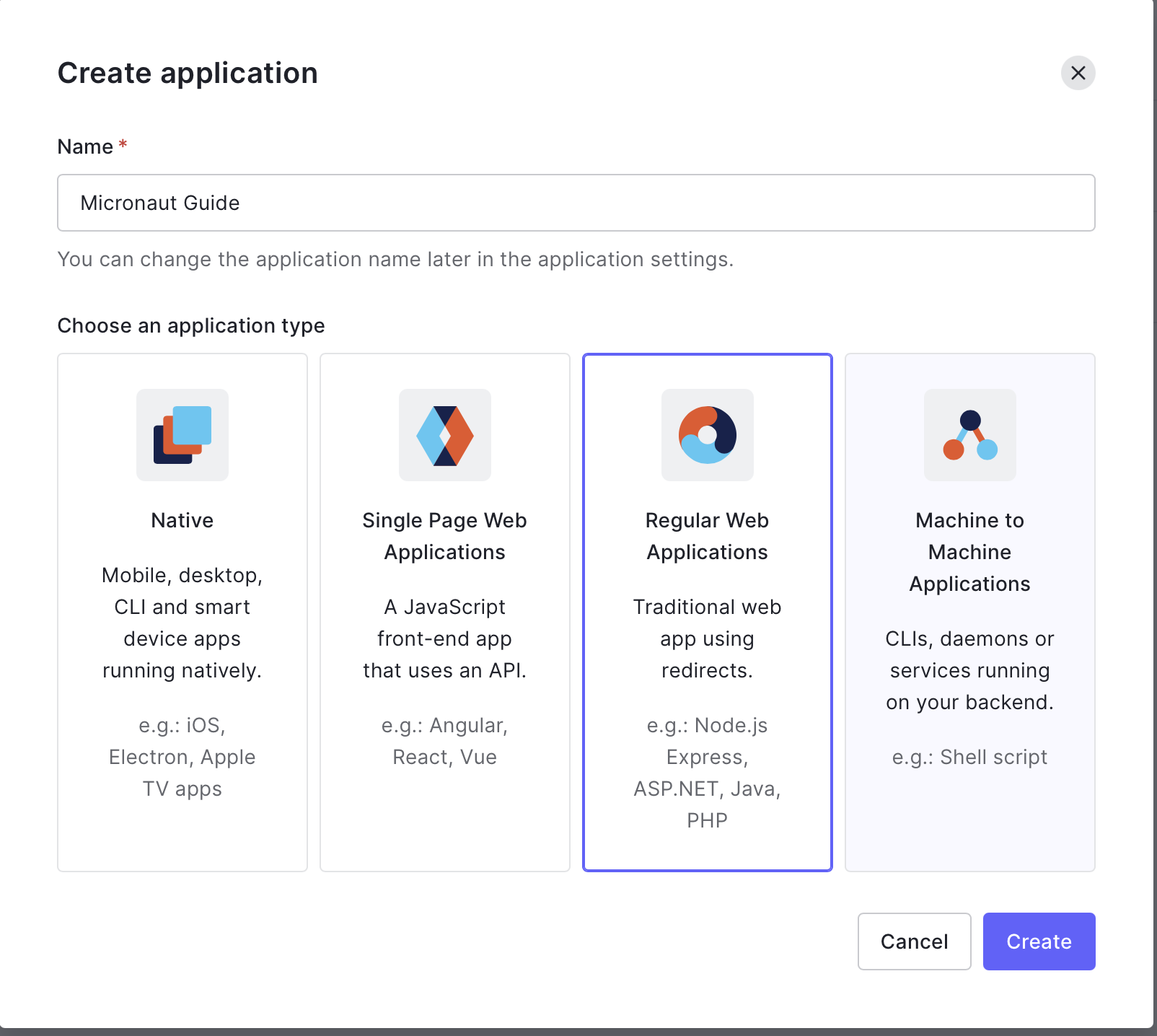
Create an application.
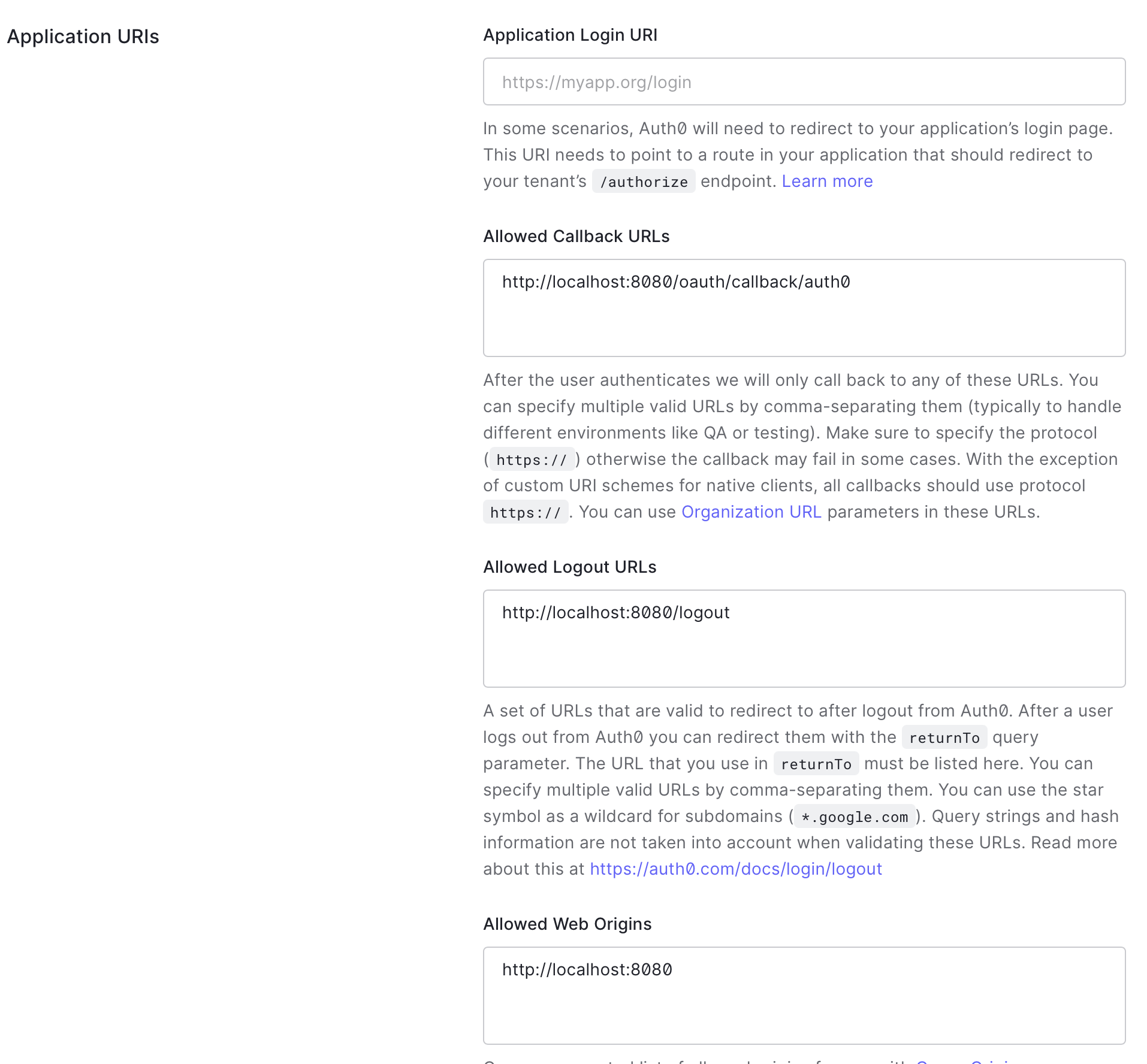
Fill the application URIs:
-
Enter
http://localhost:8080/oauth/callback/auth0as callback URL. -
Enter
http://localhost:8080/logoutas allowed logout URL. -
Enter
http://localhost:8080as the allowed web origin.
Once you have an HTTPS domain (for example, https://myapp.org), enter it as the application login URI: https://myapp.org/oauth/login/auth0.
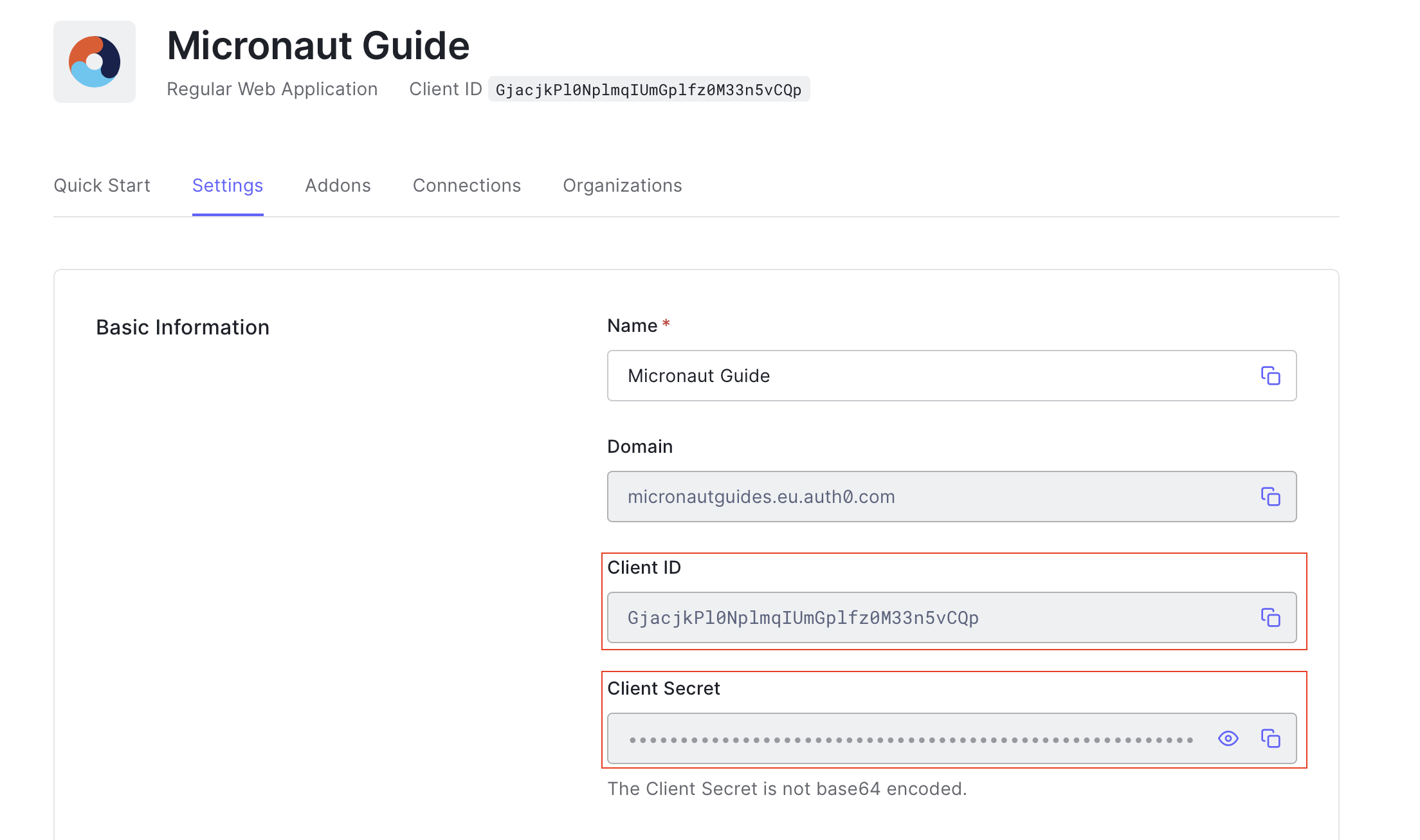
You can obtain the application’s domain, client id, and secret in the Auth0 console.
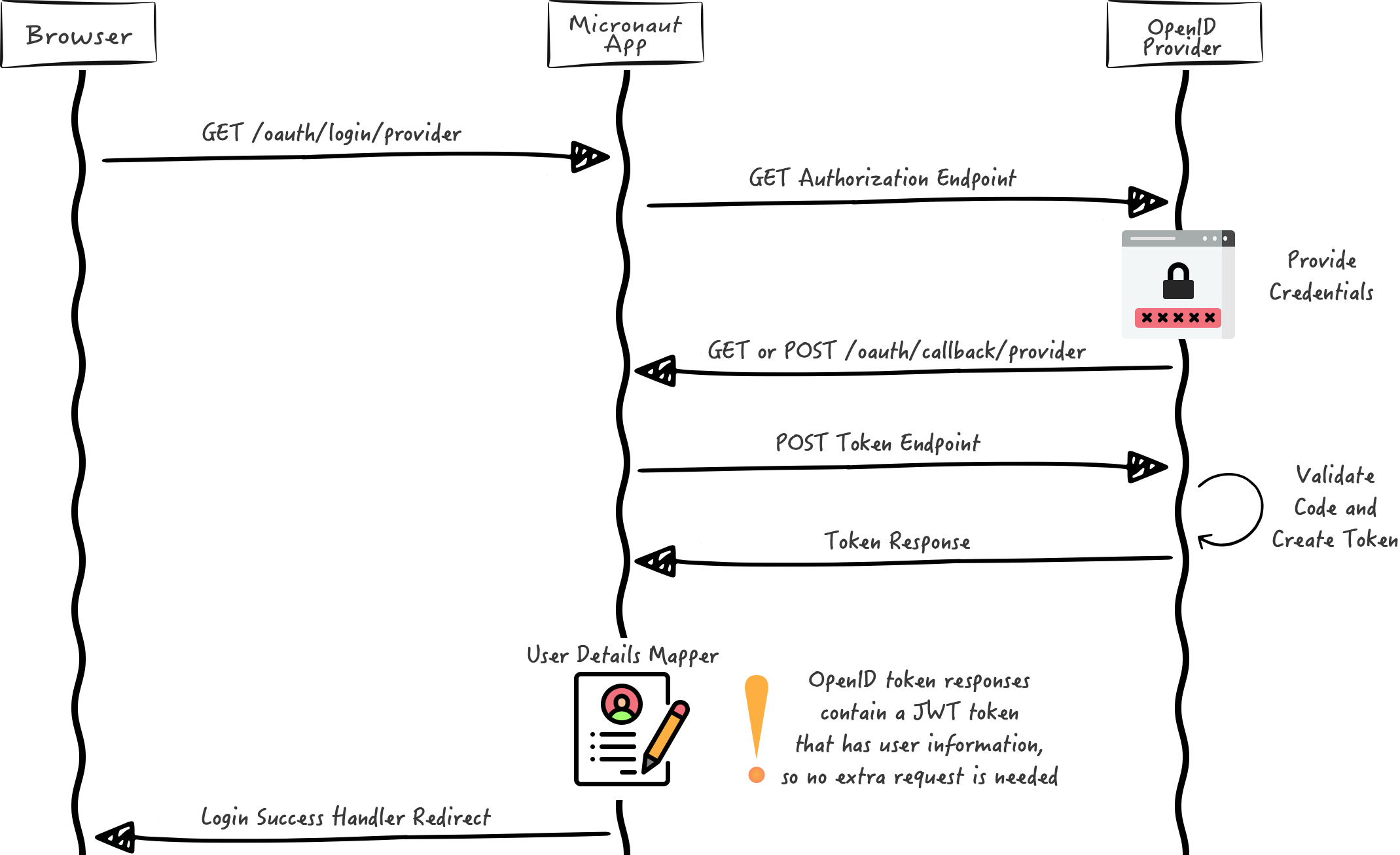
We want to use an Authorization Code grant type flow, which is described in the following diagram:
5. Writing the Application
Create an application using the Pyronaut CLI (Command Line Interface) or Pyronaut Launch
pyronaut create example.micronaut.micronautguide5.1. Dependencies
To use OAuth 2.0 integration, add the following dependency:
pyproject.toml
[tool.pyronaut.dependencies]
runtime = [
    "io.micronaut.security:micronaut-security-oauth2",
]
Also add Micronaut JWT support dependencies:
pyproject.toml
[tool.pyronaut.dependencies]
runtime = [
    "io.micronaut.security:micronaut-security-jwt",
]
5.2. Configuration
Add the following OAuth 2.0 configuration:
config/application.toml
(1)
[micronaut.security]
authentication = "idtoken"

(2)
(3)
[micronaut.security.oauth2.clients.auth0]
client-id = "${OAUTH_CLIENT_ID:xxx}"
(4)
client-secret = "${OAUTH_CLIENT_SECRET:yyy}"

(5)
[micronaut.security.oauth2.clients.auth0.openid]
issuer = "https://${OAUTH_DOMAIN:micronautguides.eu.auth0.com}/"

[micronaut.security.endpoints.logout]
(6)
get-allowed = true| 1 | Set micronaut.security.authentication as idtoken. The idtoken provided by Auth0 when the OAuth 2.0 Authorization code flow ends will be saved in a cookie. The id token is a signed JWT. For every request, the Micronaut framework extracts the JWT from the Cookie and validates the JWT signature with the remote Json Web Key Set exposed by Auth0. JWKS is exposed by the jws-uri entry of Auth0 .well-known/openid-configuration. |
| 2 | The provider identifier must match the last part of the URL you entered as a redirect URL: /oauth/callback/auth0. |
| 3 | Client ID. See previous screenshot. |
| 4 | Client Secret. See previous screenshot. |
| 5 | issuer URL. It allows the Micronaut framework to discover the configuration of the OpenID Connect server. Note: we will use the application’s domain. |
| 6 | Accept GET request to the /logout endpoint. |
When you start the Pyronaut application, it fetches the Auth0 application’s openid-configuration:
https://{auth0domain}/.well-known/openid-configurationThe previous configuration uses several placeholders. You will need to set up OAUTH_CLIENT_ID, OAUTH_CLIENT_SECRET, and OAUTH_DOMAIN environment variables.
export OAUTH_CLIENT_ID=XXXXXXXXXX
export OAUTH_CLIENT_SECRET=YYYYYYYYYY
export OAUTH_DOMAIN=micronautguides.eu.auth0.com
The views-jinjava feature uses Micronaut Views' Jinjava integration to render Jinja templates from Python dictionaries.
Add the Jinjava dependency:
pyproject.toml
[tool.pyronaut.dependencies]
runtime = [
    "io.micronaut.views:micronaut-views-jinjava",
]
Configure HTML as the default template extension:
config/application.toml
[micronaut.views.jinja]
default-extension = "html"
5.3. Home controller
Create a route function for / that returns an empty Python dictionary. @View renders the home.html Jinja template. Micronaut’s security model processor supplies the authenticated user’s details without injecting a principal into the route.
src/example/micronaut/home_controller.py
from micronaut.http.annotation import Get
from micronaut.security.annotation import Secured
from micronaut.security.rules import SecurityRule
from micronaut.views import View


@Secured(SecurityRule.IS_ANONYMOUS)  (1)
@View("home")  (2)
@Get("/")  (3)
def index() -> dict:
return {}| 1 | Annotate with io.micronaut.security.Secured to configure secured access. The SecurityRule.IS_ANONYMOUS expression will allow access without authentication. |
| 2 | Use View annotation to specify which template to use to render the response. |
| 3 | The @Get annotation maps the index method to an HTTP GET request on /. |
5.4. Jinja template
Create a Jinja template. The e filter escapes the authenticated user’s email for HTML:
config/views/home.html
<!DOCTYPE html>
<html>
<head>
    <title>Home</title>
</head>
<body>
<h1>Micronaut - Auth0 example</h1>
<h2>username: {% if security %}{{ security.attributes.email | e }}{% else %}Anonymous{% endif %}</h2>
<nav>
    <ul>
        {% if security %}
        <li><a href="/oauth/logout">Logout</a></li>
        {% else %}
        <li><a href="/oauth/login/auth0">Enter</a></li>
        {% endif %}
    </ul>
</nav>
</body>
</html>
Also, note that we return an empty model, but access security in the template.
-
The SecurityViewModelProcessor injects into the model a
securitymap with the authenticated user. See User in a view documentation.
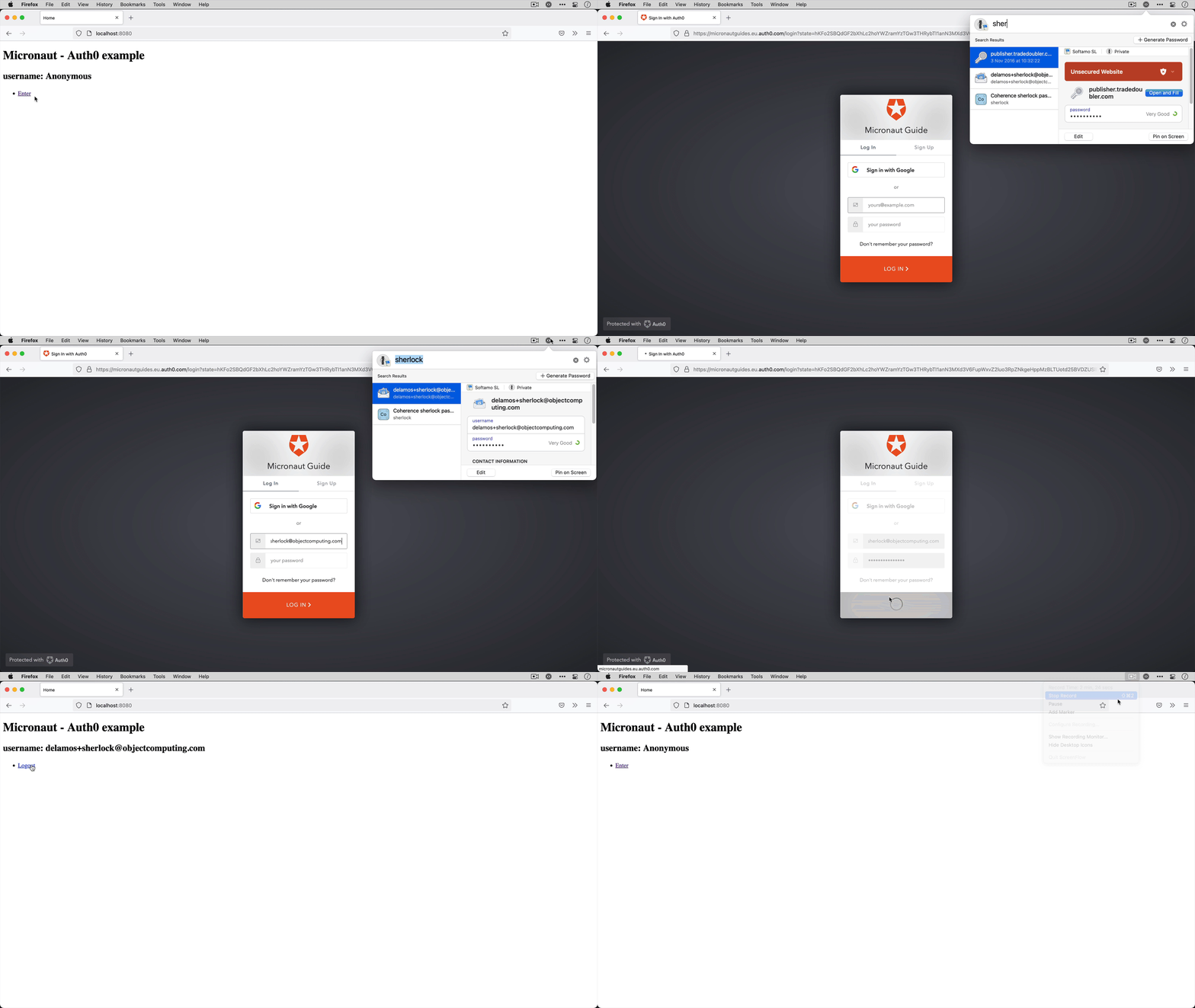
6. Running the Application
To run the application, use the pyronaut dev command, which starts the application on port 8080.
6.1. Local tests
The tests verify anonymous HTML rendering and the provider’s login link. Application startup may attempt OpenID discovery at the configured issuer. The tests do not verify a live provider login.
tests/example/micronaut/test_home_controller.py
import pytest
import requests

from pyronaut.test import MicronautTest, micronaut_test_fixture


@pytest.fixture(scope="module")
def my_context(request):
    fixture = micronaut_test_fixture(
        request,
        MicronautTest(environments=["test"], transactional=False),
    )
    try:
        yield fixture
    finally:
        fixture.stop()


@pytest.fixture
def client(my_context):
    with requests.with_context(my_context) as session:
        yield session


def test_home_page_renders_anonymous_user(client):
    response = client.get("/", timeout=90)

    assert response.status_code == 200, response.text
    assert "username: Anonymous" in response.text


def test_anonymous_user_sees_provider_login(client):
    response = client.get("/", timeout=90)

    assert response.status_code == 200, response.text
    assert 'href="/oauth/login/auth0"' in response.text
    assert 'href="/oauth/logout"' not in response.text


def test_home_page_is_rendered_html(client):
    response = client.get("/", timeout=90)

    assert response.status_code == 200, response.text
    assert response.headers["Content-Type"].startswith("text/html")
    assert "{{" not in response.text
    assert "{%" not in response.text
Run the tests:
7. Testing the Application
To run the tests:
pyronaut install
pyronaut validate-config
pyronaut test
Complete the provider configuration above and verify the authorization-code login and logout flow manually with your own account. The local tests do not verify a live provider login.
8. Next Steps
Read Micronaut OAuth 2.0 documentation to learn more.
9. License
| All guides are released with an Apache License 2.0 for the code and a Creative Commons Attribution 4.0 license for the writing and media (images). |