Table of Contents
- 1. Getting Started
- 2. What you will need
- 3. Solution
- 4. The Booking Flow
- 5. Writing the Application
- 6. Configure Oracle Database and Kafka
- 7. Application Packages
- 8. Entities and Repositories
- 9. Request and Message Contracts
- 10. Transactional Booking Service
- 11. Kafka Producer
- 12. Controller: Reserve and Suspend
- 13. First Consumer: Process Payment
- 14. Second Consumer: Resume and Complete
- 15. End-to-End Tests
- 16. Testing the Application
- 17. Try a Booking
- 18. Cleanup
- 19. Next Steps
- 20. License
Oracle Sessionless Transactions with Micronaut Data and Kafka
Learn how to use Oracle sessionless transactions with Micronaut Data and Kafka.
1. Getting Started
In this guide, we will create a Python application built with Pyronaut.
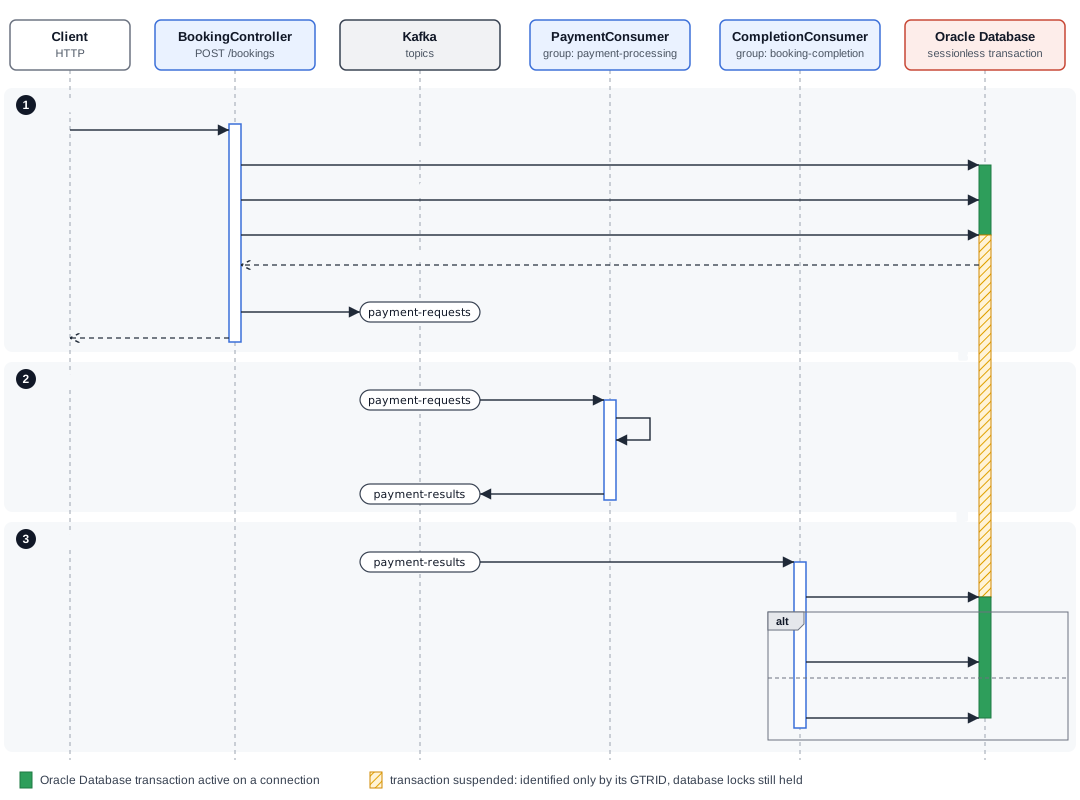
In this guide you will build a flight-booking workflow with an HTTP controller and two Kafka consumers. The controller reserves a seat in Oracle Database, suspends its transaction, and publishes a payment request. The first consumer processes a simulated payment. The second resumes the original Oracle Database transaction and confirms the booking, or rolls back the reservation if payment is declined.
The controller and consumers exchange the encoded global transaction identifier (GTRID), rather than a JDBC connection. The payment consumer never resumes the transaction and does not need to read the uncommitted booking.
2. What you will need
To complete this guide, you will need the following:
-
Some time on your hands
-
GraalPy installed and the Pyronaut CLI available locally
-
Docker, for Oracle Database Free and Kafka through Micronaut Test Resources.
-
Micronaut Data 5.2.0 or later.
-
Oracle AI Database 26ai (version 23.6 or later) and a recent Oracle JDBC Thin driver exposing
startTransaction,suspendTransactionImmediately, andresumeTransaction.
Read Developing Applications with Sessionless Transactions in the Oracle AI Database Development Guide for how the feature works, and Sessionless Transactions in the Oracle AI Database JDBC Developer’s Guide for database and driver requirements.
3. Solution
We recommend that you follow the instructions in the next sections and create the application step by step. However, you can go right to the completed example.
-
Download and unzip the source
4. The Booking Flow
The following diagram illustrates the booking flow:
-
Reserve the seat —
BookingControllerReceives
POST /bookings, reserves the seat, and saves a pending booking. It suspends the Oracle Database transaction, and then publishes aPaymentRequestedmessage containing the booking ID and GTRID to thepayment-requestsKafka topic. -
Process payment —
PaymentConsumerConsumes messages from the
payment-requestsKafka topic and processes payment while the reservation transaction remains suspended. It publishes aPaymentCompletedmessage containing the payment outcome, booking ID, and the same GTRID to thepayment-resultsKafka topic. -
Complete the booking —
CompletionConsumerConsumes messages from the
payment-resultsKafka topic and resumes the original Oracle Database transaction using the GTRID. If payment is approved, it confirms the booking and commits. If payment is declined, it rolls back the reservation.
The sample runs the controller and both consumers in one application. The consumers have separate consumer groups. They can be deployed in separate applications using the same event contracts. Reservation and completion must connect to the same Oracle Database instance and use the same application database user. No connection is held by the application while payment runs, but the suspended transaction continues to hold its database locks.
| This is an Oracle Database transaction spanning workflow steps. Kafka publishing, Kafka offset commits, and the external payment are separate operations. The example demonstrates propagation and completion; it does not provide atomic delivery or exactly-once booking across these systems. |
5. Writing the Application
Create an application using the Pyronaut CLI (Command Line Interface) or Pyronaut Launch
pyronaut create example.micronaut.micronautguide --features=data-jdbc,jdbc-hikari,oracle,liquibase,kafka,serialization-jackson,validationCreate a GraalPy virtual environment and install pytest for the booking tests:
graalpy -m venv .venv
source .venv/bin/activate
python -m pip install pytest
Use compatible versions of GraalPy, the Pyronaut CLI, and the Micronaut platform.
5.1. Oracle Driver
Add also the Oracle Driver
pyproject.toml
[tool.pyronaut.dependencies]
runtime = [
    "com.oracle.database.jdbc:ojdbc11",
]
6. Configure Oracle Database and Kafka
Configure the default datasource for Oracle Database:
config/application.toml
[datasources.default]
driver-class-name = "oracle.jdbc.OracleDriver"
db-type = "oracle"
dialect = "ORACLE"
schema-generate = "NONE"

[liquibase.datasources.default]
change-log = "classpath:db/liquibase-changelog.xml"
6.1. Database Migration with Liquibase
The [liquibase.datasources.default] table in the datasource configuration above points Micronaut Liquibase at the changelog:
config/db/liquibase-changelog.xml
<?xml version="1.0" encoding="UTF-8"?>
<databaseChangeLog xmlns="http://www.liquibase.org/xml/ns/dbchangelog"
                  xmlns:xsi="http://www.w3.org/2001/XMLSchema-instance"
                  xsi:schemaLocation="http://www.liquibase.org/xml/ns/dbchangelog https://www.liquibase.org/xml/ns/dbchangelog/dbchangelog-4.20.xsd">
    <changeSet id="1" author="micronaut">
        <sqlFile path="booking.sql" relativeToChangelogFile="true"/>
    </changeSet>
    <changeSet id="2" author="micronaut">
        <sqlFile path="seed.sql" relativeToChangelogFile="true"/>
    </changeSet>
</databaseChangeLog>
Create the schema that Liquibase applies. Schema generation is disabled so that application restarts preserve committed bookings:
config/db/booking.sql
CREATE TABLE flight_seat (
    id VARCHAR2(40) PRIMARY KEY,
    status VARCHAR2(20) NOT NULL CHECK (status IN ('AVAILABLE', 'HELD', 'BOOKED'))
);
CREATE SEQUENCE booking_seq START WITH 1 INCREMENT BY 1;
CREATE TABLE booking (
    id NUMBER(19) PRIMARY KEY,
    seat_id VARCHAR2(40) NOT NULL REFERENCES flight_seat(id),
    amount NUMBER(10, 2) NOT NULL,
    status VARCHAR2(20) NOT NULL CHECK (status IN ('PENDING', 'CONFIRMED')),
    payment_reference VARCHAR2(80) NOT NULL
);
Create the seed data. The changelog inserts two available seats when it initializes a new database:
config/db/seed.sql
INSERT INTO flight_seat (id, status) VALUES ('MN123-12A', 'AVAILABLE');
INSERT INTO flight_seat (id, status) VALUES ('MN123-12B', 'AVAILABLE');
6.2. Kafka Configuration
For Python, the Kafka client and listener annotations configure these options in the source files below.
The consumers start from the earliest available offset for a new group. Automatic offset commits are disabled; each listener uses SYNC_PER_RECORD. The producer requests acknowledgments from all in-sync replicas and enables Kafka producer idempotence. That setting covers producer retries; it does not deduplicate repeated business operations.
6.3. Test Resources Configuration
Configure Micronaut Test Resources to start an Oracle Database Free image that supports sessionless transactions in the tests:
tests-config/application-test.toml
[test-resources.containers.oracle]
image-name = "gvenzl/oracle-free"
image-tag = "23.26.3-slim-faststart"
startup-timeout = "600s"
Micronaut Test Resources supplies the datasource URL, username, password, and kafka.bootstrap.servers when they are absent. The pinned Oracle Database Free image supports sessionless transactions. For your own services, set DATASOURCES_DEFAULT_URL, DATASOURCES_DEFAULT_USERNAME, DATASOURCES_DEFAULT_PASSWORD, and KAFKA_BOOTSTRAP_SERVERS; do not put credentials in source control.
Create the two topics before sending messages when using a broker without topic auto-creation:
for topic in payment-requests payment-results; do
  kafka-topics.sh --bootstrap-server localhost:9092 --create --if-not-exists \
    --topic "$topic" --partitions 1 --replication-factor 1
done
One replica is suitable for the local demonstration. Configure replication and minimum in-sync replicas for your deployment.
7. Application Packages
The source code is organized under example.micronaut:
-
controller: HTTP booking endpoints. -
dto: HTTP request and response models and Kafka event payloads. -
entity: persistence entities and status enums. -
repository: Micronaut Data repositories. -
service: transactional booking operations and the demonstration payment gateway. -
kafka: the producer client and the two consumers.
The end-to-end tests exercise the booking controller.
8. Entities and Repositories
Create the FlightSeat entity, which maps the flight_seat table:
src/example/micronaut/entity/flight_seat.py
from dataclasses import dataclass
from typing import Annotated

from micronaut.data.annotation import Id, MappedEntity

from .seat_status import SeatStatus


@MappedEntity("flight_seat")  (1)
@dataclass
class FlightSeat:
    id: Annotated[str, Id]  (2)
status: SeatStatus| 1 | Annotate the class with @MappedEntity to map the class to the table defined in the schema. |
| 2 | Specifies the ID of an entity |
Create the SeatStatus enum:
src/example/micronaut/entity/seat_status.py
from enum import Enum

from micronaut.serde.annotation import Serdeable


@Serdeable  (1)
class SeatStatus(Enum):
    AVAILABLE = "AVAILABLE"
    HELD = "HELD"
BOOKED = "BOOKED"| 1 | Declare the @Serdeable annotation at the type level in your source code to allow the type to be serialized or deserialized. |
SeatStatus represents an available seat, a held reservation, and a completed booking. Micronaut Data stores the enum names in the existing VARCHAR2 status column. HTTP responses expose the same names through FlightSeatView, so the enum has @Serdeable while the entity does not.
Create the Booking entity, which maps the booking table:
src/example/micronaut/entity/booking.py
from java.lang import Long
from dataclasses import dataclass
from typing import Annotated

from java.math import BigDecimal
from micronaut.data.annotation import GeneratedValue, Id, MappedEntity

from .booking_status import BookingStatus


@MappedEntity("booking")  (1)
@dataclass
class Booking:
    seatId: str
    amount: BigDecimal
    status: BookingStatus
    paymentReference: str
id: Annotated[Long, Id, GeneratedValue] = None (2) (3)| 1 | Annotate the class with @MappedEntity to map the class to the table defined in the schema. |
| 2 | Specifies the ID of an entity |
| 3 | Specifies that the property value is generated by the database and not included in inserts |
Create the BookingStatus enum:
src/example/micronaut/entity/booking_status.py
from enum import Enum

from micronaut.serde.annotation import Serdeable


@Serdeable  (1)
class BookingStatus(Enum):
    PENDING = "PENDING"
CONFIRMED = "CONFIRMED"| 1 | Declare the @Serdeable annotation at the type level in your source code to allow the type to be serialized or deserialized. |
BookingStatus represents the pending and confirmed states. Micronaut Data stores the enum names in the existing VARCHAR2 status column, and the HTTP response serializes them as PENDING or CONFIRMED. The enum is serializable because it appears in BookingView; the persistence entity still has no serialization annotation.
The HTTP endpoints return DTOs instead of persistence entities. Create FlightSeatView to represent a seat:
src/example/micronaut/dto/flight_seat_view.py
from dataclasses import dataclass

from micronaut.serde.annotation import Serdeable

from ..entity.seat_status import SeatStatus


@Serdeable  (1)
@dataclass
class FlightSeatView:
    id: str
status: SeatStatus| 1 | Declare the @Serdeable annotation at the type level in your source code to allow the type to be serialized or deserialized. |
Create BookingView to represent a booking:
src/example/micronaut/dto/booking_view.py
from java.lang import Long
from dataclasses import dataclass

from java.math import BigDecimal
from micronaut.serde.annotation import Serdeable

from ..entity.booking_status import BookingStatus


@Serdeable  (1)
@dataclass
class BookingView:
    id: Long
    seatId: str
    amount: BigDecimal
    status: BookingStatus
paymentReference: str| 1 | Declare the @Serdeable annotation at the type level in your source code to allow the type to be serialized or deserialized. |
Create a repository interface for seats. Micronaut Data implements the interface at compilation time:
src/example/micronaut/repository/flight_seat_repository.py
from java.util import Optional
from micronaut.data.jdbc.annotation import JdbcRepository
from micronaut.data.model.query.builder.sql import Dialect
from micronaut.data.repository import CrudRepository

from ..dto.flight_seat_view import FlightSeatView
from ..entity.flight_seat import FlightSeat
from ..entity.seat_status import SeatStatus


@JdbcRepository(dialect=Dialect.ORACLE)  (1)
class FlightSeatRepository(CrudRepository[FlightSeat, str]):  (2)
    def findByIdAndStatusForUpdate(self, id: str, status: SeatStatus) -> Optional[FlightSeat]: ...
    def findByIdAndStatus(self, id: str, status: SeatStatus) -> Optional[FlightSeat]: ...
def queryById(self, id: str) -> Optional[FlightSeatView]: ... (3)| 1 | @JdbcRepository with a specific dialect. |
| 2 | By extending CrudRepository you enable automatic generation of CRUD (Create, Read, Update, Delete) operations. |
| 3 | Micronaut Data supports reflection-free Data Transfer Object (DTO) projections if the return type is annotated with @Introspected. |
The derived findByIdAndStatusForUpdate method lets Micronaut Data generate a locking read for the Oracle Database dialect that returns the seat only when it is AVAILABLE. The service persists the new status with the standard update method while holding this lock. During completion, findByIdAndStatus retrieves only a seat whose status is HELD. Oracle Database holds the lock until the original transaction commits or rolls back, including while it is suspended. Another reservation for the same seat can wait on that lock. A normal read still sees the previously committed AVAILABLE value; it cannot tell you whether a suspended reservation holds the seat.
Create a repository interface for bookings:
src/example/micronaut/repository/booking_repository.py
from java.lang import Long
from java.util import Optional
from micronaut.data.jdbc.annotation import JdbcRepository
from micronaut.data.model.query.builder.sql import Dialect
from micronaut.data.repository import CrudRepository

from ..dto.booking_view import BookingView
from ..entity.booking import Booking
from ..entity.booking_status import BookingStatus


@JdbcRepository(dialect=Dialect.ORACLE)  (1)
class BookingRepository(CrudRepository[Booking, Long]):  (2)
    def findByIdAndStatus(self, id: Long, status: BookingStatus) -> Optional[Booking]: ...
def queryById(self, id: Long) -> Optional[BookingView]: ... (3)| 1 | @JdbcRepository with a specific dialect. |
| 2 | By extending CrudRepository you enable automatic generation of CRUD (Create, Read, Update, Delete) operations. |
| 3 | Micronaut Data supports reflection-free Data Transfer Object (DTO) projections if the return type is annotated with @Introspected. |
The Java FlightSeat and Booking entities are records, which Micronaut Data JDBC supports; the Groovy, Kotlin, and Python variants use mutable entities. The Java service creates new record values with the updated status. None of the persistence entities has serialization annotations. The booking ID uses @GeneratedValue with its default settings. For Oracle Database, Micronaut Data selects sequence generation and derives the sequence name from the table name plus _seq, so Liquibase creates booking_seq for the booking table. A new booking has no assigned ID; the inherited save method inserts it and returns the entity with its generated ID. Sequence values can have gaps after rollback. During completion, the derived findByIdAndStatus method retrieves only a booking that is still PENDING. Changes to seats and bookings use the inherited update method. The queryById methods return the FlightSeatView and BookingView DTOs directly, so Micronaut Data selects only their properties and the controller does not map entities. Both repositories let Micronaut Data generate their SQL.
9. Request and Message Contracts
Create BookingRequest to bind the body of the HTTP booking request:
src/example/micronaut/dto/booking_request.py
from dataclasses import dataclass
from typing import Annotated

from jakarta.validation.constraints import NotBlank, Pattern
from micronaut.serde.annotation import Serdeable


@Serdeable  (1)
@dataclass
class BookingRequest:
    seatId: Annotated[str, NotBlank]  (2)
paymentToken: Annotated[str, NotBlank, Pattern(regexp="demo-approve|demo-decline")]| 1 | Declare the @Serdeable annotation at the type level in your source code to allow the type to be serialized or deserialized. |
| 2 | Use jakarta.validation.constraints Constraints to ensure the data matches your expectations. |
Create the PaymentRequested event, which the controller publishes to request a payment:
src/example/micronaut/dto/payment_requested.py
from java.lang import Long
from dataclasses import dataclass

from java.math import BigDecimal
from micronaut.serde.annotation import Serdeable


@Serdeable  (1)
@dataclass
class PaymentRequested:
    bookingId: Long
    transactionId: str
    amount: BigDecimal
paymentToken: str| 1 | Declare the @Serdeable annotation at the type level in your source code to allow the type to be serialized or deserialized. |
Create the PaymentCompleted event, which carries the payment outcome:
src/example/micronaut/dto/payment_completed.py
from java.lang import Long
from dataclasses import dataclass

from micronaut.serde.annotation import Serdeable


@Serdeable  (1)
@dataclass
class PaymentCompleted:
    bookingId: Long
    transactionId: str
    approved: bool
paymentReference: str| 1 | Declare the @Serdeable annotation at the type level in your source code to allow the type to be serialized or deserialized. |
The controller passes only seatId to the booking service and uses the payment token from the HTTP request when constructing the payment message. Kafka messages contain only the dedicated PaymentRequested and PaymentCompleted DTOs. Persistence entities are never sent to Kafka. All events use the database-generated booking ID as their Kafka key. The controller gets this ID from the saved booking before constructing the payment request. The payment request carries the server-selected price because the pending booking is not visible outside its suspended transaction.
Micronaut’s propagation API returns the Oracle Database GTRID as a string encoded by OracleSessionlessTransactionIdCodec. Include this string in the transactionId field of the Kafka messages so the final consumer can resume the transaction. You can customize the codec, but the receiving application must be able to decode the transaction IDs sent by the producing application.
Treat the encoded GTRID as sensitive transaction-control data. Restrict access to these topics, use authenticated, encrypted connections outside local development, and avoid logging it. Do not send card details in Kafka messages; the sample uses only demonstration tokens.
10. Transactional Booking Service
Create an exception to signal a declined payment:
src/example/micronaut/service/payment_declined_exception.py
class PaymentDeclinedException(RuntimeError):
    def __init__(self):
        super().__init__("Payment declined; roll back the seat reservation")
Create BookingService. It reserves a seat in a suspended transaction and later resumes that transaction to confirm or roll back the booking:
src/example/micronaut/service/booking_service.py
from jakarta.inject import Singleton
from java.math import BigDecimal
from micronaut.transaction.annotation import OracleTransactional

from ..dto.payment_completed import PaymentCompleted
from ..entity.booking import Booking
from ..entity.booking_status import BookingStatus
from ..entity.seat_status import SeatStatus
from ..repository.booking_repository import BookingRepository
from ..repository.flight_seat_repository import FlightSeatRepository
from .payment_declined_exception import PaymentDeclinedException


@Singleton  (9)
class BookingService:
    def __init__(self, flight_seat_repository: FlightSeatRepository,
                 booking_repository: BookingRepository):
        self.flight_seat_repository = flight_seat_repository
        self.booking_repository = booking_repository

    @OracleTransactional(sessionless=OracleTransactional.Sessionless.SUSPEND, timeout=300)  (1)
    def reserve(self, seat_id: str) -> Booking:
        seat = self.flight_seat_repository.findByIdAndStatusForUpdate(seat_id, SeatStatus.AVAILABLE).orElseThrow()  (2)
        seat.status = SeatStatus.HELD
        self.flight_seat_repository.update(seat)
        amount = BigDecimal("199.00")
        return self.booking_repository.save(Booking(seat_id, amount, BookingStatus.PENDING, "NONE"))  (3)

    @OracleTransactional(sessionless=OracleTransactional.Sessionless.REQUIRES_SUSPENDED)  (4)
    def complete(self, result: PaymentCompleted) -> None:
        booking = self.booking_repository.findByIdAndStatus(result.bookingId, BookingStatus.PENDING).orElseThrow()  (5)
        if not result.approved:
            raise PaymentDeclinedException()  (6)
        seat = self.flight_seat_repository.findByIdAndStatus(booking.seatId, SeatStatus.HELD).orElseThrow()  (7)
        seat.status = SeatStatus.BOOKED
        self.flight_seat_repository.update(seat)
        booking.status = BookingStatus.CONFIRMED
        booking.paymentReference = result.paymentReference
self.booking_repository.update(booking) (8)| 1 | Start an Oracle Database sessionless transaction with a five-minute suspension timeout. Oracle Database cancels a transaction that remains suspended past its timeout. |
| 2 | Lock the seat with the generated findByIdAndStatusForUpdate query, which returns the seat only when it is AVAILABLE. Change its status to HELD and call update; create the pending booking with save. A competing reservation waits for the lock, and Oracle Database then re-evaluates the status condition against the latest committed row, preventing two bookings of the same seat. If no available seat is found, orElseThrow throws an exception and rolls back the transaction. |
| 3 | save returns the booking with its database-generated ID. After the intercepted method returns, Micronaut suspends the transaction instead of committing it. The generated ID and price can be published, but the database writes are still uncommitted. |
| 4 | Resume the transaction whose GTRID is in the active propagation scope. |
| 5 | This derived finder runs inside the resumed transaction and returns only the pending booking written by the controller. |
| 6 | A runtime exception rolls back the original transaction, undoing both the seat reservation and the pending booking. |
| 7 | Find the seat only when its status is HELD; if either derived finder returns no row, the operation fails and the suspended transaction is not committed. |
| 8 | Update the seat and persist the confirmed booking through the standard repository update methods. A normal return commits both changes together. Micronaut clears the GTRID from the propagation state after completion. |
| 9 | Use jakarta.inject.Singleton to designate a class as a singleton. |
These methods are top-level transaction boundaries on an injected bean. Do not call them inside another active transaction or through self-invocation. The sessionless modes require the default REQUIRED propagation and cannot be combined with @OracleTransactional.Recoverable.
11. Kafka Producer
Create an interface to send messages to Kafka. The Micronaut framework implements the interface at compilation time:
src/example/micronaut/kafka/booking_client.py
from java.lang import Long
from typing import Annotated

from micronaut.context.annotation import Property
from micronaut.configuration.kafka.annotation import KafkaClient, KafkaKey, Topic
from org.apache.kafka.clients.producer import RecordMetadata

from ..dto.payment_completed import PaymentCompleted
from ..dto.payment_requested import PaymentRequested


@KafkaClient(acks=-1,  (1)
             properties=[Property(name="enable.idempotence", value="true")])
class BookingClient:
    @Topic("payment-requests")  (2)
    def requestPayment(self, bookingId: Annotated[Long, KafkaKey],
                       request: PaymentRequested) -> RecordMetadata: ...  (3)

    @Topic("payment-results")
    def paymentCompleted(self, bookingId: Annotated[Long, KafkaKey],
result: PaymentCompleted) -> RecordMetadata: ...| 1 | The @KafkaClient annotation is used to designate this interface as a client |
| 2 | The @Topic annotation indicates which topics the @KafkaClient should be published to. |
| 3 | The Kafka key can be specified by providing a parameter annotated with @KafkaKey. If no such parameter is specified the record is sent with a null key. |
Returning RecordMetadata makes each producer method synchronous: it waits for a Kafka acknowledgment before returning. The controller waits for its payment request to be acknowledged before returning 202 Accepted. The payment consumer waits for its result publication before its input offset is committed. There is still a crash window between suspending the Oracle Database transaction and receiving a Kafka acknowledgment.
12. Controller: Reserve and Suspend
Create BookingController to reserve seats and to expose bookings and seats over HTTP:
src/example/micronaut/controller/booking_controller.py
from java.lang import Long
from dataclasses import dataclass
from typing import Annotated

from jakarta.validation import Valid
from micronaut.http import HttpResponse
from micronaut.http.annotation import Body, Controller, Get, Post
from micronaut.scheduling import TaskExecutors
from micronaut.scheduling.annotation import ExecuteOn
from micronaut.serde.annotation import Serdeable
from micronaut.transaction.jdbc.oracle import OracleSessionlessTransactionPropagationOperations

from ..dto.booking_request import BookingRequest
from ..dto.booking_view import BookingView
from ..dto.flight_seat_view import FlightSeatView
from ..dto.payment_requested import PaymentRequested
from ..kafka.booking_client import BookingClient
from ..repository.booking_repository import BookingRepository
from ..repository.flight_seat_repository import FlightSeatRepository
from ..service.booking_service import BookingService


@Serdeable  (10)
@dataclass
class AcceptedBooking:
    bookingId: Long


@Controller("/bookings")  (1)
@ExecuteOn(TaskExecutors.BLOCKING)  (2)
class BookingController:
    def __init__(self, booking_client: BookingClient, booking_service: BookingService,
                 propagation: OracleSessionlessTransactionPropagationOperations,
                 booking_repository: BookingRepository, flight_seat_repository: FlightSeatRepository):
        self.booking_client = booking_client
        self.booking_service = booking_service
        self.propagation = propagation
        self.booking_repository = booking_repository
        self.flight_seat_repository = flight_seat_repository

    @Post  (3)
    def book(self, request: Annotated[BookingRequest, Body, Valid]) -> HttpResponse[AcceptedBooking]:
        def reserve() -> PaymentRequested:
            booking = self.booking_service.reserve(request.seatId)  (5)
            transaction_id = self.propagation.currentTransactionId().orElseThrow()  (6)
            return PaymentRequested(booking.id, transaction_id, booking.amount, request.paymentToken)

        payment = self.propagation.withPropagation(reserve)  (4)
        self.booking_client.requestPayment(payment.bookingId, payment)  (7)
        return HttpResponse.accepted().body(AcceptedBooking(payment.bookingId))

    @Get("/{id}")  (8)
    def find(self, id: Long) -> BookingView | None:
        return self.booking_repository.queryById(id).orElse(None)

    @Get("/seats/{id}")  (9)
    def seat(self, id: str) -> FlightSeatView | None:
return self.flight_seat_repository.queryById(id).orElse(None)| 1 | The class is defined as a controller with the @Controller annotation mapped to the path /bookings. |
| 2 | It is critical that any blocking I/O operations (such as fetching the data from the database) are offloaded to a separate thread pool that does not block the Event loop. |
| 3 | The @Post annotation maps the book method to an HTTP POST request on /bookings. |
| 4 | Create an empty lexical Oracle Database propagation scope for the incoming HTTP booking request. |
| 5 | Call the injected transactional service. It saves the booking and returns the entity with its generated ID and price. Its interceptor suspends the Oracle Database transaction before returning to the controller. |
| 6 | Obtain the encoded GTRID after suspension, while the propagation scope is still active. |
| 7 | Publish the payment request after the transaction has been suspended. The event carries the GTRID even though the lexical scope has ended. |
| 8 | The @Get annotation maps the find method to an HTTP GET request on /bookings/{id}. |
| 9 | The @Get annotation maps the seat method to an HTTP GET request on /bookings/seats/{id}. |
| 10 | Declare the @Serdeable annotation at the type level in your source code to allow the type to be serialized or deserialized. |
The controller returns 202 Accepted with a booking ID after Kafka acknowledges the payment request. Reservation has already run and the Oracle Database transaction is suspended, but payment and booking completion are asynchronous. Blocking Kafka sends and JDBC work run on the blocking executor. The controller is an HTTP entry point; it does not listen to a Kafka topic.
Do not publish the payment request from inside the SUSPEND method: a consumer could receive it before Oracle Database has suspended the transaction. A lexical propagation scope is not transported automatically across Kafka or asynchronous threads.
13. First Consumer: Process Payment
Create a demonstration payment gateway:
src/example/micronaut/service/demo_payment_gateway.py
from threading import Lock

from jakarta.inject import Singleton

from ..dto.payment_completed import PaymentCompleted
from ..dto.payment_requested import PaymentRequested


@Singleton  (1)
class DemoPaymentGateway:
    def __init__(self):
        self.decisions = {}
        self.lock = Lock()

    def pay(self, request: PaymentRequested) -> PaymentCompleted:
        with self.lock:
            if request.bookingId not in self.decisions:
                approved = request.paymentToken == "demo-approve"
                self.decisions[request.bookingId] = PaymentCompleted(
                    request.bookingId, request.transactionId, approved,
                    f"demo-{request.bookingId}" if approved else "DECLINED")
return self.decisions[request.bookingId]| 1 | Use jakarta.inject.Singleton to designate a class as a singleton. |
The gateway simulates an approval for demo-approve and a decline for demo-decline. Its in-memory map makes repeated payments with the same booking ID return the same result during one process lifetime. Replace this with a payment provider that accepts a durable idempotency key; the demonstration map does not survive restarts.
Create PaymentConsumer. It listens to the payment-requests topic, processes the payment, and publishes the result:
src/example/micronaut/kafka/payment_consumer.py
from micronaut.context.annotation import Property
from micronaut.configuration.kafka.annotation import KafkaListener, OffsetStrategy, Topic

from ..dto.payment_requested import PaymentRequested
from ..service.demo_payment_gateway import DemoPaymentGateway
from .booking_client import BookingClient


@KafkaListener(groupId="payment-processing", offsetStrategy=OffsetStrategy.SYNC_PER_RECORD,
               properties=[Property(name="auto.offset.reset", value="earliest"),
                           Property(name="enable.auto.commit", value="false")])  (1)
class PaymentConsumer:
    def __init__(self, demo_payment_gateway: DemoPaymentGateway, booking_client: BookingClient):
        self.demo_payment_gateway = demo_payment_gateway
        self.booking_client = booking_client

    @Topic("payment-requests")  (2)
    def pay(self, request: PaymentRequested) -> None:
        result = self.demo_payment_gateway.pay(request)  (3)
self.booking_client.paymentCompleted(request.bookingId, result) (4)| 1 | Mark the class with @KafkaListener to register it as a consumer. Its group ID identifies the consumer group, and its offset strategy controls when consumed offsets are committed. |
| 2 | The @Topic annotation is again used to indicate which topic(s) to subscribe to. |
| 3 | Process payment without entering an Oracle Database transaction or querying the pending booking. |
| 4 | Publish the result with the exact GTRID received in the payment request. |
14. Second Consumer: Resume and Complete
Create CompletionConsumer. It listens to the payment-results topic and completes the booking:
src/example/micronaut/kafka/completion_consumer.py
from micronaut.context.annotation import Property
from micronaut.configuration.kafka.annotation import KafkaListener, OffsetStrategy, Topic
from micronaut.transaction.jdbc.oracle import OracleSessionlessTransactionPropagationOperations

from ..dto.payment_completed import PaymentCompleted
from ..entity.booking_status import BookingStatus
from ..repository.booking_repository import BookingRepository
from ..service.booking_service import BookingService
from ..service.payment_declined_exception import PaymentDeclinedException


@KafkaListener(groupId="booking-completion", offsetStrategy=OffsetStrategy.SYNC_PER_RECORD,
               properties=[Property(name="auto.offset.reset", value="earliest"),
                           Property(name="enable.auto.commit", value="false")])  (1)
class CompletionConsumer:
    def __init__(self, booking_service: BookingService, booking_repository: BookingRepository,
                 propagation: OracleSessionlessTransactionPropagationOperations):
        self.booking_service = booking_service
        self.booking_repository = booking_repository
        self.propagation = propagation

    @Topic("payment-results")  (2)
    def complete(self, result: PaymentCompleted) -> None:
        booking = self.booking_repository.findById(result.bookingId)
        if booking.isPresent() and booking.get().status == BookingStatus.CONFIRMED:
            return  (3)
        try:
            self.propagation.withPropagation(result.transactionId,  (4)
                                            lambda: self.booking_service.complete(result))  (5)
        except PaymentDeclinedException:  (6)
            # The transactional interceptor has already rolled back the reservation.
pass| 1 | Mark the class with @KafkaListener to register it as a consumer. Its group ID identifies the consumer group, and its offset strategy controls when consumed offsets are committed. |
| 2 | The @Topic annotation is again used to indicate which topic(s) to subscribe to. |
| 3 | Recognize an already committed confirmation before attempting to resume its completed GTRID. This handles sequential duplicates of a successful result; it is not a complete deduplication mechanism. |
| 4 | Import the encoded GTRID into a fresh propagation scope on the consumer thread. |
| 5 | Resume the original transaction and complete the booking through the injected service. |
| 6 | Catch the expected decline only outside the transactional service, after rollback. Catching it inside that method would allow the reservation to commit. |
A declined booking leaves no booking row: the original insert was rolled back. An absent booking can also mean it is pending, has expired, or was never started. A production workflow needs a separate durable status record to distinguish those outcomes and recognize duplicate declines.
15. End-to-End Tests
Create an end-to-end test that books seats through the HTTP API. Liquibase seeds the two demonstration seats only once per database, and each test books one of them. Test Resources can reuse the same database, for example when native tests run after the JVM tests, so each test cleans up after itself through the repositories:
tests/example/micronaut/test_kafka_booking.py
import time

import pytest
import requests
from pyronaut.test import MicronautTest, micronaut_test_fixture

from example.micronaut.entity.flight_seat import FlightSeat
from example.micronaut.entity.seat_status import SeatStatus
from example.micronaut.repository.booking_repository import BookingRepository
from example.micronaut.repository.flight_seat_repository import FlightSeatRepository


@pytest.fixture(scope="module")
def my_context(request):
    fixture = micronaut_test_fixture(request, MicronautTest(environments=["test"], transactional=False))  (1)
    yield fixture
    fixture.stop()


@pytest.fixture
def client(my_context):
    yield requests.with_context(my_context)
    reset_seats(my_context)  (2)


def test_approved_payment_confirms_the_booking(client):
    seat_id = "MN123-12A"
    assert find_seat(client, seat_id)["status"] == "AVAILABLE"
    booking_id = book(client, seat_id, "demo-approve")
    await_confirmed(client, booking_id, seat_id)


def test_declined_payment_rolls_back_and_allows_the_same_seat_to_be_booked_again(client):
    seat_id = "MN123-12B"
    assert find_seat(client, seat_id)["status"] == "AVAILABLE"
    declined_booking_id = book(client, seat_id, "demo-decline")  (3)
    approved_booking_id = book(client, seat_id, "demo-approve")  (4)
    assert declined_booking_id != approved_booking_id
    await_confirmed(client, approved_booking_id, seat_id)  (5)
    assert find_booking(client, declined_booking_id) is None  (6)


def book(client, seat_id, payment_token):
    response = client.post("/bookings", json={"seatId": seat_id, "paymentToken": payment_token}, timeout=30)
    assert response.status_code == 202, response.text
    booking_id = response.json()["bookingId"]
    assert booking_id > 0
    return booking_id


def await_confirmed(client, booking_id, seat_id):
    deadline = time.monotonic() + 60
    while time.monotonic() < deadline:
        booking = find_booking(client, booking_id)
        if booking is not None and booking["status"] == "CONFIRMED":
            assert booking["id"] == booking_id
            assert booking["seatId"] == seat_id
            assert booking["paymentReference"] == f"demo-{booking_id}"
            assert find_seat(client, seat_id)["status"] == "BOOKED"
            return
        time.sleep(0.1)
    pytest.fail("Booking has not committed yet")


def find_booking(client, booking_id):
    response = client.get(f"/bookings/{booking_id}", timeout=30)
    if response.status_code == 404:
        return None
    assert response.status_code == 200, response.text
    return response.json()


def find_seat(client, seat_id):
    response = client.get(f"/bookings/seats/{seat_id}", timeout=30)
    assert response.status_code == 200, response.text
    return response.json()


def reset_seats(context):
    context[BookingRepository].deleteAll()
    seat_repository = context[FlightSeatRepository]
    seat_repository.update(FlightSeat("MN123-12A", SeatStatus.AVAILABLE))
seat_repository.update(FlightSeat("MN123-12B", SeatStatus.AVAILABLE))| 1 | Configure the test with @MicronautTest so Micronaut initializes the application context and embedded server. Tests are transactional by default, and each test transaction rolls back when the test finishes. Set transactional to false when the test must observe committed database changes. |
| 2 | After each test, delete the bookings with BookingRepository and make both demonstration seats AVAILABLE again with FlightSeatRepository. |
| 3 | Submit a declined booking for the seeded MN123-12B seat. |
| 4 | Submit an approved booking for the exact same seat. This request must acquire the lock held by the first reservation, so it can return only after that lock is released. |
| 5 | Poll until the replacement booking is CONFIRMED and its seat is BOOKED. |
| 6 | Verify the declined booking lookup returns 404, showing that its pending insert was rolled back. |
The test submits booking requests through the HTTP API and polls the booking and seat endpoints to verify the outcome. The approval scenario books the seeded MN123-12A seat, then polls until the booking is CONFIRMED with a payment reference and the seat is BOOKED.
An absent booking or an AVAILABLE seat alone would be a false positive: those are also visible while a reservation is suspended. Successfully booking the same seat again and confirming that the declined booking remains absent verify rollback through the public API. The tests use a 30-second HTTP request timeout and a 60-second polling deadline, both shorter than the five-minute Oracle Database suspension timeout, so transaction expiry cannot make this scenario pass.
The test configuration selects a dedicated Test Resources scope and sets the HTTP client timeout:
tests-config/application-test.toml
[micronaut.test.resources]
scope = "booking-controller-e2e"

[micronaut.http.client]
read-timeout = "30s"
The test has no surrounding transaction and uses a dedicated Micronaut Test Resources scope, with its own Oracle Database and Kafka containers. Docker is required; the build stops the disposable Test Resources services after the tests.
16. Testing the Application
To run the tests:
pyronaut install
pyronaut validate-config
pyronaut test
17. Try a Booking
Start the application with pyronaut dev.
Test Resources starts local Oracle Database and Kafka containers if external connection properties are absent.
Liquibase inserts MN123-12A and MN123-12B when it initializes a new database. These rows are available for the booking requests below; after a successful booking, that seat remains BOOKED across application restarts.
curl -i -X POST http://localhost:8080/bookings \
  -H 'Content-Type: application/json' \
  -d '{"seatId":"MN123-12A","paymentToken":"demo-approve"}'
Copy bookingId from the response and poll:
curl http://localhost:8080/bookings/BOOKING_ID
curl http://localhost:8080/bookings/seats/MN123-12A
Before completion, the booking lookup returns 404; after completion, it returns a booking with status: CONFIRMED and the seat is BOOKED.
Try MN123-12B with demo-decline. After payment processing and rollback, no booking is visible and the seat remains AVAILABLE. The sample has no separate rejection-status endpoint. Use a different available seat for later successful requests, or recreate the disposable database to reset the demonstration.
18. Cleanup
Stop the application and its Test Resources services.
Pyronaut stops the Test Resources server it owns when the development or test command exits.
The containers are disposable; no cloud resources are provisioned by this guide. Remove demonstration topics only from a broker dedicated to this example.
19. Next Steps
Read the Micronaut Data sessionless transaction documentation, the Micronaut Kafka guide, and the Oracle AI Database documentation on sessionless transactions: Developing Applications with Sessionless Transactions and JDBC Sessionless Transactions.
20. License
| All guides are released with an Apache License 2.0 for the code and a Creative Commons Attribution 4.0 license for the writing and media (images). |