Many-to-Many with Micronaut Data JDBC and MySQL
Learn how to map a many-to-many association with Micronaut Data JDBC and MySQL.
1. Getting Started
In this guide, we will create a Python application built with Pyronaut.
2. What you will need
To complete this guide, you will need the following:
-
Some time on your hands
-
GraalPy installed and the Pyronaut CLI available locally
3. Solution
We recommend that you follow the instructions in the next sections and create the application step by step. However, you can go right to the completed example.
-
Download and unzip the source
4. Many-To-Many Relationship
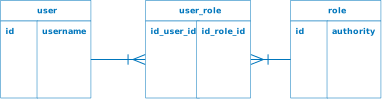
A relationship is a connection between two types of entities. In the case of a many-to-many relationship, both sides can relate to multiple instances of the other side.
In this guide, you are going to create a many-to-many relationship between User and Role entities using Micronaut Data JDBC.
A user can have many roles and the same role can be applied to multiple users.
The application consumes a database schema with the following structure:
5. Writing the Application
Create an application using the Pyronaut CLI (Command Line Interface) or Pyronaut Launch
pyronaut create example.micronaut.micronautguide --features=data-jdbc,liquibase,mysql,validationThe previous command creates a Pyronaut application with the default package example.micronaut in a directory named micronautguide.
| If you have an existing Pyronaut application and want to add the functionality described here, you can view the dependency and configuration changes from the specified features, and apply those changes to your application. |
5.1. Micronaut Data JDBC
Add Micronaut Data JDBC dependencies to the project:
pyproject.toml
[tool.pyronaut.dependencies]
runtime = [
    "io.micronaut.data:micronaut-data-jdbc",
    "io.micronaut.sql:micronaut-jdbc-hikari",
]
build = [
    "io.micronaut.data:micronaut-data-processor",
]
5.2. MySQL Driver
Add also the MySQL Driver
pyproject.toml
[tool.pyronaut.dependencies]
runtime = [
    "com.mysql:mysql-connector-j",
]
5.3. Database Configuration
And the database configuration:
config/application.toml
[datasources.default]
schema-generate = "NONE"
(1)
driver-class-name = "com.mysql.cj.jdbc.Driver"
(2)
db-type = "mysql"
(3)
dialect = "MYSQL"| 1 | Use MySQL driver. |
| 2 | In order for the database to be properly detected by Micronaut Test Resources. |
| 3 | Configure the MySQL dialect. |
5.4. Database Migration with Liquibase
We need a way to create the database schema. For that, we use Micronaut integration with Liquibase.
Add the following snippet to include the necessary dependencies:
pyproject.toml
[tool.pyronaut.dependencies]
runtime = [
    "io.micronaut.liquibase:micronaut-liquibase",
]
Configure the database migrations directory for Liquibase in application.toml.
config/application.toml
[liquibase.datasources.default]
change-log = "classpath:db/liquibase-changelog.xml"
Create the following files with the database schema creation:
config/db/liquibase-changelog.xml
<?xml version="1.0" encoding="UTF-8"?>
<databaseChangeLog
  xmlns="http://www.liquibase.org/xml/ns/dbchangelog"
  xmlns:xsi="http://www.w3.org/2001/XMLSchema-instance"
  xsi:schemaLocation="http://www.liquibase.org/xml/ns/dbchangelog
         http://www.liquibase.org/xml/ns/dbchangelog/dbchangelog-3.1.xsd">
  <include file="changelog/01-schema.xml" relativeToChangelogFile="true"/>
</databaseChangeLog>
config/db/changelog/01-schema.xml
<?xml version="1.0" encoding="UTF-8"?>

<databaseChangeLog
  xmlns="http://www.liquibase.org/xml/ns/dbchangelog"
  xmlns:xsi="http://www.w3.org/2001/XMLSchema-instance"
  xsi:schemaLocation="http://www.liquibase.org/xml/ns/dbchangelog
         http://www.liquibase.org/xml/ns/dbchangelog/dbchangelog-3.1.xsd">
  <changeSet id="01" author="username">
      <createTable tableName="users">
          <column name="id" type="BIGINT" autoIncrement="true">
              <constraints primaryKey="true" primaryKeyName="pk_user" nullable="false"/>
          </column>
          <column name="username" type="VARCHAR(255)">
              <constraints nullable="false" unique="true" uniqueConstraintName="uk_user_username"/>
          </column>
      </createTable>

      <createTable tableName="role">
          <column name="id" type="BIGINT" autoIncrement="true">
              <constraints primaryKey="true" primaryKeyName="pk_role" nullable="false"/>
          </column>
          <column name="authority" type="VARCHAR(255)">
              <constraints nullable="false" unique="true" uniqueConstraintName="uk_role_authority"/>
          </column>
      </createTable>

      <createTable tableName="user_role">
          <column name="user_id" type="BIGINT">
              <constraints nullable="false"/>
          </column>
          <column name="role_id" type="BIGINT">
              <constraints nullable="false"/>
          </column>
      </createTable>

      <addPrimaryKey tableName="user_role" constraintName="pk_user_role" columnNames="user_id, role_id"/>

      <addForeignKeyConstraint
              baseTableName="user_role"
              baseColumnNames="user_id"
              constraintName="fk_user_role_user"
              referencedTableName="users"
              referencedColumnNames="id"
              onDelete="CASCADE"/>

      <addForeignKeyConstraint
              baseTableName="user_role"
              baseColumnNames="role_id"
              constraintName="fk_user_role_role"
              referencedTableName="role"
              referencedColumnNames="id"
              onDelete="CASCADE"/>
  </changeSet>
</databaseChangeLog>
5.5. Entities
5.5.1. User
src/example/micronaut/user_entity.py
from dataclasses import dataclass
from typing import Annotated

from jakarta.validation.constraints import NotBlank
from micronaut.data.annotation import GeneratedValue, Id, MappedEntity


@dataclass
@MappedEntity("users")  (1)
class UserEntity:
    username: Annotated[str, NotBlank]  (4)
id: Annotated[int | None, Id, GeneratedValue] = None (2) (3)| 1 | Annotate the class with @MappedEntity to map the class to the table defined in the schema. |
| 2 | Specifies the ID of an entity |
| 3 | Specifies that the property value is generated by the database and not included in inserts |
| 4 | Use jakarta.validation.constraints Constraints to ensure the data matches your expectations. |
5.5.2. Role
Create a Role domain class to store authorities within the application.
src/example/micronaut/role.py
from dataclasses import dataclass
from typing import Annotated

from jakarta.validation.constraints import NotBlank
from micronaut.data.annotation import GeneratedValue, Id, MappedEntity


@dataclass
@MappedEntity  (1)
class Role:
    authority: Annotated[str, NotBlank]  (4)
id: Annotated[int | None, Id, GeneratedValue] = None (2) (3)| 1 | Annotate the class with @MappedEntity to map the class to the table defined in the schema. |
| 2 | Specifies the ID of an entity |
| 3 | Specifies that the property value is generated by the database and not included in inserts |
| 4 | Use jakarta.validation.constraints Constraints to ensure the data matches your expectations. |
5.5.3. UserRole
Create a UserRole entity that stores a many-to-many relationship between User and Role.
src/example/micronaut/user_role.py
from dataclasses import dataclass
from typing import Annotated

from micronaut.data.annotation import EmbeddedId, MappedEntity

from .user_role_id import UserRoleId


@dataclass
@MappedEntity  (1)
class UserRole:
id: Annotated[UserRoleId, EmbeddedId] (2)| 1 | Annotate the class with @MappedEntity to map the class to the table defined in the schema. |
| 2 | Composite primary keys can be defined using @EmbeddedId annotation. |
src/example/micronaut/user_role_id.py
from dataclasses import dataclass
from typing import Annotated

from micronaut.data.annotation import Embeddable, Relation

from .role import Role
from .user_entity import UserEntity


@dataclass
@Embeddable  (1)
class UserRoleId:
    user: Annotated[UserEntity, Relation(value="MANY_TO_ONE")]  (2)
role: Annotated[Role, Relation(value="MANY_TO_ONE")] (2)| 1 | Specifies that the bean is embeddable. |
| 2 | You can specify a relationship (one-to-one, one-to-many, etc.) with the @Relation annotation. |
5.6. Projection
Create a User record that represents a user and their assigned roles.
src/example/micronaut/user.py
from dataclasses import dataclass
from typing import Annotated

from jakarta.validation.constraints import NotBlank, NotNull
from micronaut.core.annotation import Introspected


@dataclass
@Introspected  (1)
class User:
    id: Annotated[int, NotNull]
    username: Annotated[str, NotBlank]
authorities: list[str] | None = None| 1 | Annotate the class with @Introspected to generate BeanIntrospection metadata at compilation time. This information can be used, for example, to render the POJO as JSON using Jackson without using reflection. |
5.7. JDBC Repositories
Create the following JDBC repositories:
5.7.1. User Repository
src/example/micronaut/user_jdbc_repository.py
from micronaut.data.annotation import Query
from micronaut.data.jdbc.annotation import JdbcRepository
from micronaut.data.repository import CrudRepository

from .user import User
from .user_entity import UserEntity


@JdbcRepository(dialect="MYSQL")  (1)
class UserJdbcRepository(CrudRepository[UserEntity, int]):  (2)
    def save(self, username: str) -> UserEntity: ...

    (3)
    @Query(value="""
        SELECT
            u.id,
            u.username,
            GROUP_CONCAT(DISTINCT r.authority ORDER BY r.authority SEPARATOR ',') AS authorities
        FROM users AS u
        LEFT JOIN user_role AS ur ON ur.user_id = u.id
        LEFT JOIN role AS r ON r.id = ur.role_id
        WHERE u.username = :username
        GROUP BY u.id, u.username;
        """)
def findByUsername(self, username: str) -> User | None: ...| 1 | @JdbcRepository with a specific dialect. |
| 2 | By extending CrudRepository you enable automatic generation of CRUD (Create, Read, Update, Delete) operations. |
| 3 | You can use the @Query annotation to specify an explicit query. |
5.7.2. Role Repository
src/example/micronaut/role_jdbc_repository.py
from micronaut.data.jdbc.annotation import JdbcRepository
from micronaut.data.repository import CrudRepository

from .role import Role


@JdbcRepository(dialect="MYSQL")  (1)
class RoleJdbcRepository(CrudRepository[Role, int]):  (2)
    def save(self, authority: str) -> Role: ...

    def findByAuthority(self, authority: str) -> Role | None: ...

def deleteByAuthority(self, authority: str) -> None: ...| 1 | @JdbcRepository with a specific dialect. |
| 2 | By extending CrudRepository you enable automatic generation of CRUD (Create, Read, Update, Delete) operations. |
5.7.3. UserRole Repository
src/example/micronaut/user_role_jdbc_repository.py
from micronaut.data.jdbc.annotation import JdbcRepository
from micronaut.data.repository import CrudRepository

from .user_role import UserRole
from .user_role_id import UserRoleId


@JdbcRepository(dialect="MYSQL")  (1)
class UserRoleJdbcRepository(CrudRepository[UserRole, UserRoleId]):  (2)
pass| 1 | @JdbcRepository with a specific dialect. |
| 2 | By extending CrudRepository you enable automatic generation of CRUD (Create, Read, Update, Delete) operations. |
A domain class fulfills the M in the Model View Controller (MVC) pattern and represents a persistent entity that is mapped onto an underlying database table.
5.8. Test
Add a test that verifies the many-to-many relationship:
tests/example/micronaut/test_many_to_many.py
import pytest

from pyronaut.test import MicronautTest, micronaut_test_fixture

from example.micronaut.user_role import UserRole
from example.micronaut.user_role_id import UserRoleId

ROLE_USER = "ROLE_USER"
ROLE_ADMIN = "ROLE_ADMIN"
U_SERGIO = "sergio"
U_TIM = "tim"


@pytest.fixture
def my_context(request):
    fixture = micronaut_test_fixture(
        request,
        MicronautTest(start_application=False, transactional=False),  (1)
    )
    yield fixture
    fixture.stop()


@pytest.fixture
def role_repo(my_context):
    return my_context["example.micronaut.RoleJdbcRepository"]


@pytest.fixture
def user_repo(my_context):
    return my_context["example.micronaut.UserJdbcRepository"]


@pytest.fixture
def user_role_repo(my_context):
    return my_context["example.micronaut.UserRoleJdbcRepository"]


def test_many_to_many_persistence(role_repo, user_repo, user_role_repo):
    role_user = role_repo.save(ROLE_USER)
    role_admin = role_repo.save(ROLE_ADMIN)

    assert user_repo.findByUsername(U_SERGIO) is None

    sergio = user_repo.save(U_SERGIO)
    assert_user(user_repo.findByUsername(U_SERGIO), U_SERGIO, None)

    user_role_repo.save(UserRole(UserRoleId(sergio, role_user)))
    user_role_repo.save(UserRole(UserRoleId(sergio, role_admin)))
    assert_user(
        user_repo.findByUsername(U_SERGIO),
        U_SERGIO,
        [ROLE_ADMIN, ROLE_USER],
    )

    tim = user_repo.save(U_TIM)
    user_role_repo.save(UserRole(UserRoleId(tim, role_user)))
    assert_user(
        user_repo.findByUsername(U_TIM),
        U_TIM,
        [ROLE_USER],
    )


def assert_user(user, expected_username: str, expected_authorities: list[str] | None):
    assert user is not None
    assert user.id is not None
    assert user.username == expected_username
assert user.authorities == expected_authorities| 1 | Annotate the class with @MicronautTest so the Micronaut framework will initialize the application context. This test does not need the embedded server. Set startApplication to false to avoid starting it. |
6. Testing the Application
To run the tests:
pyronaut install
pyronaut validate-config
pyronaut test
If you run the test, you will see a MySQL container being started by Micronaut Test Resources through integration with Testcontainers to provide throwaway containers for testing.
6.1. Micronaut Test Resources Goals
zero-configuration: without adding any configuration, test resources should be spawned and the application configured to use them. Configuration is only required for advanced use cases.
classpath isolation: use of test resources shouldn’t leak into your application classpath, nor your test classpath
compatible with GraalVM native: if you build a native binary, or run tests in native mode, test resources should be available
easy to use: the Micronaut build plugins for Gradle and Maven should handle the complexity of figuring out the dependencies for you
extensible: you can implement your own test resources, in case the built-in ones do not cover your use case
technology agnostic: while lots of test resources use Testcontainers under the hood, you can use any other technology to create resources
7. Next Steps
Explore more features with Pyronaut Guides.
8. License
| All guides are released with an Apache License 2.0 for the code and a Creative Commons Attribution 4.0 license for the writing and media (images). |