package example.micronaut.domain

import com.fasterxml.jackson.annotation.JsonAnyGetter
import com.fasterxml.jackson.annotation.JsonAnySetter
import io.micronaut.data.annotation.GeneratedValue
import io.micronaut.data.annotation.Id
import io.micronaut.data.annotation.MappedEntity
import io.micronaut.data.annotation.Relation
import io.micronaut.data.annotation.sql.JoinTable

@MappedEntity(value = "TBL_STUDENT", alias = "s") (1)
data class Student(
    @Id (2)
    @GeneratedValue(GeneratedValue.Type.IDENTITY) (3)
    val id: Long?,
    val name: String,
    @JoinTable(name = "TBL_STUDENT_CLASSES", alias = "sc") (4)
    @Relation(Relation.Kind.MANY_TO_MANY) (5)
    val classes: List<Class>,
    @field:JsonAnyGetter (6)
    @field:JsonAnySetter
    val extras: Map<String, Any?> = emptyMap()
)Use JSON duality view in Oracle
Learn how to use JSON duality views in Micronaut
Authors: Dimitrije Zdravkovic
Micronaut Version: 5.2.3
1. Getting Started
In this guide, we will create a Micronaut application written in Kotlin.
In this guide, we will set up and use an Oracle JSON Relational Duality View with Micronaut Data. The application includes classes that represent a JSON Relational Duality View in Oracle Database. In the background, the SQL CREATE statement for the view is generated and executed.
1.1. What Is a JSON Relational Duality View
A JSON Relational Duality View in Oracle Database lets you map relational tables to JSON documents. This creates a document-style interface for data stored relationally.
JSON Relational Duality is a new data modeling capability that features updatable and consistent JSON document views over relational data. This allows data that is stored efficiently in relational tables to be accessed as simple JSON documents. JSON Relational Duality Views can be accessed with document APIs, such as MongoDB-compatible APIs, REST, and SQL.
1.2. Usage
In Micronaut, JSON duality views are supported by annotating an entity with @JsonView.
2. What you will need
To complete this guide, you will need the following:
-
Some time on your hands
-
A decent text editor or IDE
-
JDK 1.8 or greater installed with
JAVA_HOMEconfigured appropriately -
Docker installed to run MySQL and to run tests using Testcontainers.
3. Writing the application
In Micronaut, users don’t have to use SQL to create JSON duality views and execute CRUD operations on them. By annotating classes with @JsonView, users specify which views to generate. CRUD operations are executed via PageableRepository.
3.1. High-level diagram of the classes used
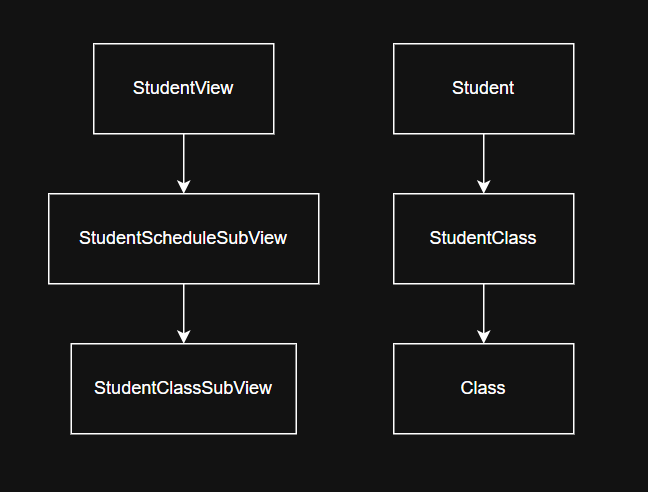
3.2. Writing an entity class
For each table in the database, we can create a corresponding entity class. For the Student table, we can create the following class:
src/main/kotlin/example/micronaut/domain/Student.kt
| 1 | @MappedEntity annotation to specify the corresponding table name |
| 2 | @Id annotation to specify the primary key |
| 3 | @GeneratedValue annotation to specify that it is an auto-increment field |
| 4 | @JoinTable annotation to specify the corresponding join table |
| 5 | @Relation annotation to specify an association |
| 6 | @JsonAnyGetter and @JsonAnySetter expose arbitrary JSON properties through a flex column |
3.3. Writing a view class
A class annotated with @JsonView generates the corresponding JSON duality view. The @JsonView annotation has an entity field, which represents the class for which the view will be created; in our case, Student.class. It is a required field.
Create the view class:
src/main/kotlin/example/micronaut/domain/StudentView.kt
package example.micronaut.domain

import com.fasterxml.jackson.annotation.JsonAnyGetter
import com.fasterxml.jackson.annotation.JsonAnySetter
import io.micronaut.data.annotation.GeneratedValue
import io.micronaut.data.annotation.Id
import io.micronaut.data.annotation.JsonView
import io.micronaut.data.annotation.Relation

@JsonView(entity = Student::class) (1)
data class StudentView(
    @Id (2)
    @GeneratedValue(GeneratedValue.Type.IDENTITY) (3)
    val id: Long?,
    val name: String,
    @Relation(Relation.Kind.ONE_TO_MANY) (4)
    val classes: List<StudentScheduleSubView>,
    @field:JsonAnyGetter (5)
    @field:JsonAnySetter
    val extras: Map<String, Any?> = emptyMap()
)| 1 | @JsonView annotation with the specified entity class |
| 2 | @Id annotation to specify the primary key |
| 3 | @GeneratedValue annotation to specify that it is an auto-increment field |
| 4 | @Relation annotation to specify an association |
| 5 | @JsonAnyGetter and @JsonAnySetter expose arbitrary JSON properties through a flex column |
3.4. Using a flex column
The extras map on Student and StudentView is annotated with @JsonAnyGetter and @JsonAnySetter. Micronaut Data maps it to an Oracle JSON flex column: declared properties remain relational fields, while arbitrary properties such as department or remote can be added to the JSON document without adding Java, Groovy, or Kotlin fields or table columns.
3.5. Writing subview classes
As you can see from the StudentView.classes relation, JSON duality views support table joins. They are specified by using the @Relation annotation.
For every relation, a subview is created. A subview class must be created for each relation. To specify a subview class, we use the @JsonSubView annotation. @JsonSubView also has an entity field with the same meaning; it is required as well. These classes represent subviews; CREATE statements are generated only for classes annotated with @JsonView.
Define the following entity and corresponding subview classes:
3.5.1. Entity classes
A student can enroll in multiple classes, and each class can include multiple students, so we model this many-to-many relationship using a join table represented by StudentClass that links Student and Class. That’s why we have two MANY_TO_ONE relations in StudentClass.
src/main/kotlin/example/micronaut/domain/StudentClass.kt
package example.micronaut.domain

import io.micronaut.data.annotation.GeneratedValue
import io.micronaut.data.annotation.Id
import io.micronaut.data.annotation.MappedEntity
import io.micronaut.data.annotation.MappedProperty
import io.micronaut.data.annotation.Relation

@MappedEntity(value = "TBL_STUDENT_CLASSES", alias = "sc") (1)
data class StudentClass(
    @Id (2)
    @GeneratedValue(GeneratedValue.Type.IDENTITY) (3)
    val id: Long?,
    @Relation(Relation.Kind.MANY_TO_ONE) (4)
    val student: Student,
    @Relation(Relation.Kind.MANY_TO_ONE) (4)
    @MappedProperty("CLASS_ID") (5)
    val clazz: Class
)| 1 | @MappedEntity annotation to specify the corresponding table name |
| 2 | @Id annotation to specify the primary key |
| 3 | @GeneratedValue annotation to specify that it is an auto-increment field |
| 4 | @Relation annotation to specify an association |
| 5 | @MappedProperty annotation to specify the corresponding table’s column name |
src/main/kotlin/example/micronaut/domain/Class.kt
package example.micronaut.domain

import io.micronaut.data.annotation.GeneratedValue
import io.micronaut.data.annotation.Id
import io.micronaut.data.annotation.MappedEntity
import jakarta.validation.constraints.NotNull

@MappedEntity(value = "TBL_CLASS", alias = "c") (1)
data class Class(
    @Id (2)
    @GeneratedValue(GeneratedValue.Type.IDENTITY) (3)
    val id: Long?,
    @field:NotNull (4)
    val name: String
)| 1 | @MappedEntity annotation to specify the corresponding table name |
| 2 | @Id annotation to specify the primary key |
| 3 | @GeneratedValue annotation to specify that it is an auto-increment field |
| 4 | @NotNull annotation to specify a required property |
3.5.2. Subview classes
src/main/kotlin/example/micronaut/domain/StudentScheduleSubView.kt
package example.micronaut.domain

import com.fasterxml.jackson.annotation.JsonProperty
import io.micronaut.data.annotation.Id
import io.micronaut.data.annotation.Relation
import io.micronaut.data.annotation.JsonSubView
import io.micronaut.serde.annotation.Serdeable

@Serdeable
@JsonSubView(entity = StudentClass::class)
data class StudentScheduleSubView(
    @Id
    val id: Long,
    @JsonProperty("class")
    @Relation(Relation.Kind.ONE_TO_ONE)
    val clazz: StudentScheduleClassSubView
)
src/main/kotlin/example/micronaut/domain/StudentScheduleClassSubView.kt
package example.micronaut.domain

import io.micronaut.data.annotation.Embeddable
import io.micronaut.data.annotation.Id
import io.micronaut.data.annotation.MappedProperty
import io.micronaut.data.annotation.JsonSubView
import io.micronaut.data.annotation.JsonView

@Embeddable
@JsonSubView(entity = Class::class, operations = [JsonView.Operation.INSERT, JsonView.Operation.UPDATE]) (1)
data class StudentScheduleClassSubView(
    @Id
    @MappedProperty(value = "id")
    val classID: Long?,
    val name: String
)| 1 | Restrict the Class subview to INSERT and UPDATE operations. Class is shared by multiple students through TBL_STUDENT_CLASSES, so deleting it through this view is intentionally disabled. Oracle otherwise rejects the view with ORA-42693; foreign keys still protect relational integrity, and class deletion should be handled separately. |
3.6. The resulting SQL CREATE statement
The provided classes will generate the following view at build time:
src/main/resources/db/V1__create_student_view.sql
CREATE OR REPLACE JSON RELATIONAL DUALITY VIEW student_view AS
SELECT JSON {
    '_id': s.id,
    'name': s.name,
    s.extras AS FLEX COLUMN,
    'classes': [
        SELECT JSON {
            'id': sc.id,
            'class': (
                SELECT JSON {
                    'classID': c.id,
                    'name': c.name
                }
                FROM TBL_CLASS c
                WITH INSERT UPDATE
                WHERE sc."CLASS_ID"=c."ID"
            )
        }
        FROM TBL_STUDENT_CLASSES sc
        WITH UPDATE INSERT DELETE
        WHERE s."ID"=sc."STUDENT_ID"
    ]
}
FROM TBL_STUDENT s WITH UPDATE INSERT DELETE;
4. Writing Tests
This is a sample repository that uses the StudentView class, including arbitrary flex-column properties:
src/main/kotlin/example/micronaut/StudentViewRepository.kt
package example.micronaut

import io.micronaut.data.jdbc.annotation.JdbcRepository
import io.micronaut.data.model.query.builder.sql.Dialect
import io.micronaut.data.repository.PageableRepository
import example.micronaut.domain.StudentView
import java.util.Optional

@JdbcRepository(dialect = Dialect.ORACLE)
interface StudentViewRepository : PageableRepository<StudentView, Long> {
    fun findByName(name: String): Optional<StudentView>
}
Create a test to verify CRUD operations using the StudentViewRepository:
src/test/kotlin/example/micronaut/StudentViewRepositoryTest.kt
package example.micronaut

import example.micronaut.domain.StudentScheduleClassSubView
import example.micronaut.domain.StudentScheduleSubView
import example.micronaut.domain.StudentView
import io.micronaut.test.extensions.junit5.annotation.MicronautTest
import jakarta.inject.Inject
import org.junit.jupiter.api.Test
import org.junit.jupiter.api.Assertions.assertEquals
import org.junit.jupiter.api.Assertions.assertTrue

@MicronautTest
class StudentViewRepositoryTest {

    @Inject
    lateinit var studentViewRepository: StudentViewRepository

    @Inject
    lateinit var classRepository: ClassRepository

    @Test
    fun testCreateStudentView() {
        val mathClass = classRepository.save(example.micronaut.domain.Class(null, "Math"))
        val studentScheduleClassSubView = StudentScheduleClassSubView(mathClass.id, mathClass.name)
        val studentScheduleSubView = StudentScheduleSubView(0L, studentScheduleClassSubView)
        val studentView = StudentView(null, "John", listOf(studentScheduleSubView), mapOf("department" to "Research", "remote" to true))
        studentViewRepository.save(studentView)
        val student = studentViewRepository.findByName(studentView.name)
        assertTrue(student.isPresent)
        val savedStudent = student.orElseThrow()
        assertEquals("Research", savedStudent.extras["department"])
        assertEquals(true, savedStudent.extras["remote"])
        assertEquals(1, savedStudent.classes.size)
        assertEquals("Math", savedStudent.classes[0].clazz.name)
    }
}
5. Testing the Application
To run the tests:
./gradlew testThen open build/reports/tests/test/index.html in a browser to see the results.
6. Running the Application
To run the application, use the ./gradlew run command, which starts the application on port 8080.
7. Next Steps
Read more about Micronaut Data and JSON Duality Views.
8. License
| All guides are released with an Apache License 2.0 for the code and a Creative Commons Attribution 4.0 license for the writing and media (images). |