pyronaut create example.micronaut.micronautguideTable of Contents
Configure CORS in a Pyronaut application
Learn how to configure Cross-Origin Resource Sharing (CORS) in a Pyronaut application.
1. Getting Started
In this guide, we will create a Python application built with Pyronaut.
In this guide, you will configure Cross-Origin Resource Sharing (CORS) in a Pyronaut application:
Cross-Origin Resource Sharing (CORS) is an HTTP-header based mechanism that allows a server to indicate any origins (domain, scheme, or port) other than its own from which a browser should permit loading resources
2. What you will need
To complete this guide, you will need the following:
-
Some time on your hands
-
GraalPy installed and the Pyronaut CLI available locally
3. Solution
We recommend that you follow the instructions in the next sections and create the application step by step. However, you can go right to the completed example.
-
Download and unzip the source
4. Writing the Application
Create an application using the Pyronaut CLI (Command Line Interface) or Pyronaut Launch
5. Static Website
In a different folder, create a static website. It makes an HTTP GET request with JavaScript and updates an HTML element with the response.
index.html
<!DOCTYPE html>
<html>
	<head>
		<script>
		function request(method, url) {
			const xhr = new XMLHttpRequest();
			xhr.open(method, url);
			xhr.onreadystatechange = function () {
				document.getElementById("message").innerHTML = this.responseText;
			};
			xhr.send();
		}
		request("GET","http://localhost:8080/hello");
		</script>
	</head>
	<body>
        <h1 id="message">CORS not setup</h1>
	</body>
</html>
Add a controller that the static website consumes with JavaScript.
5.1. Controller
To create a microservice that responds with "Hello World", you first need a controller.
src/example/micronaut/hello_controller.py
from micronaut.http import MediaType
from micronaut.http.annotation import Get
from micronaut.http.annotation import Produces

@Get("/hello")  (1)
@Produces(MediaType.TEXT_PLAIN) (2)
def index() -> str:
return "Hello World" (3)| 1 | The @Get annotation maps the index method to an HTTP GET request on /hello. |
| 2 | By default, a Micronaut response uses application/json as Content-Type. We are returning a String, not a JSON object, so we set it to text/plain with the @Produces annotation. |
| 3 | A String "Hello World" is returned as the result. |
6. Running the Application
To run the application, use the pyronaut dev command, which starts the application on port 8080.
7. Run the static website
From the folder containing index.html, serve the static website with Python’s standard-library HTTP server:
python -m http.server 8000 --bind 127.0.0.1The UI is served at http://127.0.0.1:8000/. Keep the Pyronaut application running in a separate terminal.
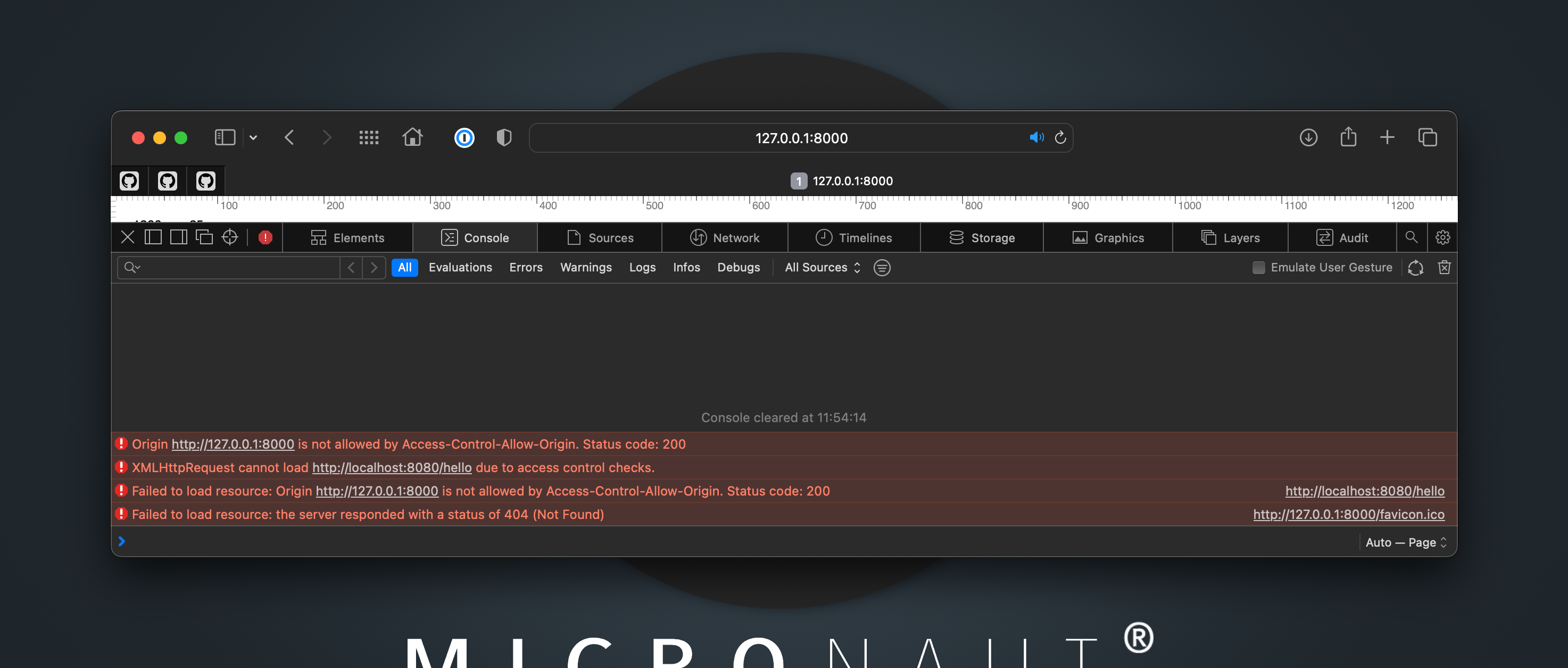
7.2. Enable CORS Configuration
Enable CORS configuration.
config/application.toml
[micronaut.server.cors]
enabled = true
Restart the Pyronaut application.
Refresh the UI in your browser, and you should see Hello World and no errors in the console.
7.3. Fine-grained CORS Configuration
The previous setup is a "wide open" configuration. It is best to enable CORS access only to a specific list of allowed origins.
You can do that with:
config/application.toml
[micronaut.server.cors]
enabled = true

[micronaut.server.cors.configurations.ui]
allowed-origins = ["http://127.0.0.1:8000"]
Stop the static server and restart it with python -m http.server 8001 --bind 127.0.0.1. Open http://127.0.0.1:8001/ and verify that the browser rejects the cross-origin request. The application’s configuration only allows the origin http://127.0.0.1:8000.
7.4. Tests
The Python tests use requests.with_context to target the running application’s dynamically assigned URL. They verify allowed and unconfigured origins, plus the preflight response’s allowed origin, method, and headers. These HTTP assertions do not replace the browser check above.
tests/example/micronaut/test_cors.py
import pytest
import requests

from pyronaut.test import MicronautTest, micronaut_test_fixture


@pytest.fixture
def my_context(request):
    fixture = micronaut_test_fixture(
        request,
        MicronautTest(environments=["test"], transactional=False),
    )
    yield fixture
    fixture.stop()


@pytest.fixture
def client(my_context):
    with requests.with_context(my_context) as session:
        yield session


def test_cors_allows_configured_origin(client):
    response = client.get(
        "/hello",
        headers={"Origin": "http://127.0.0.1:8000"},
    )

    assert response.status_code == 200
    assert response.text == "Hello World"
    assert response.headers["Access-Control-Allow-Origin"] == "http://127.0.0.1:8000"


def test_cors_does_not_allow_unconfigured_origin(client):
    response = client.get(
        "/hello",
        headers={"Origin": "http://127.0.0.1:8001"},
    )

    assert response.status_code == 200
    assert response.headers.get("Access-Control-Allow-Origin") != "http://127.0.0.1:8001"


def test_preflight_allows_configured_origin_method_and_headers(client):
    response = client.options(
        "/hello",
        headers={
            "Origin": "http://127.0.0.1:8000",
            "Access-Control-Request-Method": "GET",
            "Access-Control-Request-Headers": "X-Requested-With",
        },
    )

    assert response.status_code == 200
    assert response.headers["Access-Control-Allow-Origin"] == "http://127.0.0.1:8000"
    assert response.headers["Access-Control-Allow-Methods"] == "GET"
    assert response.headers["Access-Control-Allow-Headers"].lower() == "x-requested-with"
8. Next Steps
Explore more features with Pyronaut Guides.
Learn more about configuring CORS with the Micronaut Framework.
9. License
| All guides are released with an Apache License 2.0 for the code and a Creative Commons Attribution 4.0 license for the writing and media (images). |